Getting Started with NI Devices
R2026bThis example shows how to get started with National Instruments™ devices from the command line.
Discover Available Devices
Discover devices connected to your system using daqlist. To learn more about an individual device, access the entry in the device table.
d = daqlist;
d(1,:)
ans =

  1×5 table

    VendorID     DeviceID               Description                Model               DeviceInfo
    ________    ___________    ______________________________    _________    _____________________________

      "ni"      "cDAQ1Mod1"    "National Instruments NI 9205"    "NI 9205"    [1×1 daq.ni.CompactDAQModule]
d.DeviceInfo(1)
ans =

ni: National Instruments NI 9205 (Device ID: 'cDAQ1Mod1')
   Analog input supports:
      4 ranges supported
      Rates from 0.6 to 250000.0 scans/sec
      32 channels ('ai0' - 'ai31')
      'Voltage' measurement type

This module is in slot 1 of the 'cDAQ-9178' chassis with the name 'cDAQ1'.
Create DataAcquisition Object
Create a DataAcquisition object using the daq function. The DataAcquisition object contains information describing hardware, scan rate, and other properties associated with the acquisition.
dq = daq("ni")
dq =

DataAcquisition using National Instruments hardware:

                     Running: 0
                        Rate: 1000
           NumScansAvailable: 0
            NumScansAcquired: 0
              NumScansQueued: 0
    NumScansOutputByHardware: 0
                   RateLimit: []

Show channels
Show properties and methods
Add Analog Input Channel
Add an input channel to the DataAcquisition object using the addinput function.
ch = addinput(dq,"cDAQ1Mod1","ai0","Voltage")
ch =

    Index    Type      Device       Channel    Measurement Type          Range                Name          TEDS Enabled
    _____    ____    ___________    _______    ________________    __________________    _______________    ____________

      1      "ai"    "cDAQ1Mod1"     "ai0"     "Voltage (Diff)"    "-10 to +10 Volts"    "cDAQ1Mod1_ai0"       "false"
Acquire Timestamped Data
The read command starts the acquisition and returns the results as a timetable.
data = read(dq,seconds(1));
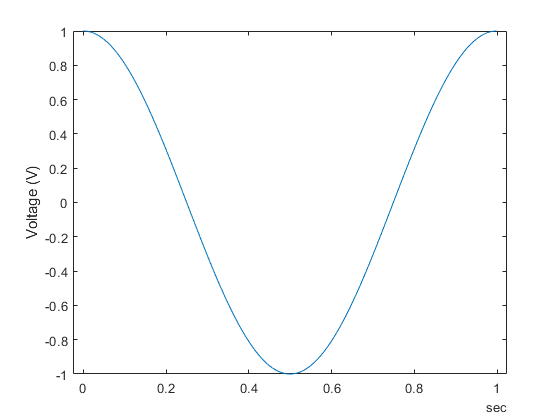
Plot Data
plot(data.Time,data.cDAQ1Mod1_ai0);
ylabel("Voltage (V)");
Change Default Properties of Data Acquisition
By default, acquisition runs at a scan rate of 1000 scans per second. To acquire at a higher rate, set the Rate property.
dq.Rate = 5000;
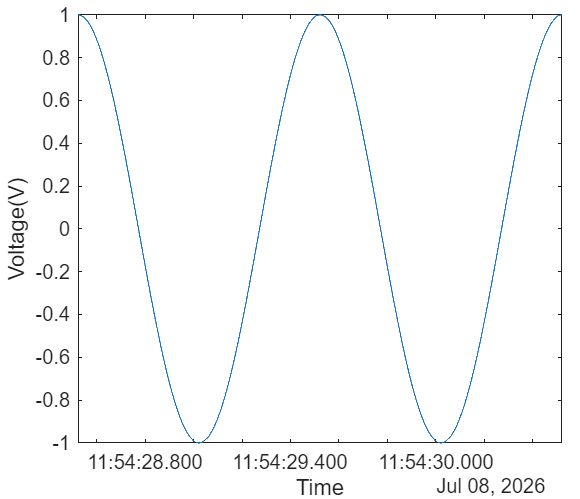
Run the acquisition and plot the acquired data. data.Time contains elapsed time relative to the start of the acquisition. To convert to absolute clock times, add startTime.
[data,startTime] = read(dq,seconds(2));
plot(data.Time+startTime,data.cDAQ1Mod1_ai0);
xlabel("Time");
ylabel("Voltage (V)");