Tune PyTorch Model Using Experiment Manager
R2026bThis example shows how to use the Experiment Manager app to tune hyperparameters of a PyTorch® model by sweeping over combinations of hyperparameter values. The Experiment Manager app manages the tuning process. You define a set of hyperparameters and their values, and the app runs a separate trial for each combination. The app tracks training progress, records metrics, and stores the results, trained networks, and configuration for each trial. You can then compare trials, visualize model performance, and export trained models.
To run this example, you must have a configured Python® environment with PyTorch installed. To export the trained model as a dlnetwork object,
you also need the Deep Learning Toolbox™ Converter for PyTorch Models support package. For setup instructions, see Set Up Python Environment for Deep Learning with PyTorch Workflows.
This example trains a PyTorch model to classify images by sweeping over two hyperparameters: number of epochs
and learning rate. The training produces four trials. After training, the example compares
results and exports the top-performing model as a dlnetwork object. During
this example, you create each of these files:
loadExperimentResources.mlx— Initialization function that loads data before trials begintorch_module.py— Python module with the per-batch training step and optimizer resettrainableNetwork.py— Python module that defines the model architecturetrainableModel.pt— PyTorch file containing the model with initial weightstrainPyTorchModel.mlx— Training function that manages the loop and calls the Python training step
Create a Custom Training Experiment
Open the Experiment Manager app and create a new project. In the new experiment dialog box, select Custom Training.
This example configures three sections of the experiment definition:
An initialization function that runs once before trials begin
A hyperparameter table that defines the values to sweep
A training function that runs once per trial
If you have existing PyTorch training code, you can use Experiment Manager with a custom training experiment to tune hyperparameters and track results without leaving MATLAB®.
Load Data and Resources Before Trials Begin
When all trials share the same data or setup steps, define an initialization function so
that the app runs the setup once and shares the output across all trials. The initialization
function is a MATLAB function that runs before any trials begin and returns a structure. The
training function accesses this output through
params.InitializationFunctionOutput.
In the Initialization Function section of the experiment
definition, click New and type the function name
loadExperimentResources. Click Yes to create the
function file in the project root and open it in the MATLAB Editor.
In this experiment, the initialization function loads the training data into an
augmentedImageDatastore object and stores the project root folder path
so the training function can locate the PyTorch model file. Replace the contents of
loadExperimentResources.mlx with this code.
function output = loadExperimentResources()
digitDatasetPath = fullfile(matlabroot,"toolbox","nnet","nndemos","nndatasets","DigitDataset");
imds = imageDatastore(digitDatasetPath,IncludeSubfolders=true,LabelSource="foldernames");

output.dsTrain = augmentedImageDatastore([28 28],imds);
output.modulePath = currentProject().RootFolder;
end
Choose Hyperparameters to Tune
In the Hyperparameters section of the experiment, select a sweep
strategy and add the hyperparameters you want to explore. This example uses
Exhaustive Sweep, which runs one trial for each combination of
values. The two hyperparameters are number of epochs and learning rate.
Experiment Manager automatically manages the sweep and passes the
hyperparameter values for each trial to the training function as fields of the structure
params.
Name | Values |
|---|---|
|
|
|
|
Define Per-Batch Training Step
If you already have a Python module with your training logic, you can use it directly. Module-level variables persist across trials, so explicitly reset any state that must start fresh for each trial. In this example, the module defines two functions:
reset_optimizer— Clears the optimizer at the start of each trial so that accumulated state does not carry over from a previous trialtraining_step— Performs one mini-batch forward and backward pass, accepts the learning rate as an argument, and returns the loss
Save this code as torch_module.py in the project folder.
import torch
loss_fn = torch.nn.CrossEntropyLoss()
optimizer = None

def reset_optimizer():
    global optimizer
    optimizer = None

def training_step(model, x, y, learn_rate):
    global optimizer
    if optimizer is None:
        optimizer = torch.optim.Adam(model.parameters(), lr=learn_rate)
    pred = model(x)
    y_indices = y.argmax(dim=1)
    loss = loss_fn(pred, y_indices)
    optimizer.zero_grad()
    loss.backward()
    optimizer.step()
    return loss.item()
Provide Model Architecture
The training function, defined later in this example, uses pyTorchModel to
load the model from a PyTorch file. To reconstruct the model architecture from that file,
pyTorchModel needs access to the Python module that defines the model architecture.
This example defines the architecture for digit classification. Save this code as
trainableNetwork.py in the project folder.
import torch
from torch import nn

class NeuralNetwork(nn.Module):
    def __init__(self):
        super().__init__()
        self.flatten = nn.Flatten()
        self.linear_relu_stack = nn.Sequential(
            nn.Linear(28*28, 512),
            nn.ReLU(),
            nn.Linear(512, 512),
            nn.ReLU(),
            nn.Linear(512, 10),
        )

    def forward(self, x):
        x = self.flatten(x)
        logits = self.linear_relu_stack(x)
        return logits
Save Model with Initial Weights
Create the model and save the model as a PyTorch file so that every trial starts from the same initial weights. Using the same initial weights isolates the effect of the hyperparameters you are tuning.
In the MATLAB Command Window, run this code to create the model, save it as
trainableModel.pt, and add the file to the project.
model = py.trainableNetwork.NeuralNetwork();
py.torch.save(model,"trainableModel.pt")
addFile(currentProject,"trainableModel.pt")
Define Training Function
The training function is a MATLAB function that runs once per trial and accepts two inputs:
params— The hyperparameter values for the current trial and the initialization function outputmonitor— Anexperiments.Monitorobject for logging metrics and tracking progress
In the Training Function section of the experiment definition,
click New and type the function name
trainPyTorchModel. Click Yes to create the
function file in the project root and open it in the MATLAB Editor.
The training function manages the training loop and calls your existing Python code in each iteration using callFunction.
This approach keeps Experiment Manager in control of progress tracking and trial
management. Use recordMetrics to log values so the app can display
metrics in real time. The training function must also return an output that Experiment
Manager saves for export after the experiment completes.
In this example, the training function performs these steps:
Retrieve the training data from
params.InitializationFunctionOutputand reset the optimizer so that each trial trains independently.Load the model using
pyTorchModel. TheInputDimensionOrderandOutputDimensionOrderarguments specify how to permute dimensions between MATLAB and PyTorch conventions.Use
addFunctionto configure data transfer for the Python training step, and then call it each iteration usingcallFunction. Log the training loss withrecordMetrics.Evaluate the trained model using a confusion chart and export it as a
dlnetworkobject.
The function includes three local helper functions:
preprocessMiniBatch— Prepares each mini-batch for the modelcreateConfusionMatrix— Evaluates the trained model and displays a confusion chartconstructFromTorchModel— Exports the trained model as adlnetworkobject
Replace the contents of trainPyTorchModel.mlx with this code.
function dlnet = trainPyTorchModel(params,monitor)
dsTrain = params.InitializationFunctionOutput.dsTrain;
numEpoch = params.numEpoch;
learnRate = params.learnRate;

monitor.Metrics = "TrainingLoss";
monitor.Status = "Training";

modulePath = params.InitializationFunctionOutput.modulePath;
if count(py.sys.path,modulePath) == 0
    insert(py.sys.path,int64(0),modulePath);
end

py.torch_module.reset_optimizer();

ptModel = pyTorchModel(fullfile(modulePath,"trainableModel.pt"), ...
    ModuleName="trainableNetwork", ...
    ModulePath=modulePath, ...
    TrainingMode="train", ...
    InputDimensionOrder=[4 3 1 2], ...
    OutputDimensionOrder=[2 1]);

miniBatchSize = 64;
mbq = minibatchqueue(dsTrain,2, ...
    MiniBatchSize=miniBatchSize, ...
    PartialMiniBatch="discard", ...
    OutputAsDlarray=[false false], ...
    OutputEnvironment="cpu", ...
    MiniBatchFcn=@preprocessMiniBatch);

addFunction(ptModel,"torch_module.training_step", ...
    NumInputs=3,InputDimensionOrder={[4 3 1 2],[2 1],[]});

iteration = 0;
for epoch = 1:numEpoch
    if monitor.Stop
        break
    end
    monitor.Progress = ((epoch - 1) * 100) / numEpoch;
    shuffle(mbq);
    while hasdata(mbq)
        iteration = iteration + 1;
        [X,Y] = next(mbq);

        loss = callFunction(ptModel,"torch_module.training_step", ...
            X,Y,learnRate);
        recordMetrics(monitor,iteration,TrainingLoss=loss);
    end
end

monitor.Status = "Evaluating";
createConfusionMatrix(ptModel,mbq);

monitor.Status = "Exporting model";
dlnet = constructFromTorchModel(ptModel,X);
end

function [X,Y] = preprocessMiniBatch(XCell,YCell)
X = cat(4,XCell{:});
X = single(X) / 255;
Y = cat(2,YCell{:});
Y = onehotencode(Y,1);
end

function createConfusionMatrix(ptModel,mbq)
ptModel.TrainingMode = "eval";
allPreds = [];
allTrue = [];
shuffle(mbq);
while hasdata(mbq)
    [X,Y] = next(mbq);
    pred = forward(ptModel,X);
    [~,predLabels] = max(pred,[],1);
    [~,trueLabels] = max(Y,[],1);
    allPreds = [allPreds; predLabels(:)];
    allTrue = [allTrue; trueLabels(:)];
end
classNames = string(0:9);
confusionchart(classNames(allTrue),classNames(allPreds))
title("Confusion Matrix")
end

function dlnet = constructFromTorchModel(ptModel,exampleInput)
ptModel.TrainingMode = "eval";
modelFile = "trainedModel.pt";
export(ptModel,"traced",modelFile,exampleInput);
dlnet = importNetworkFromPyTorch(modelFile);
end
Run Experiment and Export Results
When you click Run, the Experiment Manager app manages the tuning process by running a separate trial for each combination of hyperparameter values. The app tracks training progress, records metrics, and stores the results for each trial. You can then compare training loss across trials in the results table.
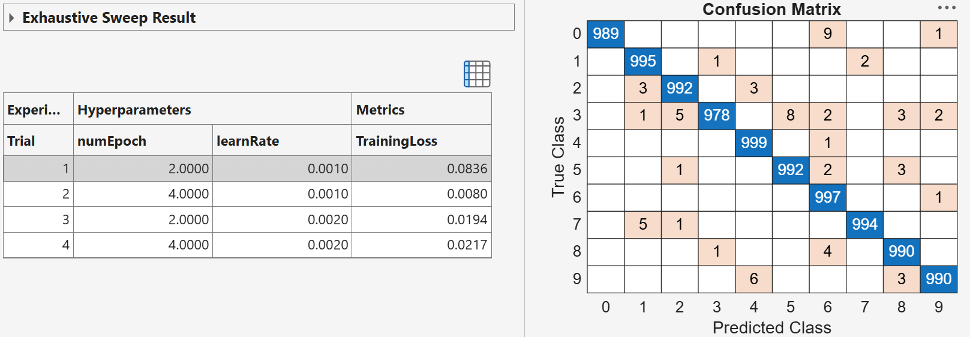
To export the top-performing trained dlnetwork object to the MATLAB workspace, select the trial in the results table and click Export > Trained Network on the toolstrip. The exported dlnetwork object is ready for
inference or further fine-tuning in MATLAB, independent of the Python environment.