High-Level Synthesis Code Generation for DF2T Filter
R2026bThis example shows how to generate High-Level Synthesis (HLS) code from a MATLAB® design for a direct-form II transposed filter.
MATLAB Design
Set up the df2t_filter design and test bench for this example.
mlhdlc_demo_setup("df2t_filter");

% Design
design_name = "mlhdlc_df2t_filter";

% Test Bench
testbench_name = "mlhdlc_df2t_filter_tb";
Copying files from the following folders:
  /mathworks/devel/bat/filer/batfs2566-0/Bdoc26b.3351752/build/runnable/matlab/toolbox/hdlcoder/hdldesignpatterns/matlabhdl/dsp
Successfully copied: mlhdlc_df2t_filter
Successfully copied: mlhdlc_df2t_filter_runme
Successfully copied: mlhdlc_df2t_filter_runme_hls
Successfully copied: mlhdlc_df2t_filter_tb

=== MATLAB HDL Coder Demo: mlhdlc_df2t_filter ===

Working directory: /tmp/Bdoc26b_3351752_3483655/mlhdlc_df2t_filter

Next steps:
  1. Open the design and testbench files in the Editor,
     then execute the *_runme*.m files to generate HDL code.
  2. Or create HDL Coder GUI project:
       coder -hdlcoder -new <projectName>
  3. Or generate HDL directly using CLI workflow:
       cfg = coder.config('hdl'); codegen -config cfg <designFunction>
     See *_runme*.m files for design name, testbench, and other codegen config options.
Review the df2t_filter design.
dbtype(design_name)
1     %#codegen
2     function y = mlhdlc_df2t_filter(x)
3
4     %   Copyright 2011-2015 The MathWorks, Inc.
5
6     persistent z;
7     if isempty(z)
8         % Filter states as a column vector
9         z = zeros(2,1);
10    end
11
12    % Filter coefficients as constants
13    b = [0.29290771484375   0.585784912109375  0.292907714843750];
14    a = [1.0                0.0                0.171600341796875];
15
16    y    =  b(1)*x + z(1);
17    z(1) = (b(2)*x + z(2)) - a(2) * y;
18    z(2) =  b(3)*x - a(3) * y;
19
20    end
Simulate the Design
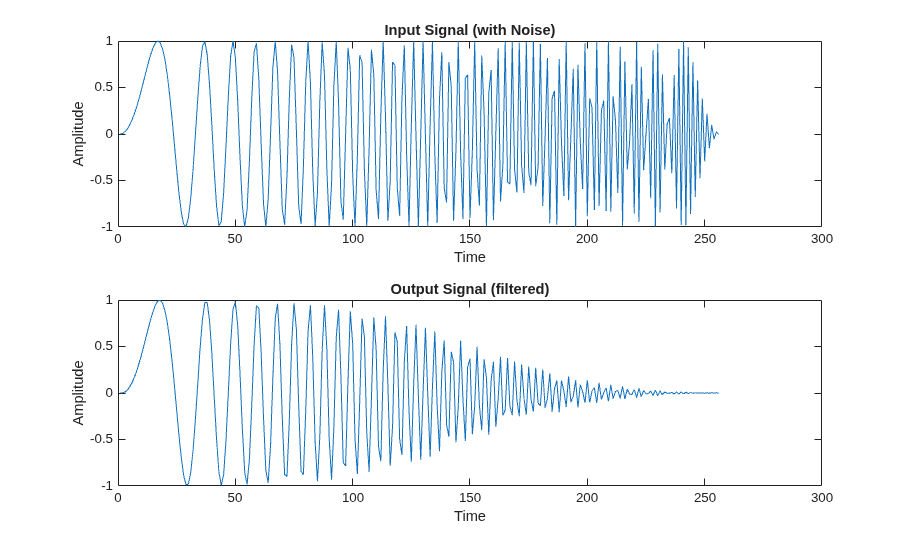
Simulate the design with the test bench before code generation to make sure there are no runtime errors.
mlhdlc_df2t_filter_tb
Create HDL Coder™ Project and Generate HLS Code
Before you create the project, set up the HLS tool path by using the function hdlsetuphlstoolpath.
To create the mlhdlc_df2t_prj project and open the HDL Workflow Advisor, run this command:
coder -hdlcoder -new mlhdlc_df2t_prj
Configure the HDL Workflow Advisor for HLS code generation:
1. In the HDL Workflow Advisor task, set Code Generation Workflow to MATLAB to HDL.
2. In the Define Input Types task, add the design and test bench files:
For MATLAB Function, click Browse and select
mlhdlc_df2t_filter.m.For MATLAB Test Bench, click + and select
mlhdlc_df2t_filter_tb.m.
3. Click Run to run the test bench and infer the input data types of the MATLAB design mlhdlc_df2t_filter.
4. In the Select Code Generation Target task, set Synthesis tool to your target HLS tool.
5. Right-click the HLS Code Generation task and select Run to selected task.
Examine the generated HLS code by clicking the hyperlinks in the HLS Code Generation output logs.
For more information, see Get Started with MATLAB to High-Level Synthesis Workflow Using HDL Coder App.

