Create a Line Buffer Interface for HLS Code Generation
R2026bThis example shows how to generate HLS code from MATLAB® code by using a line buffer interface. The MATLAB code implements a simple Sobel filter, which is used for edge detection in images.
The Sobel filter edge detection algorithm operates on a grayscale image and produces an image that highlights the high spatial frequency regions corresponding to edges in the input image.
The example highlights these aspects of generating HLS code from MATLAB Code:
Line buffer interface - Use the
coder.hdl.interface
Input matrix - The entry point function
hls_sobelin the MATLAB code accepts two-dimensional matrices as input and returns the pixel value.
Generating 2D working sets - Use the
hdl.WorkingSet
Sobel Filter MATLAB Design
The hls_sobel function operates on a given working set by applying the Sobel filter kernel. The function returns the output pixel that corresponds to the position of the working set in the input image.
dbtype("hls_sobel")
1     %%%%%%%%%%%%%%%%%%%%%%%%%%%%%%%%%%%%%%%%%%%%%%%%%%%%%%%%%%%%%%%%%%%%%%%%%%%
2     %% Sobel edge detection using Line buffer interface in HLS.
3     %%%%%%%%%%%%%%%%%%%%%%%%%%%%%%%%%%%%%%%%%%%%%%%%%%%%%%%%%%%%%%%%%%%%%%%%%%%
4     % This example shows how to generate a line buffer interface from the MATLAB(R)
5     % design using MATLAB to HLS workflow. This MATLAB design implements the
6     % Sobel edge detection algorithm by the following steps.
7     %
8     % 1. Compute the horizontal and vertical gradients, gh and gv by convolving
9     %    the working set with the Sobel kernel and its transpose.
10    %      Sobel kernel = [-1 -2 -1
11    %                       0  0  0
12    %                       1  2  1];
13    % 2. Compute the gradient y as follows:
14    %      y = floor(abs(gh) + abs(gv)) / 4;
15    % 3. If the gradient is greater than the threshold, the pixel is considered
16    %    an edge pixel. In this example, the threshold is chosen as 255.
17
18    %#codegen
19
20    %   Copyright 2023 The MathWorks, Inc.
21    function y = hls_sobel(ws)
22
23    ORIGIN = [2 2];
24    % IMAGE_SIZE = [30 30];
25    CONSTANT_FILL_VALUE = 0;
26
27    % Specify the line buffer properties using coder.hdl.interface pragma.
28    coder.hdl.interface("ws", "Line Buffer", "ImageSize", [480 752], Origin=ORIGIN, FillMethod="ConstantFill", FillValue=CONSTANT_FILL_VALUE);
29
30    ws1 = reshape(ws, [1 3*3]);
31
32    % Sobel kernel
33    Gx = [-1 0 1 -2 0 2 -1 0 1];
34    Gy = [-1 -2 -1 0 0 0 1 2 1];
35
36    % Compute horizontal and vertical gradients
37    gh = sum(ws1 .* Gx);
38    gv = sum(ws1 .* Gy);
39
40    % Compute the gradient.
41    y = floor(abs(gh) + abs(gv)) / 4;
42
43    % Determine whether the pixel is on the edge or not.
44    y = min(y,255);
45
46    end
Sobel Filter MATLAB Test Bench
In MATLAB testbench, use the hdl.WorkingSethls_sobel function. The dimensions of each working set matrix are determined by the WINDOW_SIZE parameter defined in the testbench.
dbtype("hls_sobel_tb")
1     %
2
3     %   Copyright 2023 The MathWorks, Inc.
4
5     clear;
6
7     % Read the image for which the edge detection needs to be performed.
8     image3d = double(imread('mlhdlc_img_yuv.png'));
9     image = image3d(:,:,1);
10
11    [IMAGE_HEIGHT, IMAGE_WIDTH] = size(image);
12    WINDOW_SIZE = [3 3];  % Size of the working set/Window size
13    ORIGIN = [2 2];    % Working set origin
14    % Constant value to fill the pixels falling outside the image in the working set.
15    CONSTANT_FILL_VALUE = 0;
16
17    y = zeros(IMAGE_HEIGHT,IMAGE_WIDTH);
18
19    % Create the working set object. This helps in creating the 2-D working sets
20    % of specified size and origin from the input image.
21    ws = hdl.WorkingSet(image, WINDOW_SIZE, Origin=ORIGIN, FillMethod="ConstantFill", FillValue=CONSTANT_FILL_VALUE);
22
23    for i = 1:IMAGE_HEIGHT
24        for j = 1:IMAGE_WIDTH
25            % Get the working set at the pixel (i,j) in the image.
26            workingSet = ws.getWorkingSet(i,j);
27            y(i,j) = hls_sobel(workingSet);
28        end
29    end
30
31    % Plot the original image and the extracted edges.
32    figure('Name', [mfilename, '_plot'])
33
34    subplot(1,2,1);
35    imshow(uint8(image));
36    title('Original Image');
37
38    subplot(1,2,2);
39    imshow(uint8(y));
40    title('Edges');
Simulate the MATLAB Algorithm
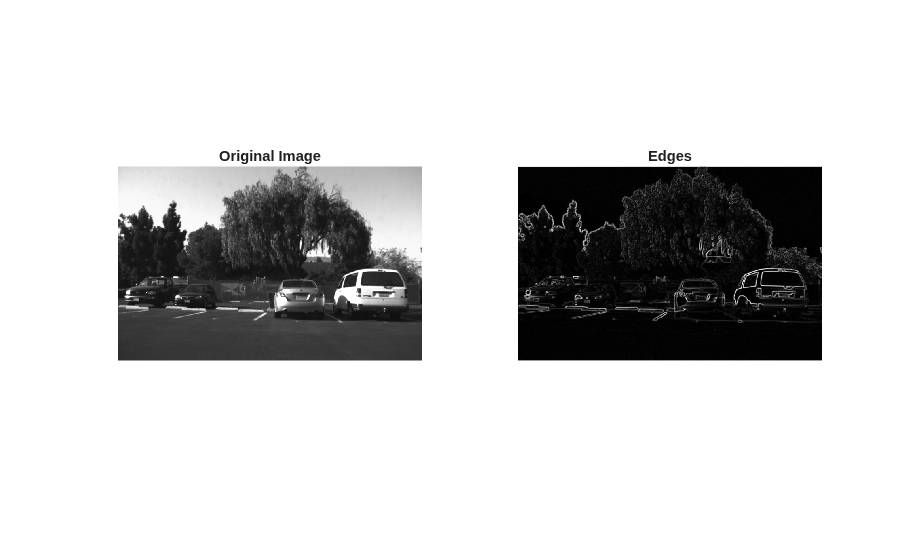
Simulate the design with the test bench to verify there are no runtime errors.
hls_sobel_tb
Generate HLS Code Using HDL Workflow Advisor
To generate HLS code from the MATLAB design:
1. At the MATLAB command line, set up the high-level synthesis (HLS) tool path for SystemC code generation by using the function hdlsetuphlstoolpath.
2. To create an HDL Coder project and open the HDL Workflow Advisor, run this command:
coder -hdlcoder -new sobelFilter
3. In the HDL Workflow Advisor task, set Code Generation Workflow to MATLAB to HLS.
4. In the Define Input Types task, add the design and test bench files. For MATLAB Function, click Browse and select mlhdlc_sobel.m. For MATLAB Test Bench, click + and select mlhdlc_sobel_tb.m.
5. Click Run. HDL Coder runs the test bench and infers the input data types of the MATLAB design mlhdlc_sobel.
6. In the Select Code Generation Target task, from the Synthesis tool list, select Cadence Stratus HLS.
7. Right-click the HLS Code Generation task and select Run to selected task.
For more information, see Get Started with MATLAB to High-Level Synthesis Workflow Using HDL Coder App.
Examine the Generated Code
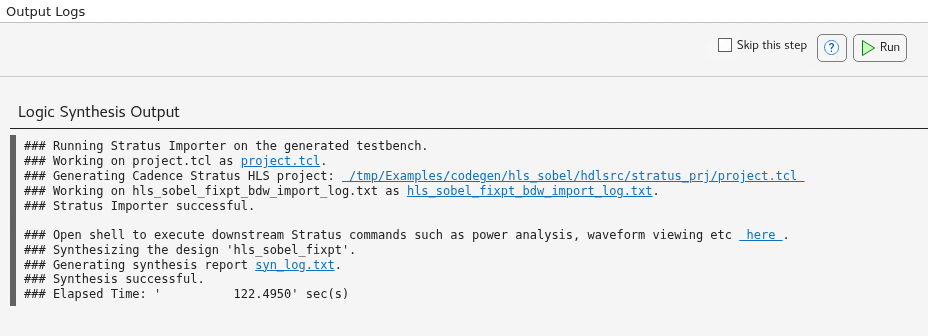
You can examine the generated HLS code by clicking the hyperlinks in the HLS Code Generation step log window.
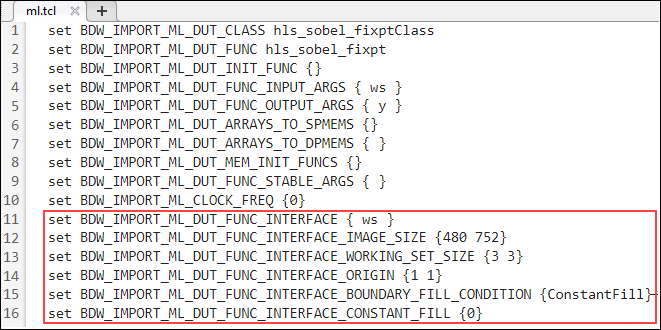
The line buffer properties specified in the coder.hdl.interface pragma are populated in the ml.tcl metadata file. These are read by the Stratus HLS tool to create appropriate line buffers.