Import and Export Test Runs from MATLAB Test Manager
R2026bTo save test and coverage results from a previous run in the MATLAB Test Manager, you can export the run to a JSON file. To view the saved results, you can import the run.
Export Test Runs
To export test runs:
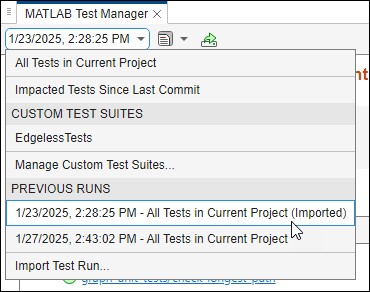
Open a previous test run. In the menu, click the drop-down list on the left, and select the run under Previous Runs.

Click the Export button
 .
.In the Export test run to file window, save the test run.
The exported JSON file contains the test results. If the tests ran with code coverage or generated code coverage enabled, the JSON file also contains the coverage results.
Import Test Runs and View Results
To import test runs, click the drop-down list in the left of
the menu and select Import Test Run. In the Import test run from file
window, select the JSON file to import.
The MATLAB Test Manager opens the previous run and displays the test suite, the results, and lists the date and time that the suite ran.

If you ran the tests with coverage enabled, you can view a summary of the coverage
results for the previous run by pointing to the Statement button.
Open the report by clicking the Statement button. Alternatively,
click the Report button  and select the report under MATLAB Code
Coverage Reports.
and select the report under MATLAB Code
Coverage Reports.
If you ran equivalence tests that generated C/C++ code as a static library and
executed in SIL or PIL mode, you can open the generated code coverage report by clicking
the Report button and selecting the report under Generated
Code Coverage Reports.
To generate a report from the test results in a previous run, click the Report button
. Then, under Test Result
Reports, click Generate Test Result Report.
To navigate to the current test run, click the drop-down list on the left of the menu
and select All Tests in Current
Project or a custom test suite.
To navigate from the current test run to an imported test run, click the drop-down
list on the left of the menu, then select a run under Previous
Runs. The MATLAB Test Manager includes
(Imported) at the end of the test suite name to indicate imported
test runs.