Report C/C++ Test Specifications with Test Results
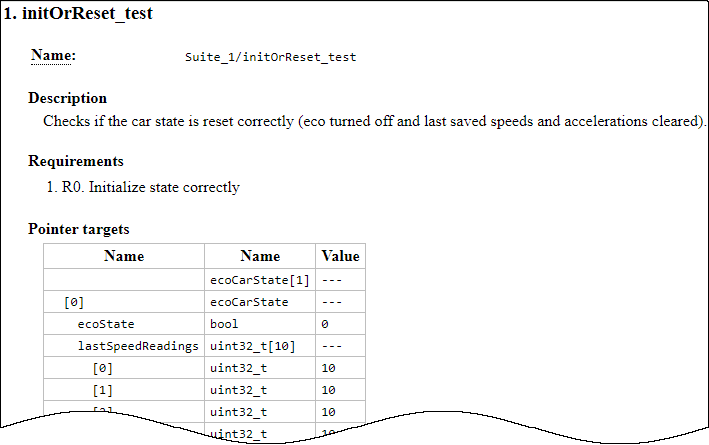
R2026bYou can export C/C++ test results to HTML reports for archiving and certification. By default, when you generate a report from your results, the report shows only the pass/fail status of tests along with details of assessments in the tests. The report does not show the test specifications themselves. This topic shows how to report the test specifications in addition to test results.
Report Test Specifications
To generate a report of test specifications in addition to test results:
When generating reports in the Polyspace® Platform user interface:
With the test results open, on the Polyspace Platform toolstrip, select Report. In the Generate HTML Report dialog box, select Report test specifications. For more details on the other options in the dialog box, see Generate Reports from C/C++ Test Results.
Select OK.
When generating reports at the command line, use the option
-generate-test-spec-reportwith the commandpolyspace-test -report.
You can also specify reporting of test specifications in a report options file. For more information, see Customize Content and Style of Polyspace Test Reports.
Navigate to Test Specifications from Test Results
If you generate test specification HTML reports, you can navigate to them in your file explorer or directly from the test result HTML reports:
The folder containing reports contains an additional subfolder named
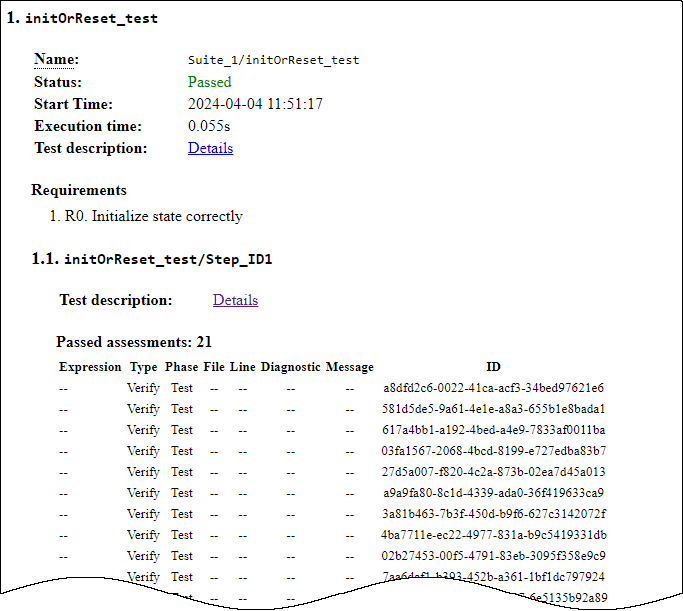
specwith HTML reports of test specifications.In the test result reports, for each test, you see an additional entry Test description that links to the corresponding test specification.
Click this link to see the test specifications (such as test name, description, requirements, inputs, and assessments).