Read a ROS Point Cloud Message in Simulink
R2026bRead in a point cloud message from a ROS network. Calculate the center of mass of the coordinates and display the point cloud as an image.
This example requires Computer Vision Toolbox® and Robotics System Toolbox®.
Start a ROS network.
rosinit
Launching ROS Core...
Status before launching ros core :0
result before launching ros core: Microsoft.Management.Serv     2068 Services                   0    120,244 K
Microsoft.SharePoint.exe     23100 Console                    1    342,068 K
WindowsTerminal.exe          17292 Console                    1     76,432 K

Creating Python virtual environment for ros1...Done.
Adding required Python packages to virtual environment...Done.
Copying include folders..Done.
Copying libraries..Done.
.....Done in 6.0976 seconds.
* Inside getProcessPID function *
Process Name: rosmaster  - rosmaster  --core -p 54499 -w 3
Status before getting PID :0
Result before getting PID :Microsoft.Management.Serv     2068 Services                   0    120,336 K
Microsoft.SharePoint.exe     23100 Console                    1    341,912 K
WindowsTerminal.exe          17292 Console                    1     87,192 K
rosmaster.exe                18808 Console                    1      4,992 K
python.exe                   18936 Console                    1      4,740 K
python.exe                   17492 Console                    1     30,192 K

Result:
WindowsTerminal.exe          17292 Console                    1     87,192 K

Status: 0
PID obtained: 17292
Status after getting PID :0
Result after getting PID :Microsoft.Management.Serv     2068 Services                   0    120,304 K
Microsoft.SharePoint.exe     23100 Console                    1    341,912 K
WindowsTerminal.exe          17292 Console                    1     87,192 K
rosmaster.exe                18808 Console                    1      4,992 K
python.exe                   18936 Console                    1      4,740 K
python.exe                   17492 Console                    1     30,192 K

* Exiting getProcessPID function *
Status after launching ros core :0
result after launching ros core: Microsoft.Management.Serv     2068 Services                   0    120,304 K
Microsoft.SharePoint.exe     23100 Console                    1    341,912 K
WindowsTerminal.exe          17292 Console                    1     87,192 K
rosmaster.exe                18808 Console                    1      4,992 K
python.exe                   18936 Console                    1      4,740 K
python.exe                   17492 Console                    1     30,192 K

Status before deleting node :0
Result before deleting node :Microsoft.Management.Serv     2068 Services                   0    120,304 K
Microsoft.SharePoint.exe     23100 Console                    1    341,912 K
WindowsTerminal.exe          17292 Console                    1     87,192 K
rosmaster.exe                18808 Console                    1      4,992 K
python.exe                   18936 Console                    1      4,740 K
python.exe                   17492 Console                    1     30,284 K
libmwros1server.exe          22316 Console                    1     29,432 K

Status after deleting node :0
Result after deleting node :Microsoft.Management.Serv     2068 Services                   0    120,304 K
Microsoft.SharePoint.exe     23100 Console                    1    341,912 K
WindowsTerminal.exe          17292 Console                    1     87,192 K
rosmaster.exe                18808 Console                    1      4,992 K
python.exe                   18936 Console                    1      4,740 K
python.exe                   17492 Console                    1     30,244 K

Initializing ROS master on http://172.31.78.36:54499.
Initializing global node /matlab_global_node_18515 with NodeURI http://vdi-ah2wsp-001:63025/ and MasterURI http://localhost:54499.
Load sample messages to send including a sample point cloud message, ptcloud. Create a publisher to send an ROS PointCloud2 message on the '/ptcloud_test' topic. Specify the message type as 'sensor_msgs/PointCloud2'. Send the point cloud message.
exampleHelperROSLoadPCloud
pub = rospublisher('/ptcloud_test','sensor_msgs/PointCloud2');
send(pub,ptcloud)
Open the Simulink® model for subscribing to the ROS message and reading in the point cloud from the ROS.
Ensure that the Subscribe block is subscribing to the '/ptcloud_test' topic. Under the Simulation tab, select ROS Toolbox > Variable Size Arrays and verify the Data array has a maximum length greater than the sample image (9,830,400 points).
The model only displays the RGB values of the point cloud as an image. The XYZ output is used to calculate the center of mass (mean) of the coordinates using a MATLAB Function block. All NaN values are ignored.
open_system('read_point_cloud_example_model.slx')
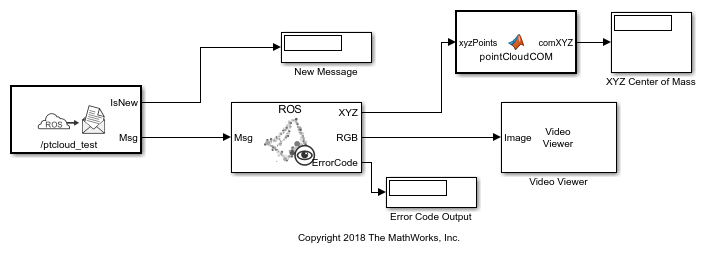

Run the model. The Video Viewer shows the sample point cloud as an image. The output center of mass is [-0.2869 -0.0805 2.232] for this point cloud.

Stop the simulation and shut down the ROS network.
rosshutdown
Shutting down global node /matlab_global_node_18515 with NodeURI http://vdi-ah2wsp-001:63025/ and MasterURI http://localhost:54499.
Status before deleting node :0
Result before deleting node :Microsoft.Management.Serv     2068 Services                   0    120,304 K
Microsoft.SharePoint.exe     23100 Console                    1    342,072 K
WindowsTerminal.exe          17292 Console                    1     87,200 K
rosmaster.exe                18808 Console                    1      4,992 K
python.exe                   18936 Console                    1      4,740 K
python.exe                   17492 Console                    1     30,284 K
libmwros1server.exe           9292 Console                    1     41,828 K

Status after deleting node :0
Result after deleting node :Microsoft.Management.Serv     2068 Services                   0    120,304 K
Microsoft.SharePoint.exe     23100 Console                    1    342,072 K
WindowsTerminal.exe          17292 Console                    1     87,200 K
rosmaster.exe                18808 Console                    1      4,992 K
python.exe                   18936 Console                    1      4,740 K
python.exe                   17492 Console                    1     30,244 K

Shutting down ROS master on http://172.31.78.36:54499.
Status before deleting core :0
Result before deleting core :Microsoft.Management.Serv     2068 Services                   0    120,304 K
Microsoft.SharePoint.exe     23100 Console                    1    342,076 K
WindowsTerminal.exe          17292 Console                    1     87,200 K
rosmaster.exe                18808 Console                    1      4,992 K
python.exe                   18936 Console                    1      4,740 K
python.exe                   17492 Console                    1     30,244 K

* Inside killROSProcess function *
Status after Process Killed: 0
Result after Process Killed: SUCCESS: Sent termination signal to the process with PID 17292.

Status after deleting core :0
Result after deleting core :Microsoft.Management.Serv     2068 Services                   0    120,288 K
Microsoft.SharePoint.exe     23100 Console                    1    342,076 K
WindowsTerminal.exe          17292 Console                    1     77,776 K

* Exiting killROSProcess function *
The pointCloudCOM function block contains the following code for calculating the center of mass of the coordinates.
function comXYZ = pointCloudCOM(xyzPoints)
% Compute the center of mass of a point cloud based on the input NxMx3
% matrix.

% Turn matrix into vectors.
xPoints = reshape(xyzPoints(:,:,1),numel(xyzPoints(:,:,1)),1);
yPoints = reshape(xyzPoints(:,:,2),numel(xyzPoints(:,:,2)),1);
zPoints = reshape(xyzPoints(:,:,3),numel(xyzPoints(:,:,3)),1);

% Calculate the mean for each set of coordinates.
xMean = mean(xPoints,'omitnan');
yMean = mean(yPoints,'omitnan');
zMean = mean(zPoints,'omitnan');

comXYZ = [xMean,yMean,zMean];

end

