PS Terminator
R2026bTerminator for unconnected physical signal outputs
PS Terminator block

To add a block to a model, double-click the canvas and start typing the block name. Then, select the block from the list.
Libraries:
Simscape /
Foundation Library /
Physical Signals /
Sinks
Description
Use the PS Terminator block to cap physical signal output ports that do not connect to other blocks.
Unlike conserving ports in physical modeling, or Simulink® output ports, unconnected physical signal output ports do not generate warnings. However, you can use a PS Terminator block for clarity, to indicate that the signal was not inadvertently left unconnected.
The block icon size allows you to connect the PS Terminator block to an open port without rerouting the adjacent lines:

Examples
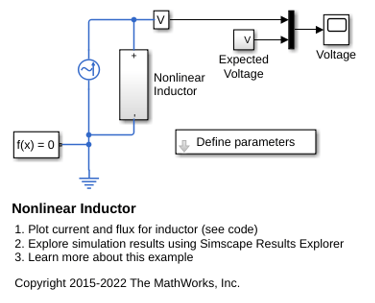
Nonlinear Inductor
An implementation of a nonlinear inductor where inductance depends on current. A tanh function defines the nonlinear flux-current relationship. The flux saturates for large currents, which can occur, for example, in iron core inductors.
Ports
Input
Programmatic Use: Add Block
To add the block programmatically, use the add_block function with one of these library block paths as the source.
"fl_lib/Physical Signals/Sinks/PS Terminator"
Example: add_block("fl_lib/Physical Signals/Sinks/PS Terminator","myModel/myBlock",MakeNameUnique="on")
For information about programmatic access to individual block parameters, see the Programmatic Use section of parameter descriptions on this page.

