Model a Simple Dehumidifier
R2026bThis example shows how to model a simple dehumidifier. You examine a model of a dehumidifier, then observe how changing the entrained water droplet and condensation settings affect the model behavior.
Examine the Model
Open the SimpleDehumidifier model. A Reservoir (MA) block represents an environment with 0.5 relative humidity at 293.15 K, and a Flow Rate Source (MA) block drives the moist air flow from the reservoir through two Pipe (MA) blocks. The first pipe, where the wall temperature is 1 degC, cools the air, which causes condensation by increasing the relative humidity in the pipe. When the temperature in the pipe lowers, the water vapor saturation pressure decreases, because cool air can hold less moisture. Because relative humidity is inversely proportional to the water vapor saturation pressure, this decrease in water vapor saturation pressure increases the relative humidity. When the relative humidity in a fluid volume is greater than 1, vapor can condense and leave the fluid flow.
After the Cooling pipe condenses the vapor to remove the moisture, the Heating pipe reheats the air to a a temperature of 27.1 degC. You can change how the dehumidifier functions by modifying the block parameters. For example, this example demonstrates the effects of the Enable entrained water droplets and Condensation on wall surface parameters.
system = "SimpleDehumidifier";
open_system(system);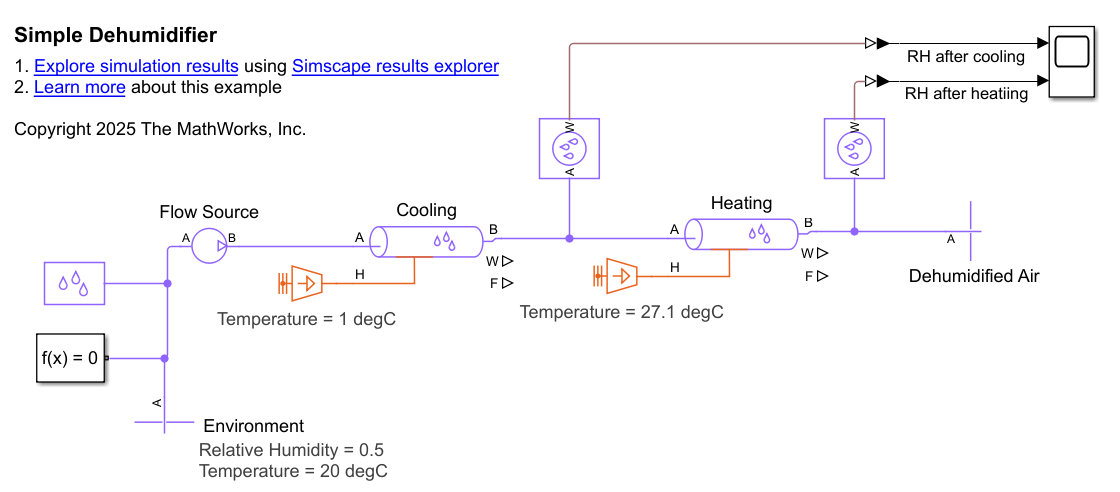
Model Entrained Droplets
In the Moist Air Properties block, the Enable entrained water droplets parameter is selected. Because the model includes entrained water droplets, it retains the condensed water in the moist air flow as droplets. The Fraction of condensate entrained as water droplets parameter is 1, which means the air stream carries 100% of the droplets.
Simulate the model and open the Scope block. The relative humidity in the Cooling pipe reaches 1, which means that condensation can occur. The relative humidity leaving the Heating pipe is 0.5, which is the same as the relative humidity in the environment.
sim(system);
open_system(system + "/Scope")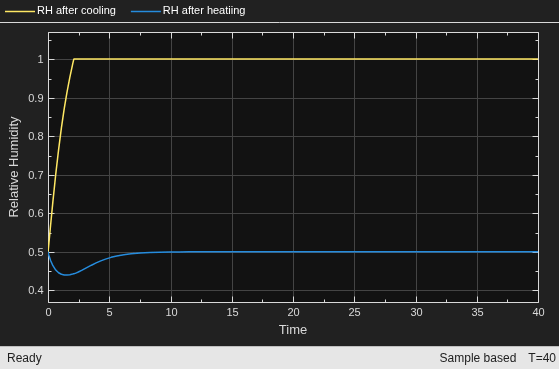
This dehumidifier design is not effective, because the relative humidity leaving the Heating pipe is not lower than the relative humidity in the environment. This behavior happens because all the condensed water in the Cooling pipe forms entrained droplets, rather than draining away. These droplets travel downstream to the Heating pipe, where they evaporate and increase the relative humidity. Plot the rate of condensation in the Cooling pipe and the rate of evaporation in the Heating pipe.
time = tout;
condensation = simlog_SimpleDehumidifier.Cooling.condensation.series.values; % [kg/s] Rate of condensation
evaporation = simlog_SimpleDehumidifier.Heating.evaporation.series.values; % [kg/s] Rate of evaporation
figure
plot(time,condensation,time,evaporation)
xlabel("Time (s)")
ylabel(["Rate of condensation" "or evaporation (kg/s)"])
legend("Condensation in Cooling pipe","Evaporation in Heating pipe","Location", "Best")

The rates of condensation in the Cooling pipe and evaporation in the Heating pipe are roughly equal. The roughly equivalent rates show that the moist air flow retains almost all the water, and the final conditions match the initial environment conditions. This behavior does not model a dehumidifier, because there is no removed moisture from the flow. To improve the model, lower the water entrained in the flow by disabling droplet modeling.
Model Without Droplets
To prevent the model from modeling entrained droplets, clear the Enable entrained water droplets parameter in the Moist Air Properties block. Alternatively, you can set the Fraction of condensate entrained as water droplets parameter to 0. Simulate the model again.
set_param(system + "/Moist Air Properties (MA)","enable_droplets","false")
sim(system);
open_system(system + "/Scope")
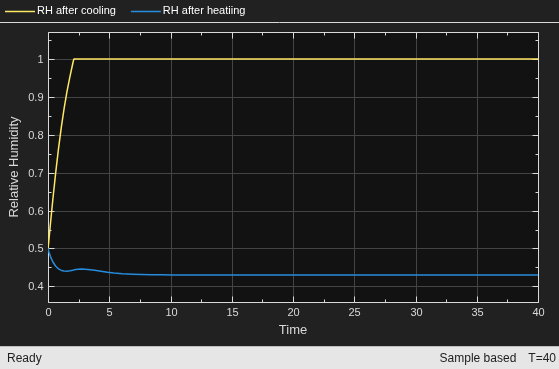
The water still condenses in the Cooling pipe. However, because no condensed water travels downstream through the flow, there is no water available in the Heating pipe for evaporation. Because there is no evaporation in the Heating pipe, the relative humidity that leaves the pipe is lower than in the environment. Plot the rate of condensation in the Cooling pipe and evaporation in the Heating pipe to confirm this behavior.
time = tout;
condensation = simlog_SimpleDehumidifier.Cooling.condensation.series.values; % [kg/s] Rate of condensation
evaporation = simlog_SimpleDehumidifier.Heating.evaporation.series.values; % [kg/s] Rate of evaporation
figure
plot(time,condensation,time,evaporation)
xlabel("Time (s)")
ylabel(["Rate of condensation" "or evaporation (kg/s)"])
legend("Condensation in Cooling pipe","Evaporation in Heating pipe","Location", "Best")
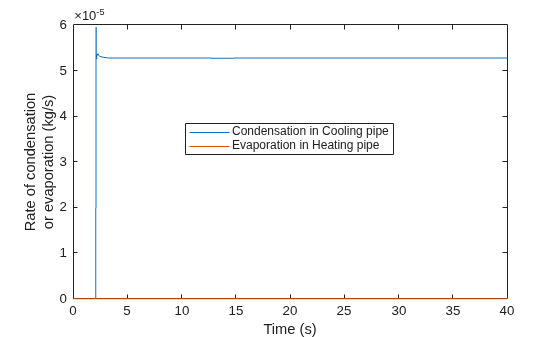
No evaporation occurs in the Heating pipe, which keeps the relative humidity low, even after heating. The model represents an effective dehumidifier. However, you can improve the model by increasing the amount of water that condenses in the Cooling pipe.
Model with Wall Condensation and No Droplets
In the Cooling pipe, select the Condensation on wall surface parameter. When you select this parameter, the block models the water vapor that condenses on the cool pipe wall, which increases the amount of water that condenses in the Cooling pipe. This condensation can happen before the relative humidity is 1, which allows more water to condense in the Cooling pipe. With these settings, the relative humidity leaving the Cooling pipe is lower, which lowers the relative humidity that leaves the Heating pipe. Simulate the model again.
set_param(system + "/Moist Air Properties (MA)","enable_droplets","false")
set_param(system + "/Cooling","wall_condensation","true");
sim(system);
open_system(system + "/Scope")
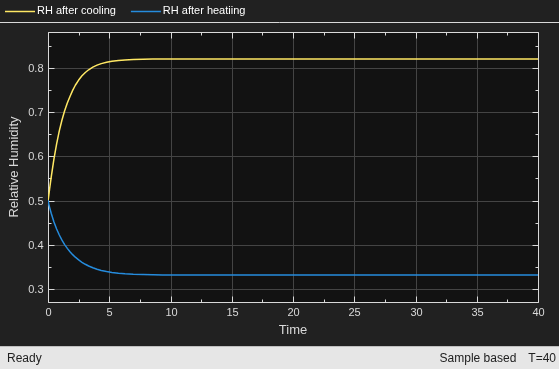
The relative humidity leaving the Heating pipe is about 0.34, which shows that the dehumidifier is effective.
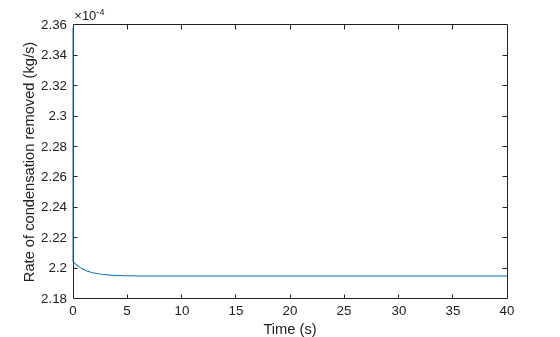
Plot the rate of condensation in the Cooling pipe. The plot confirms that enabling condensation at the wall increases the rate of condensation in the pipe. In the previous model with no wall condensation, the rate was about kg/s.
time = tout;
condensation_removed = simlog_SimpleDehumidifier.Cooling.W.series.values; % [kg/s] Rate of condensation removal
figure
plot(time,condensation_removed)
xlabel('Time (s)');
ylabel('Rate of condensation removed (kg/s)')
hold off
To confirm the dehumidified air is a comfortable temperature, plot the temperature of the air that leaves both pipes.
time = tout;
heat_temp = simlog_SimpleDehumidifier.Heating.B.T.series.values('degC'); % [degC] Temperature of air leaving Heating pipe
cool_temp = simlog_SimpleDehumidifier.Cooling.B.T.series.values('degC'); % [degC] Temperature of air leaving Cooling pipe
figure
plot(time,cool_temp,time,heat_temp)
xlabel("Time (s)")
ylabel("Temperature ^{\circ}C")
legend("Temperature leaving Cooling pipe","Temperature leaving Heating pipe","Location", "Best")
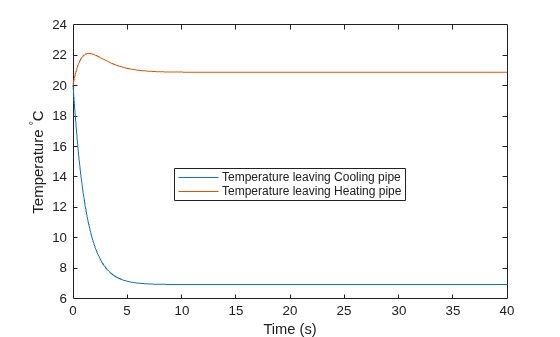
The temperature that leaves the Cooling pipe is about 7  C. The
 Heating pipe heats this air to about 21  C, which is close to the initial environmental temperature.

