Tank Fill and Empty with Animation
R2026bThis example shows how to model the dynamics of liquid in a tank. The model simulates liquid inflow and outflow and displays an animated visualization of the process.
Open Model
Open the Simulink model.
open_system('sldemo_tank');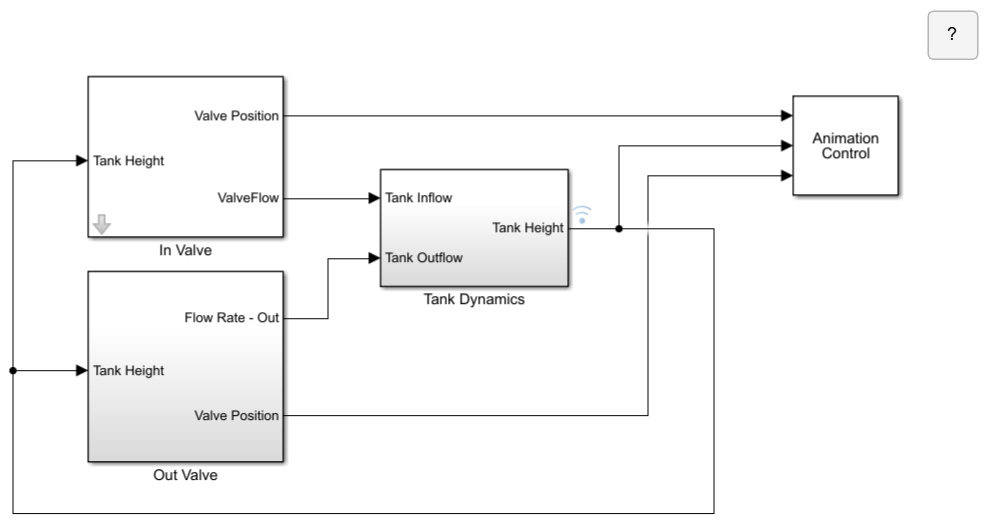
Explore Model
The model implements a control system to maintain the tank level within a desired range. You can view the tank height using the data inspector. The control system adjusts the inflow and outflow based on the current tank level. You can also change the parameter values for the initial water level, inflow and outflow rates, and tank dimensions from the Tank Model GUI.
The model has four subsystems:
In ValveOut ValveTank DynamicsAnimation Control
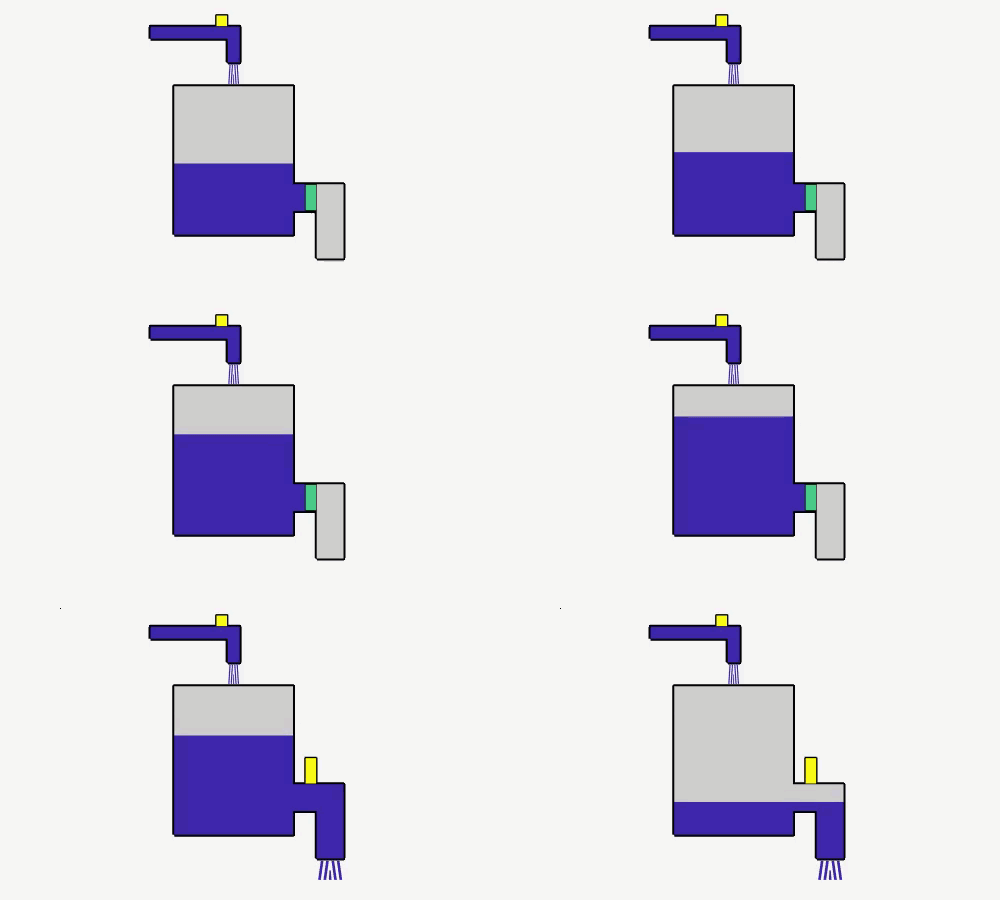
The In Valve and Out Valve subsystems regulate the liquid flow rate. The Tank Dynamics subsystem models the differential equation that describes the dynamics of the liquid level inside a tank. The Animation Control subsystem creates and updates a graphical display of the tank using an S-function. The animation shows the tank fill and empty when a flush pulse is applied.
In Valve Subsystem
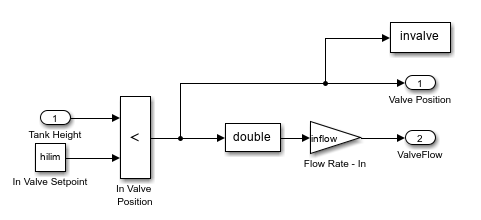
The In Valve subsystem controls the inflow of liquid into the tank by adjusting the valve to maintain the desired level. It monitors the current tank height and opens the valve when the level is below the a specified height, allowing more liquid to enter until the tank reaches the specified level. The Tank Height input represents the current liquid level in the tank, while the In Valve Setpoint (hilim) input defines the desired maximum level. You can set this value using the Maximum Height Limit in the Tank Model GUI. The In Valve Position block compares the current tank height with the maximum level. If the tank height is less than the maximum level, the block outputs 1 to open the valve, and the tank begins to fill at the specified inflow rate. You can also set the inflow rate using Flow Rate - In in the Tank Model GUI.
Out Valve Subsystem
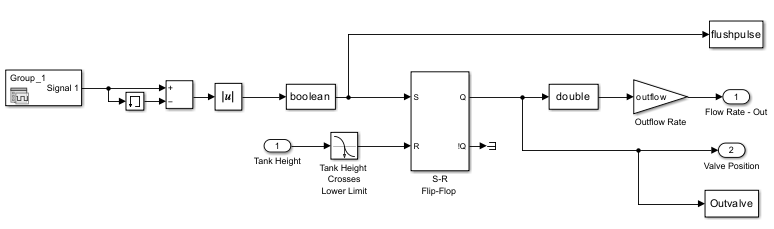
The Out Valve subsystem simulates a control system for managing the outflow from a tank. The model manages and controls the outflow from a tank, ensuring it operates within set parameters and responds to changes in tank height and flow conditions. The input_SE.mat file provides the flush pulse using a Signal Editor block. You can edit the signal in the Signal Editor block. When the flush pulse sets the S-R flip-flop, the tank starts to empty at the outflow rate specified by the value of Flow Rate - Out in the Tank Model GUI. The model compares the current tank height to Minimum Height Limit value set in the Tank Model GUI. When the tank height crosses the predefined lower limit, the system resets the S-R flip-flop, stops the outflow, and changes the valve position.
Tank Dynamics Subsystem
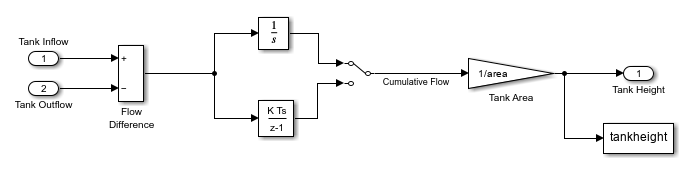
The Tank Dynamics subsystem models the differential equation that describes the dynamics of the liquid level inside a tank. The model simulates how the liquid height in the tank changes over time based on the difference between inflow and outflow rates. The model then integrates the flow difference to calculate cumulative flow and then divides this value by the tank area to determine the current tank height. You can select a discrete-time integrator using the switch and adjust the tank area in the Tank Model GUI.
Animation Control Subsystem
The Animation Control subsystem uses S-Function block to run the script sldemo_tanksfun, which creates a GUI and animates the tank filling and emptying based on the in valve and out valve positions and the current tank height.
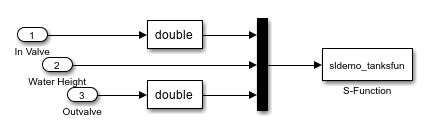
The S-function uses the sldemo_tanksfun script to dynamically update the graphical representation of the tank based on flow rates and tank dimensions. The script includes logic for managing the visualization of valve states and tank levels. The sldemo_tanksfun script uses the sldemo_tankgui function to create and update the graphical user interface. The script also animates the GUI figures in real time during the simulation.
Simulate Model
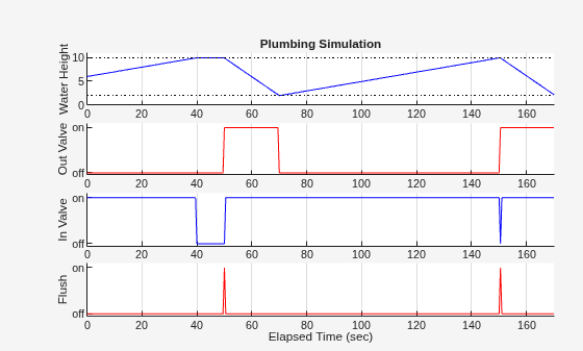
To start the simulation and animate the tank fill and empty, click Start. When the simulation ends, review the plot that shows the liquid height and the states of the two valves.
sim('sldemo_tank');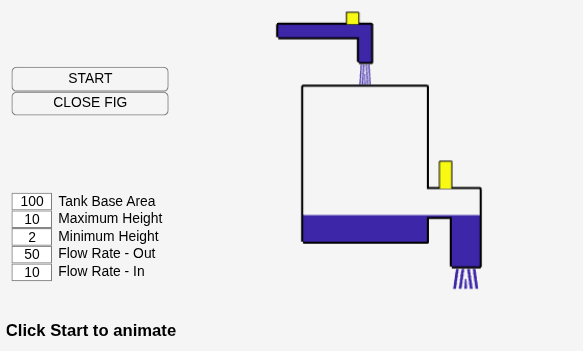
See Also
Enabled Subsystem | Triggered Subsystem

