ModelAdvisor.Table
R2026bCreate table to display Model Advisor results
Description
Use the ModelAdvisor.Table class to create and format tables to
display Model Advisor results. You can define the number of rows and columns in the table, and
customize headings, alignment, and cell content.
Creation
Description
Input Arguments
Object Functions
getEntry | Get cell contents from table |
setColHeading | Specify column heading for table |
setColHeadingAlign | Specify horizontal alignment for column heading |
setColHeadingValign | Specify vertical alignment for column heading |
setColWidth | Specify column widths for table |
setEntries | Specify content for all table cells |
setEntry | Specify content cell in table |
setEntryAlign | Specify horizontal alignment for cell content |
setEntryValign | Specify vertical alignment for cell content |
setHeading | Specify title for table |
setHeadingAlign | Specify horizontal alignment for table heading |
setRowHeading | Specify row heading for table |
setRowHeadingAlign | Specify horizontal alignment for row heading |
setRowHeadingValign | Specify vertical alignment for row heading |
Examples
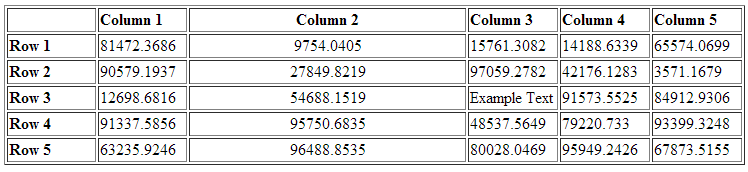
This example shows how to create a table with five rows and five columns in Model Advisor results, populate it with randomly generated numbers, and customize its appearance. The steps include setting column and row headings, adjusting column alignment and width, and inserting a text object into a specific cell.
matrixData = rand(5,5) * 10^5;

% Create the table
table1 = ModelAdvisor.Table(5,5);

% Set column headings
for n=1:5
    table1.setColHeading(n, ['Column ', num2str(n)]);
end

% Align and set width for column 2
table1.setColHeadingAlign(2, 'center');
table1.setColWidth(2, 3);

% Set row headings
for n=1:5
    table1.setRowHeading(n, ['Row ', num2str(n)]);
end

% Enter table content
for rowIndex=1:5
    for colIndex=1:5
        value = num2str(matrixData(rowIndex, colIndex));
        table1.setEntry(rowIndex, colIndex, value);

        if colIndex == 2
            table1.setEntryAlign(rowIndex, colIndex, 'center');
        end
    end
end

% Overwrite one entry with a text object
text = ModelAdvisor.Text('Example Text');
table1.setEntry(3,3, text)
Version History
Introduced in R2006b

