Main Content

evpdf

Extreme value probability density function

Description

p = evpdf(x) returns the probability density function (pdf) of the type 1 extreme value distribution (also known as the Gumbel distribution) with a location parameter equal to 0 and a scale parameter equal to 1, evaluated at the values in x. The software returns the pdf for the minimum case. To model the maximum case, call evpdf using the negative of the original values in x. For more information, see Extreme Value Distribution.

p = evpdf(x,mu,sigma) returns the pdf with the location parameters mu and scale parameters sigma, evaluated at the values in x.

example

Examples

collapse all

Compute the probability density function (pdf) of the type 1 extreme value (Gumbel) distribution with a location parameter equal to 5 and scale parameter equal to 3, for values in the range –20 to 15.

x = -20:0.01:15;
p = evpdf(x,5,3);

Plot the pdf.

figure;
plot(x,p)
grid on
xlabel("x")
ylabel("p")
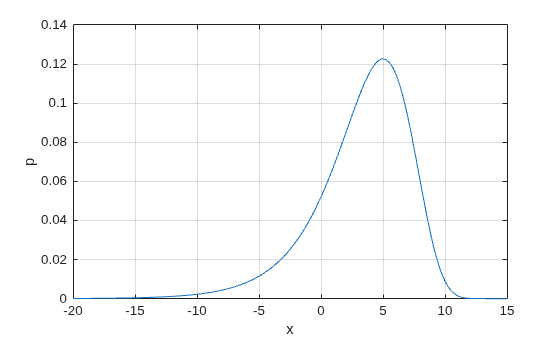
Figure contains an axes object. The axes object with xlabel x, ylabel p contains an object of type line.

Input Arguments

collapse all

Values at which to evaluate the extreme value pdf, specified as a scalar value or an array of scalar values.

To evaluate the pdf at multiple values, specify x as an array. To evaluate the pdfs of multiple distributions, specify either mu or sigma (or both) using arrays. If one or more of the input arguments x, mu, and sigma are arrays, then the array sizes must be the same. In this case, evpdf expands each scalar input into a constant array of the same size as the array inputs. Each element in p is the pdf value of the distribution specified by the corresponding elements in mu and sigma, evaluated at the corresponding element in x.

Data Types: single | double

Location parameter, specified as a scalar value or an array of scalar values.

To evaluate the pdf at multiple values, specify x as an array. To evaluate the pdfs of multiple distributions, specify either mu or sigma (or both) using arrays. If one or more of the input arguments x, mu, and sigma are arrays, then the array sizes must be the same. In this case, evpdf expands each scalar input into a constant array of the same size as the array inputs. Each element in p is the pdf value of the distribution specified by the corresponding elements in mu and sigma, evaluated at the corresponding element in x.

Data Types: single | double

Scale parameter, specified as a positive scalar value or an array of positive scalar values.

To evaluate the pdf at multiple values, specify x as an array. To evaluate the pdfs of multiple distributions, specify either mu or sigma (or both) using arrays. If one or more of the input arguments x, mu, and sigma are arrays, then the array sizes must be the same. In this case, evpdf expands each scalar input into a constant array of the same size as the array inputs. Each element in p is the pdf value of the distribution specified by the corresponding elements in mu and sigma, evaluated at the corresponding element in x.

Data Types: single | double

Output Arguments

collapse all

Type 1 extreme value pdf values, returned as a numeric scalar or array. p is the same size as x, mu, and sigma after any necessary scalar expansion. Each element in p is the pdf value of the distribution specified by the corresponding elements in mu and sigma, evaluated at the corresponding element in x.

Alternative Functionality

  • evpdf is a function specific to the extreme value distribution. Statistics and Machine Learning Toolbox™ also offers the generic function pdf, which supports various probability distributions. To use pdf, create an ExtremeValueDistribution probability distribution object and pass the object as an input argument or specify the probability distribution name and its parameters. Note that the distribution-specific function evpdf is faster than the generic function pdf.

  • Use the Probability Distribution Function Tool to create an interactive plot of the cumulative distribution function (cdf) or probability density function (pdf) for a probability distribution.

Extended Capabilities

expand all

C/C++ Code Generation
Generate C and C++ code using MATLAB® Coder™.

Version History

Introduced before R2006a