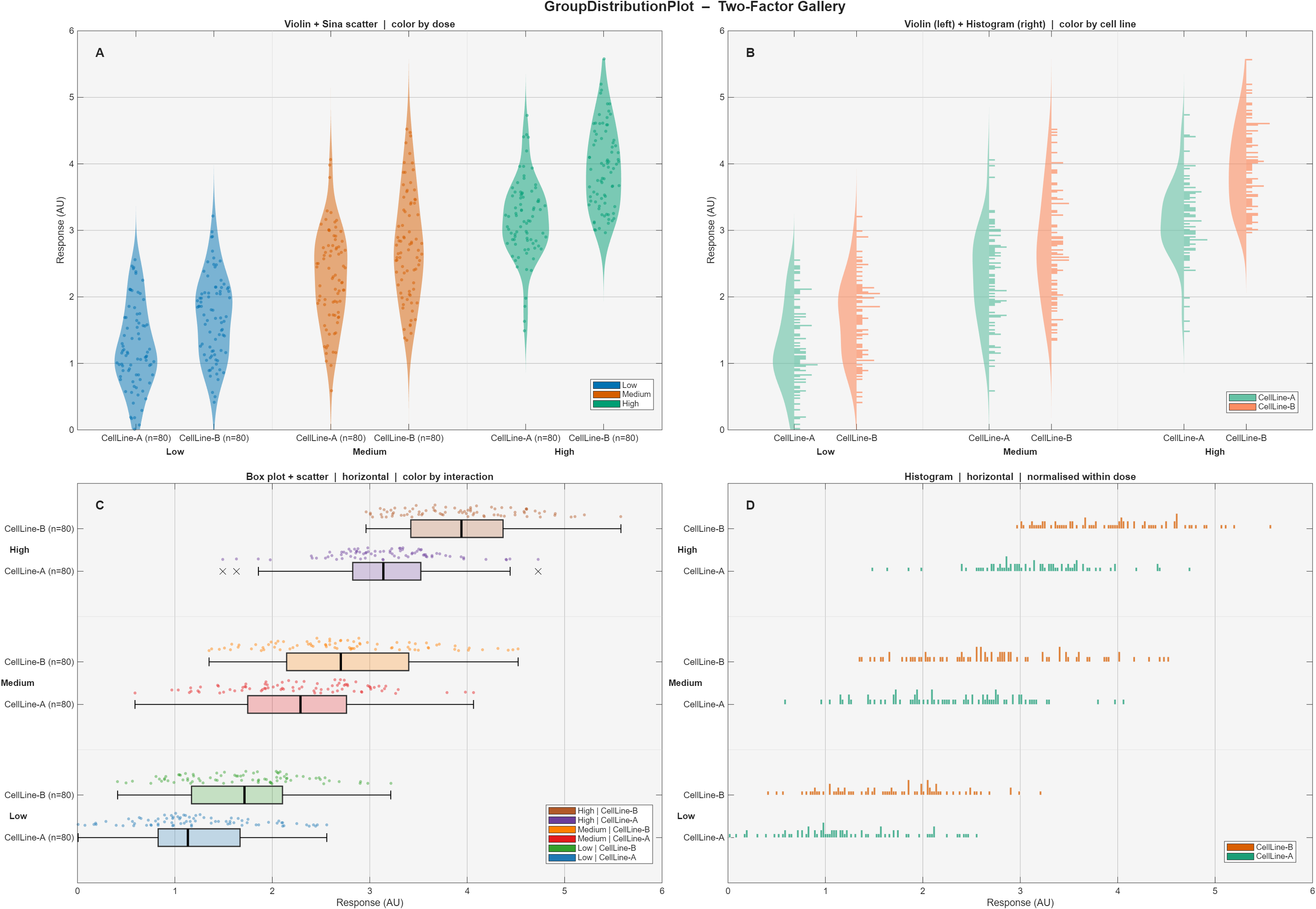
Grouped violin, sina scatter, box, and histogram plots for 1–2 categorical factors.Colorblind-safe palettes. Publication-ready MATLAB output
You are now following this Submission
- You will see updates in your followed content feed
- You may receive emails, depending on your communication preferences
GroupDistributionPlot is a MATLAB handle class that generates publication-quality grouped distribution figures. It is designed for researchers who need to compare distributions across one or two categorical factors — for instance, dose levels, genotypes, experimental conditions, or cell lines — and who want full control over the visual representation without writing low-level graphics code.
Core features
Four complementary plot elements can be shown simultaneously or in any combination:
- Violin plot — kernel density estimate rendered as a filled polygon, with optional symmetric, left-only, or right-only display.
- Sina scatter — raw data points jittered proportionally to the local KDE density, following the method of Sidiropoulos et al. (2018). Standard uniform-random jitter is also available.
- Tukey box plot — IQR box, median line, 1.5×IQR whiskers, and individual outlier markers, all drawn from scratch with full style access.
- Histogram — PDF-normalized bar chart aligned to the same axis as the violin, enabling direct density comparison.
Two-factor grouped layout — a primary grouping factor controls major column clusters; a secondary factor nests sub-columns within each cluster. A synchronized secondary axes automatically renders bold cluster labels. The same code path handles the single-factor case.
Flexible normalization — KDE and histogram heights can be scaled globally (across all cells), within Group1 rows, within Group2 columns, or independently per cell, enabling fair visual comparisons even when group sizes differ greatly.
Color system — five built-in palettes (Okabe-Ito, Tableau 10, ColorBrewer Set2 / Dark2 / Paired) plus support for any custom RGB matrix or MATLAB colormap function handle. Color can be driven by Group1, Group2, or the full Group1×Group2 interaction.
Orientation — any configuration can be rendered vertically or horizontally by setting a single property.
Descriptive statistics — n, mean, median, SD, SEM, variance, IQR, min, max, and 95% confidence interval on the mean are computed at construction time and stored in obj.stats.descriptive for downstream use.
Two fully annotated demos are included:
- demo_one_factor.m — four distribution shapes (Gaussian, Uniform, Bimodal, Skewed) compared with violin + sina + box + histogram.
- demo_two_factors.m — a simulated pharmacology dataset (3 doses × 2 cell lines) displayed across four panels covering all layout and color modes.
Cite As
Nicolas Liaudet (2026). GroupDistributionPlot: Violin, Sina, Box & Histogram (https://ch.mathworks.com/matlabcentral/fileexchange/183748-groupdistributionplot-violin-sina-box-histogram), MATLAB Central File Exchange. Retrieved .
core facility, Bioimaging, and Nicolas Liaudet. Bioimaging/GroupDistributionPlot: GroupDistributionPlot v1.0.0. Zenodo, 2026, https://doi.org/10.5281/ZENODO.19842607.
Acknowledgements
Inspired by: daviolinplot - violin and raincloud plots, sinaViolinBoxPlot
General Information
- Version 1.0.1 (17.5 KB)
MATLAB Release Compatibility
- Compatible with R2019a and later releases
Platform Compatibility
- Windows
- macOS
- Linux
