splMeter
Measure sound pressure level of audio signal
Description
The splMeter
System object™ computes sound pressure level measurements. The object returns measurements for:
frequency-weighted sound levels
fast or slow time-weighted sound levels
equivalent-continuous sound levels
peak sound levels
maximum sound levels
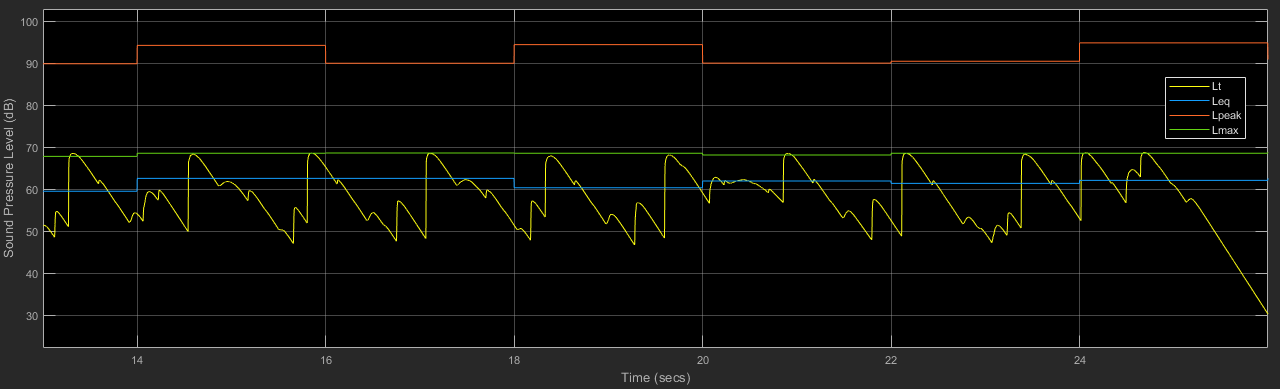
To implement SPL metering:
Create the
splMeterobject and set its properties.Call the object with arguments, as if it were a function.
To learn more about how System objects work, see What Are System Objects?
Creation
Description
SPL = splMeter creates a System object, SPL, that performs SPL metering.
SPL = splMeter( sets each
property PropertyName=Value)Name to the specified Value. Unspecified
properties have default values.
Example: SPL =
splMeter(FrequencyWeighting="C-weighting",SampleRate=12000) creates a
System object, SPL, that performs C-weighting and operates at 12
kHz.
Properties
Unless otherwise indicated, properties are nontunable, which means you cannot change their
values after calling the object. Objects lock when you call them, and the
release function unlocks them.
If a property is tunable, you can change its value at any time.
For more information on changing property values, see System Design in MATLAB Using System Objects.
Width of analysis bands, specified as "Full band", "1
octave", "2/3 octave", or "1/3
octave". If Bandwidth is specified as "Full
band", the SPL meter returns one set of measurements for the whole frequency
band. If Bandwidth is specified as "1 octave",
"2/3 octave", or "1/3 octave", the SPL meter
returns one set of measurements per octave or fractional-octave band.
Tunable: No
Data Types: char | string
Frequency range of the filter bank in Hz, specified as a two-element row vector of
positive monotonically increasing values. Frequency bands centered above
SampleRate/2 are excluded.
Tunable: No
Dependencies
To enable this property, set Bandwidth to "1
octave", "2/3 octave", or "1/3
octave".
Data Types: single | double | int8 | int16 | int32 | int64 | uint8 | uint16 | uint32 | uint64
Order of the octave filter, specified as an even integer.
Tunable: No
Dependencies
To enable this property, set Bandwidth to "1
octave", "2/3 octave", or "1/3
octave".
Data Types: single | double
Frequency weighting applied to input, specified as "A-weighting",
"C-weighting", or "Z-weighting", where
Z-weighting corresponds to no weighting. The frequency weighting is designed and
implemented using the weightingFilter
System object.
Tunable: No
Data Types: char | string
Time weighting, in seconds, for calculation of time-weighted sound level and maximum
time-weighted sound level, specified as "fast",
"slow", or "custom". The
TimeWeighting property is used to specify the coefficient of a
lowpass filter.
"fast"– 1/8."slow"– 1."custom"– Use theAttackTimeandReleaseTimeproperties to customize time weighting. (since R2026a)
Tunable: Yes
Data Types: char | string
Since R2026a
Time-weighting attack time in seconds, specified as a positive scalar.
This argument applies only when you set the TimeWeighting
property to "custom".
Tunable: Yes
Since R2026a
Time-weighting release time in seconds, specified as a positive scalar.
This argument applies only when you set the TimeWeighting
property to "custom".
Tunable: Yes
Reference pressure for dB calculations in Pa, specified as a positive scalar.
Tunable: Yes
Data Types: single | double
Time interval, in seconds, to report equivalent-continuous, peak, and maximum time-weighted sound levels, specified as a positive scalar.
Tunable: No
Data Types: single | double
Scalar (mono input) or vector (multichannel input) calibration factor multiplied by input.
To set the calibration factor using a reference tone, use calibrate.
Tunable: No
Data Types: single | double
Input sample rate in Hz, specified as a positive scalar.
Tunable: No
Data Types: single | double
Usage
Description
Input Arguments
Audio input to the SPL meter, specified as a column vector or matrix. The columns of the matrix are treated as independent audio channels.
Data Types: single | double
Output Arguments
Time-weighted sound level in dB, returned as a column vector, matrix, or 3-D array
the same type as audioIn.
Size and interpretation of the outputs depend on what the Bandwidth property is set to:
"Full band"(default) ––Lt,Leq,Lpeak, andLmaxare returned as column vectors or matrices the same size asaudioIn."1 octave","2/3 octave", or"1/3 octave"––Lt,Leq,Lpeak, andLmaxare returned as L-by-B-by-C arrays.L –– Number of rows in
audioInB –– Number of octave bands
C –– Number of columns in
audioIn
Data Types: single | double
Equivalent-continuous sound level in dB, returned as a column vector, matrix, or
3-D array the same type as audioIn.
Size and interpretation of the outputs depend on what the Bandwidth property is set to:
"Full band"(default) ––Lt,Leq,Lpeak, andLmaxare returned as column vectors or matrices the same size asaudioIn."1 octave","2/3 octave", or"1/3 octave"––Lt,Leq,Lpeak, andLmaxare returned as L-by-B-by-C arrays.L –– Number of rows in
audioInB –– Number of octave bands
C –– Number of columns in
audioIn
Data Types: single | double
Peak sound level in dB, returned as a column vector, matrix, or 3-D array the same
type as audioIn.
Size and interpretation of the outputs depend on what the Bandwidth property is set to:
"Full band"(default) ––Lt,Leq,Lpeak, andLmaxare returned as column vectors or matrices the same size asaudioIn."1 octave","2/3 octave", or"1/3 octave"––Lt,Leq,Lpeak, andLmaxare returned as L-by-B-by-C arrays.L –– Number of rows in
audioInB –– Number of octave bands
C –– Number of columns in
audioIn
Data Types: single | double
Maximum time-weighted sound level in dB, returned as a column vector, matrix, or
3-D array the same type as audioIn.
Size and interpretation of the outputs depend on what the Bandwidth property is set to:
"Full band"(default) ––Lt,Leq,Lpeak, andLmaxare returned as column vectors or matrices the same size asaudioIn."1 octave","2/3 octave", or"1/3 octave"––Lt,Leq,Lpeak, andLmaxare returned as L-by-B-by-C arrays.L –– Number of rows in
audioInB –– Number of octave bands
C –– Number of columns in
audioIn
Data Types: single | double
Object Functions
To use an object function, specify the
System object as the first input argument. For
example, to release system resources of a System object named obj, use
this syntax:
release(obj)
calibrate | Calibrate meter using calibration tone with known level |
getCenterFrequencies | Center frequencies of filters |
Examples
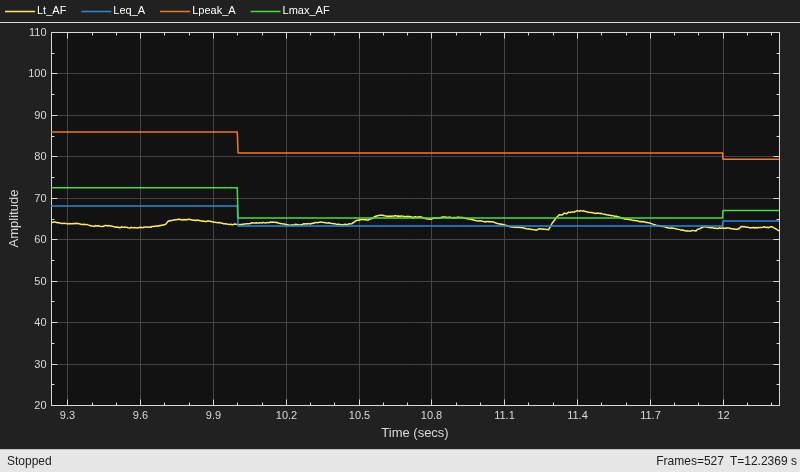
Use the splMeter System object™ to measure the A-weighted sound pressure level of a streaming audio signal. Specify a two second time-interval for reporting and a fast time-weighting. Visualize the SPL measurements using the timescope object.
Create a dsp.AudioFileReader object to read in an audio file frame by frame. Create an audioDeviceWriter object to listen to the audio signal. Create a timescope object to visualize SPL measurements. Create an splMeter to measure the sound pressure level of the audio file. Use the default calibration factor of 1.
source = dsp.AudioFileReader("Ambiance-16-44p1-mono-12secs.wav"); fs = source.SampleRate; player = audioDeviceWriter(SampleRate=fs); scope = timescope(SampleRate=fs, ... TimeSpanSource="property",TimeSpan=3, ... YLimits=[20 110], ... ShowLegend=true,BufferLength=4*3*fs, ... ChannelNames=["Lt_AF","Leq_A","Lpeak_A","Lmax_AF"], ... Name="Sound Pressure Level Meter"); SPL = splMeter(TimeWeighting="Fast", ... FrequencyWeighting="A-weighting", ... SampleRate=fs, ... TimeInterval=2);
In an audio stream loop:
Read in the audio signal frame.
Play the audio signal to your output device.
Call the SPL meter to return the time-weighted, equivalent-continuous, peak, and maximum time-weighted sound levels in dB.
Display the sound levels using the scope.
As a best practice, release your objects once complete.
while ~isDone(source) x = source(); player(x); [Lt,Leq,Lpeak,Lmax] = SPL(x); scope([Lt,Leq,Lpeak,Lmax]) end release(source) release(player) release(SPL) release(scope)
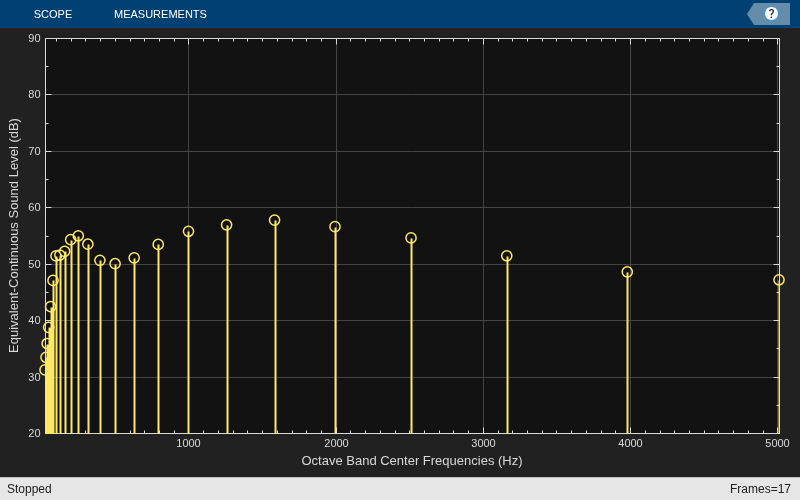
The splMeter enables you to monitor sound pressure level for octave and fractional-octave bands. In this example, you monitor the equivalent-continuous sound pressure level of 1/3-octave bands.
Create a dsp.AudioFileReader object to read in an audio file frame by frame. Create an audioDeviceWriter object so you can listen to the audio signal. Create an splMeter to measure the octave sound pressure level of the audio file. Use the default calibration factor of 1. Create a dsp.ArrayPlot object to visualize the equivalent-continuous SPL for each octave band.
source = dsp.AudioFileReader("JetAirplane-16-11p025-mono-16secs.wav"); fs = source.SampleRate; player = audioDeviceWriter(SampleRate=fs); SPL = splMeter( ... Bandwidth="1/3 octave", ... SampleRate=fs); centerFrequencies = getCenterFrequencies(SPL); scope = dsp.ArrayPlot(... XDataMode="Custom", ... CustomXData=centerFrequencies, ... XLabel="Octave Band Center Frequencies (Hz)", ... YLabel="Equivalent-Continuous Sound Level (dB)", ... YLimits=[20 90], ... ShowGrid=true, ... Name="Sound Pressure Level Meter");
In an audio stream loop:
Read in the audio signal frame.
Play the audio signal to your output device.
Call the SPL meter to return the equivalent-continuous sound pressure level in dB.
Display the sound levels using the scope. Update the scope only when the equivalent-continuous sound pressure level has changed.
As a best practice, release your objects once complete.
LeqPrevious = zeros(size(centerFrequencies)); while ~isDone(source) x = source(); player(x); [~,Leq] = SPL(x); for i = 1:size(Leq,1) if LeqPrevious ~= Leq(i,:) scope(Leq(i,:)') LeqPrevious = Leq(i,:); end end end release(source) release(player) release(SPL) release(scope)
Algorithms
Sound pressure level calculations follow the algorithms described in [1]. You can specify property values to conform to standards [2] and [3].
To account for environmental and input device effects in SPL measurements, the audio input is multiplied by a calibration factor:
The CalibrationFactor property can be set directly, or by using the
calibrate
function, which compares a known level with acquired data. The known level is determined
using a physical calibrator.
A-, C-, or Z-frequency weighting is applied. The frequency weighting is implemented
using the weightingFilter
System object.
If you specify the Bandwidth property as "1
octave", "2/3 octave" or "1/3 octave",
then the SPL calculations are applied to each octave or fractional-octave band. These
analysis bands are determined after frequency weighting.
Time-weighted sound level is defined as the ratio of the time-weighted root mean squared sound pressure to the reference sound pressure, converted to dB. That is,
h(y2) can be interpreted as the convolution of y2 with a filter with impulse response . y is the output of the frequency-weighting filter. The impulse response corresponds to a lowpass filter of the form . Using impulse invariance, the discrete filter can be interpreted as,
fs is the sample rate specified by the
SampleRate property.
τ is specified by the time-weighting coefficient as 0.125 (if
TimeWeighting is set to "fast") or 1 (if
TimeWeighting is set to"slow").
You can also set the TimeWeighting property to "custom" (since R2026a) to customize time weighting. The
smoothing filter then uses two time constants,
τA (attack) and
τR (release). You can set
these time constant through the new properties, AttackTime (since R2026a) and ReleaseTime (since R2026a). The algorithm then switches between two
discrete filters
The convolution h(y)2 is smoothed using the attack and release time properties
The attack time coefficient, αA , is calculated as
The release time coefficient, αR , is calculated as
Equivalent-continuous sound level is also called time-average sound level. It is defined as the ratio of root mean squared sound pressure to the reference sound pressure, converted to dB. That is,
where
y is the output of the frequency-weighting filter.
po is the reference sound pressure, specified by the
PressureReferenceproperty.
Peak sound level is defined as the ratio of peak sound pressure to the reference sound pressure, converted to dB. That is,
where
y is the output of the frequency-weighting filter.
po is the reference sound pressure, specified by the
PressureReferenceproperty.
Maximum time-weighted sound level is defined as the greatest time-weighted sound level within a stated time interval.
References
[1] Harris, Cyril M. Handbook of Acoustical Measurements and Noise Control. 3rd ed. American Institute of Physics, 1998.
[2] International Electrotechnical Commission. Electroacoustics - Sound level meters - Part 1: Specifications. IEC 61672-1:2013.
[3] American National Standards Institute. ANSI S1.4: Specification for Sound Level Meters. 1983.
Extended Capabilities
Usage notes and limitations:
System Objects in MATLAB Code Generation (MATLAB Coder)
Version History
Introduced in R2018aYou can set the TimeWeighting property to
"custom" and use the new AttackTime and
ReleaseTime properties to customize time weighting.
MATLAB Command
You clicked a link that corresponds to this MATLAB command:
Run the command by entering it in the MATLAB Command Window. Web browsers do not support MATLAB commands.
Select a Web Site
Choose a web site to get translated content where available and see local events and offers. Based on your location, we recommend that you select: .
You can also select a web site from the following list
How to Get Best Site Performance
Select the China site (in Chinese or English) for best site performance. Other MathWorks country sites are not optimized for visits from your location.
Americas
- América Latina (Español)
- Canada (English)
- United States (English)
Europe
- Belgium (English)
- Denmark (English)
- Deutschland (Deutsch)
- España (Español)
- Finland (English)
- France (Français)
- Ireland (English)
- Italia (Italiano)
- Luxembourg (English)
- Netherlands (English)
- Norway (English)
- Österreich (Deutsch)
- Portugal (English)
- Sweden (English)
- Switzerland
- United Kingdom (English)