Binary Linear Encoder
R2026bCreate linear block code from binary vector data
Binary Linear Encoder block
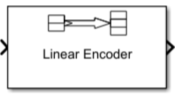
To add a block to a model, double-click the canvas and start typing the block name. Then, select the block from the list.
Libraries:
Communications Toolbox /
Error Detection and Correction /
Block
Description
The Binary Linear Encoder block creates a binary linear block code by using a generator matrix that you specify. For more information, see Linear Block Coding.
Examples
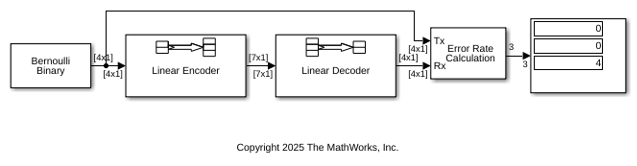
This example shows how to model a simple encoder and decoder using appropriate vector lengths for the code and message.
The cm_binary_linear model includes these blocks:
Bernoulli Binary Generator block with
Samples per frameset to4to match the binary linear encoder message lengthBinary Linear Encoder block with default parameter values
Binary Linear Decoder block with default parameter values
Error Rate Calculation block with
Output dataset toPortDisplay block connected to the output port of the Error Rate Calculation block
To display the vector length of signals in the model, go to Debug > Diagnostics > Information Overlays > Signals and select Signal Dimensions. The connector lines show the signal attributes. To compile the model, press Ctrl+D. Run the model to display the error rate statistics.
Ports
Input
Output
Parameters
Block Characteristics
Data Types |
|
Multidimensional Signals |
|
Variable-Size Signals |
|
More About
References
[1] Clark, George C., and J. Bibb Cain. Error-Correction Coding for Digital Communications. Applications of Communications Theory. New York: Plenum Press, 1981.
Extended Capabilities
Version History
Introduced before R2006a

