Puncture
R2026bOutput elements that correspond to 1s in binary puncture vector
Puncture block

To add a block to a model, double-click the canvas and start typing the block name. Then, select the block from the list.
Libraries:
Communications Toolbox /
Sequence Operations
Description
The Puncture block creates an output vector by removing selected elements of the input vector and preserving others. The block determines which elements to remove and preserve by using the binary Puncture vector parameter. The block repeats the puncturing pattern, as necessary, to include all input elements. The preserved elements appear in the output vector in the same order in which they appear in the input vector.
Examples
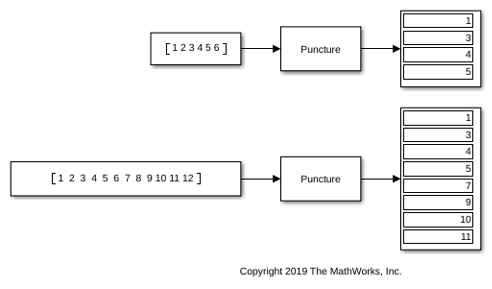
Puncture Input Vector
Use the Puncture block to puncture an input vector by using a modulus 6 puncture pattern with 0s in the second and sixth element locations, [1;0;1;1;1;0].
Ports
Input
Output
Parameters
Block Characteristics
Data Types |
|
Multidimensional Signals |
|
Variable-Size Signals |
|
Programmatic Use: Add Block
To add the block programmatically, use the add_block function with one of these library block paths as the source.
"commsequence2/Puncture"
Example: add_block("commsequence2/Puncture","myModel/myBlock",MakeNameUnique="on")
Extended Capabilities
Version History
Introduced before R2006a

