VITA 49 File Reader
R2026bThis example shows how to read signal time data packets and the associated metadata (context packet data) from a VITA 49 format file into the MATLAB® workspace.
Read VITA 49 Packets
Use the vita49Reader object to read files containing VITA 49 formatted data. The object contains information about the VITA 49 file and enables you to read the upcoming signal or context packets from the file.
Specify the VITA 49 file and set the OutputTimestampFormat property to seconds or datetime in the vita49Reader object.
Configure a VITA 49 file reader object to read the VITA49SampleData.bin data file. The sample data file contains a total of 40 packets. The first packet 10 packets are context packets and the remaining packets are signal data packets.
fileName = "VITA49SampleData.bin"; outputTimestampFormat ="seconds"; vita49ReaderObj = vita49Reader(fileName,OutputTimestampFormat=outputTimestampFormat);
Read the next upcoming VITA 49 packet in the file by using read function on the VITA 49 file reader object. This next packet can be either signal data packet or context packet, depending on the value of the PacketType field in the packet structure.
firstPacket = read(vita49ReaderObj) % read next packetfirstPacket = struct with fields:
PacketType: 4
StreamID: 0
ClassID: "7C386C0000"
IntegerTimestampType: "GPS"
IntegerTimestampValue: 1625215654
FractionalTimestampType: "real time"
FractionalTimestampValue: 0
RawBytes: [84×1 uint8]
ContextFieldChangeIndicator: 1
ReferencePointIdentifier: [1×0 double]
Bandwidth: 15500025
IFReferenceFrequency: 0
RFFrequency: 1.2100e+09
RFFrequencyOffset: [1×0 double]
IFBandOffset: [1×0 double]
ReferenceLevel: -30
Gain: 36
OverRangeCount: [1×0 double]
SampleRate: 17222250
TimestampAdjustment: [1×1 struct]
TimestampCalibrationTime: [1×0 double]
StateAndEventIndicator: [1×1 struct]
SignalDataPayloadFormat: [1×1 struct]
nextPacket = read(vita49ReaderObj); % read next packetYou can use the read function to read a certain number of packets by specifying NumPackets.
When you specify only
NumPacketsand do not specifyPacketType, the function returns signal data packets and context packets separately.When you specify
NumPacketsandPacketType, the function returns only the information of the specified packet type (signal data or context). The packet type values from 0 to 3 indicate a signal data packet, a packet type value of 4 and 5 indicates a context packet.
n = 39; % Number of packets required
vita49ReaderObj = vita49Reader(fileName);
[signalDataPackets,contextPackets]  = read(vita49ReaderObj,NumPackets=n);
anotherPacket = read(vita49ReaderObj)
anotherPacket = struct with fields:
PacketType: 1
StreamID: 0
ClassID: "7C386C0000"
PadBitCount: 0
IntegerTimestampType: "GPS"
IntegerTimestampValue: 1625215654
FractionalTimestampType: "real time"
FractionalTimestampValue: 901216160000
RawBytes: [1472×1 uint8]
IQSamples: [722×1 double]
Trailer: [1×1 struct]
Read Signal Data Packets
To read only signal data packets, set PacketType to signal data.
vita49ReaderObj = vita49Reader(fileName); packetType ="signal data"; % Skips the context packets until signal data packet arrives signalDataPacket = read(vita49ReaderObj,PacketType=packetType)
signalDataPacket = struct with fields:
                  PacketType: 1
                    StreamID: 0
                     ClassID: "7C386C0000"
                 PadBitCount: 0
        IntegerTimestampType: "GPS"
       IntegerTimestampValue: 1625215654
     FractionalTimestampType: "real time"
    FractionalTimestampValue: 900000344000
                    RawBytes: [1472×1 uint8]
                   IQSamples: [722×1 double]
                     Trailer: [1×1 struct]
Read Context Packets
To read only context packets from the VITA 49 formatted file into the MATLAB workspace, set PacketType to context.
vita49ReaderObj = vita49Reader(fileName); % Seeks to the next context Packet packetType ="context"; contextPacket = read(vita49ReaderObj,PacketType=packetType)
contextPacket = struct with fields:
                     PacketType: 4
                       StreamID: 0
                        ClassID: "7C386C0000"
           IntegerTimestampType: "GPS"
          IntegerTimestampValue: 1625215654
        FractionalTimestampType: "real time"
       FractionalTimestampValue: 0
                       RawBytes: [84×1 uint8]
    ContextFieldChangeIndicator: 1
       ReferencePointIdentifier: [1×0 double]
                      Bandwidth: 15500025
           IFReferenceFrequency: 0
                    RFFrequency: 1.2100e+09
              RFFrequencyOffset: [1×0 double]
                   IFBandOffset: [1×0 double]
                 ReferenceLevel: -30
                           Gain: 36
                 OverRangeCount: [1×0 double]
                     SampleRate: 17222250
            TimestampAdjustment: [1×1 struct]
       TimestampCalibrationTime: [1×0 double]
         StateAndEventIndicator: [1×1 struct]
        SignalDataPayloadFormat: [1×1 struct]
Read Data from RF Capture
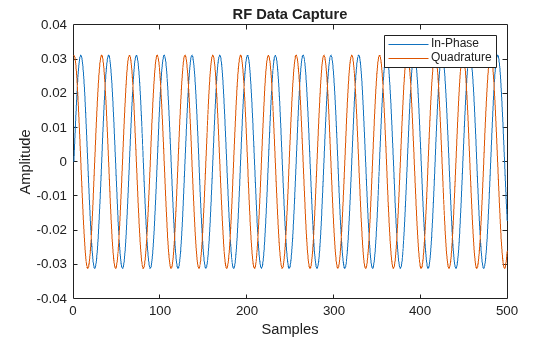
The VITA49SineWaveData.bin data file contains IQ samples of sine wave data captured from RF.
Configure a VITA 49 file reader object to read the VITA49SineWaveData.bin data file. The sample data file consists of a total of nine packets. The first packet is context packet and the remaining are signal data packets.
fileName = "VITA49SineWaveData.bin";           % VITA 49 file with sine wave data
vita49ReaderObj = vita49Reader(fileName);
numPackets = 9;                                % First packet is context packet in the file
[dataPackets,~] = read(vita49ReaderObj,NumPackets=numPackets);
iqSamples = dataPackets(1).IQSamples;          % Plot first packet data
plot(real(iqSamples));
hold on;
plot(imag(iqSamples));
xlabel("Samples")
ylabel("Amplitude")
title("RF Data Capture")
legend(["In-Phase","Quadrature"])
Reset to First Packet
Reset the position of the VITA 49 file reader to the first packet of the VITA 49 file.
reset(vita49ReaderObj);
readFirstPacket = read(vita49ReaderObj);
clear vita49ReaderObj
References
[1] VITA 49 website: https://www.vita.com

