Supported Hardware and Required Software
R2026bSupported Hardware
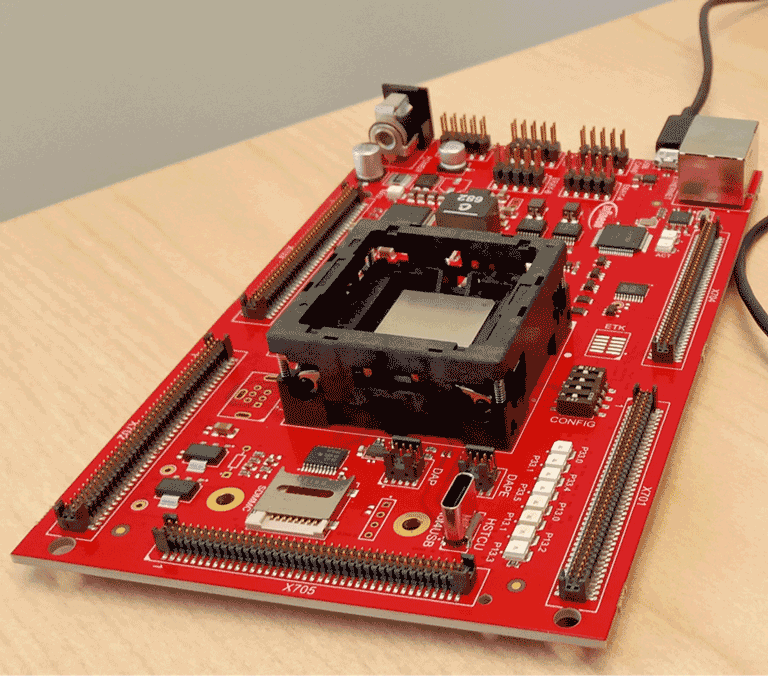
Embedded Coder® Support Package for Infineon® AURIX™ TC4x Microcontrollers supports the following device series, hardware boards, processing units, and peripheral blocks. For more information on how to configure Infineon AURIX custom boards, see Board.
| Device Series | Hardware Boards | Processing Units | Supporting Peripheral blocks |
|---|---|---|---|
TC46x |
|
|
|
TC48x |
|
|
|
TC49xN |
|
|
|
TC4Dx |
|
|
|
| TC4Zx |
|
|
|
Note
The Device Series parameter value must match the hardware board connected for deploying the application model. To change the Device Series, press Ctrl+E to open in Configuration Parameters dialog box and navigate to Hardware Implementation > Device Series.
Supported Third-Party Tools
To run the Embedded Coder Support Package for Infineon AURIX TC4x Microcontrollers, you might need the following third-party tools.
| Third-Party Toolchain | Description |
|---|---|
Infineon Low Level Driver (iLLD) | Follow the hardware setup window to download and install. |
| TASKING® SmartCode | To compile and run the code for the TriCore® processing units and the parallel processing unit (PPU). Follow the hardware setup window to download and install. |
| Green Hills® Software for TriCore | To compile and run the code for the TriCore processing units. Follow the hardware setup window to download and install. |
HighTec LLVM TriCore Development Platform | To compile and run the code for the TriCore processing units. Follow the hardware setup window to download and install. |
| GCC for AURIX TriCore based on AURIX Development Studio | To compile and run the code for the TriCore processing units. Follow the hardware setup window to download and install. |
| Synopsys® Virtualizer Development Kit | To build and test your model on virtual prototyping without the Infineon AURIX hardware board. You must install both Synopsys Virtualizer Development Kit and Synopsys Virtualizer Runtime to use virtual prototyping. Follow the hardware setup window to download and install. |
| Synopsys Virtualizer Runtime | To build and test your model on virtual prototyping without the Infineon AURIX hardware board. You must install both Synopsys Virtualizer Development Kit and Synopsys Virtualizer Runtime to use virtual prototyping. Follow the hardware setup window to download and install. |
| Infineon TAS/DAS | To connect host computer to your hardware board. Follow the hardware setup window to download and install. |
Synopsys MetaWare for Infineon AURIX TC4x | To compile and run the code for the PPU. Follow the hardware setup window to download and install. |
This table lists all the supported third-party tools for MATLAB®.
| MATLAB Version | iLLD | TASKING SmartCode | Green Hills Software for TriCore | HighTec LLVM TriCore Development Platform | Synopsys MetaWare for Infineon AURIX TC4x | GCC for AURIX TriCore based on AURIX Development Studio | Synopsys Virtualizer Development Kit | Synopsys Virtualizer Runtime | Infineon TAS/DAS |
|---|---|---|---|---|---|---|---|---|---|
| MATLAB 9.13 (R2022b) | 2.0.1.1.18 | 10.1r1 | 2021.1.5 | - | 2021.12 | - | 2.0.1 | Q-2020.06-SP2 | 7.3.7 |
| MATLAB 9.14 (R2023a) | 2.0.1.1.18 | 10.1r1 | 2021.1.5 | - | 2022.03 | - | 2.0.1 | Q-2020.06-SP2 | 7.3.7 |
| MATLAB 23.2 (R2023b) | 2.0.1.2.11 | 10.1r1 | 2021.1.5 | 6.1.0 | 2022.03 | - | 2.0.1 | Q-2020.06-SP2 | 7.3.7 |
| MATLAB 24.1 (R2024a) | 2.0.1.2.19 | 10.1r1 | 2021.1.5 | 7.1.2 | 2022.03 | - | 2.0.1 | Q-2020.06-SP2 | 8.0.5 |
| MATLAB 24.2 (R2024b) | 2.0.1.3.5 | 10.2r1 | 2023.5.4 | 8.1.2 | 2.0(2023.09) | - | 2.0.1 | Q-2020.06-SP2 | 8.1.4 |
| MATLAB 25.1 (R2025a) | 2.0.1.3.13 | 10.2r1 | 2023.5.4 | 8.1.2 | 2.0(2023.09) | - | 2.0.1 | Q-2020.06-SP2 | 8.0.5/8.1.4 |
| MATLAB 25.2 (R2025b) | 2.0.1.3.13 | 10.2r1 | 2023.5.4 | 8.1.2 | 2.0(2023.09) | - | 2.0.1 | Q-2020.06-SP2 | 8.0.5/8.1.4 |
| MATLAB 26.1 (R2026a) | 2.3.0 | 10.3r1 | 2024.1.4 | 9.1.2 | 2.1(2024.06) | 11.3.1 | 2.0.1 | Q-2020.06-SP2 | 8.3.0 |
| MATLAB 26.2 (R2026b) | 2.5.0 | 10.4r1 | 2025.1.4 | 10.1.0 | 2.1(2024.06) | 11.3.1 | 2.0.1 | Q-2020.06-SP2 | 8.3.0 |
Embedded Coder Support Package for Infineon AURIX TC4x Microcontrollers supports both 8.0.5 and 8.1.4 versions of Infineon TAS/DAS for MATLAB R2025a and R2025b versions.
Virtual Prototyping
The Embedded Coder Support Package for Infineon AURIX TC4x Microcontrollers is verified in Synopsys Virtual Prototyping (VP) Virtualizer.
Virtual Prototyping (VP) provides an alternative platform that can simulate all the processing units, memories and peripherals available in Infineon AURIX TC4x MCU. You can build and test your model on virtual prototyping without the hardware using the Synopsys Virtual Prototyping (VP) Virtualizer.
MathWorks Products
The following MathWorks® products are required for using Embedded Coder Support Package for Infineon AURIX TC4x Microcontrollers.
MATLAB
Embedded Coder
Simulink®
Simulink Coder™
Embedded Coder Support Package for Infineon AURIX TC4x Microcontrollers
Recommended Products
Motor Control Blockset™
Fixed-Point Designer™
Vehicle Network Toolbox™

