Verification of Generated HDL Code
R2026bWhen you generate HDL code using HDL Coder, the tools provide options for automatic verification of the generated code against your source MATLAB® or Simulink® design. Use the HDL Workflow Advisor to guide you through code generation and verification. See Getting Started with the HDL Workflow Advisor (HDL Coder) and Generate Test Bench and Enable Code Coverage Using the HDL Workflow Advisor (HDL Coder).
You can generate four kinds of testbenches for verification of generated code:
HDL simulation
FPGA-in-the-loop (FIL)
HDL Cosimulation
DPI component
The latter two testbenches are provided when you have an HDL Verifier™ license. FIL requires a license for SoC Blockset™ for AMD or HDL Coder. See Choose a Test Bench for Generated HDL Code (HDL Coder).
These functionalities are not available in MATLAB Online™.
Topics
Cosimulation
- Automatic Verification of Generated HDL Code from Simulink
Verify generated HDL code using a generated cosimulation model. - Verify Generated HDL Code from MATLAB
Verify generated HDL code using a generated cosimulation script.
System Verilog DPI Component
- Verify HDL Design Using SystemVerilog DPI Test Bench (HDL Coder)
This example shows how to use SystemVerilog DPI test bench for verification of HDL code where a large data set is required.
Combination of Multiple Testbench Types
- Verify the Combination of Hand-Written and Generated HDL Code
This example uses HDL cosimulation and FPGA-in-the-loop (FIL) simulation to verify an HDL design comprising generated and legacy HDL code. - Verify MATLAB-to-HDL Code by Using Cosimulation and FPGA-in-the-Loop
This example shows how to verify generated HDL code by using HDL cosimulation and FPGA-in-the-loop (FIL) verification when you generate HDL code from MATLAB functions.
Related Information
- Verification and Debugging (HDL Coder)
Featured Examples
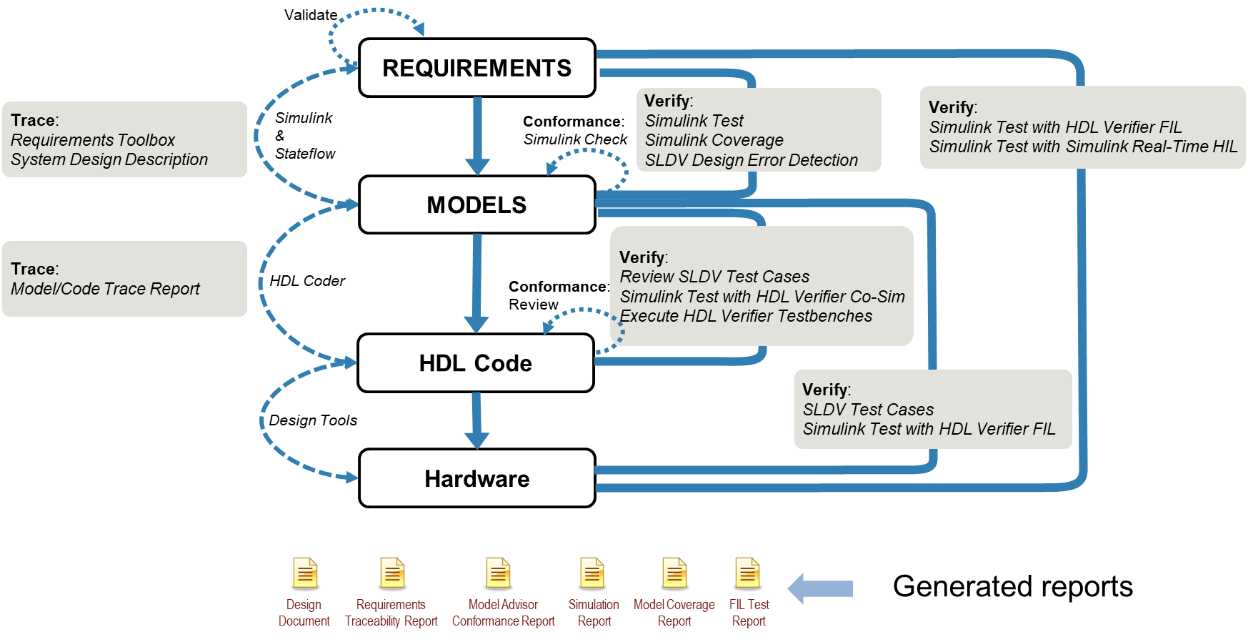
Hydraulic Actuator Control: Verification from Requirements to HDL Implementation
Presents a workflow that applies Model-Based Design to implement and verify a hydraulic actuator control. The workflow starts with requirements, creates test harnesses and test suites, generates HDL code, and then verifies that code. Using HDL Verifier™ and Simulink® verification and validation tools, the example shows how:
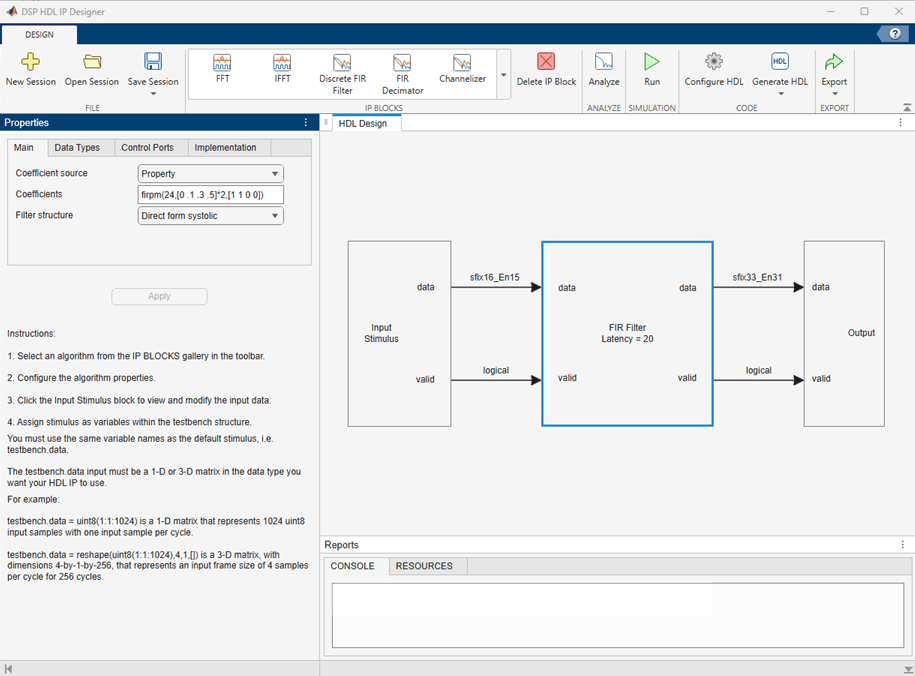
Generate and Verify HDL Code with DSP HDL IP Designer App
Configure a hardware-friendly FIR filter and generate HDL code and testbenches with the DSP HDL IP Designer app.

