Centrifugal Pump (IL)
R2026bCentrifugal pump in isothermal liquid network
Centrifugal Pump (IL) block

To add a block to a model, double-click the canvas and start typing the block name. Then, select the block from the list.
Libraries:
Simscape /
Fluids /
Isothermal Liquid /
Pumps & Motors
Description
The Centrifugal Pump (IL) block represents a centrifugal pump that transfers energy from the shaft to a fluid in an isothermal liquid network. The pressure differential and mechanical torque are functions of the pump head and brake power, which depend on pump capacity. You can parameterize the pump analytically or by linear interpolation of tabulated data. The pump affinity laws define the core physics of the block, which scale the pump performance to the ratio of the current to the reference values of the pump angular velocity and impeller diameter.
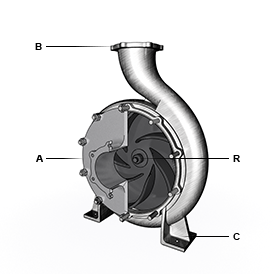
By default, the flow and pressure gain are from port A to port B. Port C represents the pump casing, and port R represents the pump shaft. You can specify the normal operating shaft direction in the Mechanical orientation parameter. If the shaft begins to spin in the opposite direction, the pressure difference across the block drops to zero.
Port Configuration
The figure shows the location of the block ports on a typical centrifugal pump.
Analytical Parameterization: Capacity, Head, and Brake Power
When you set, Pump parameterization to Capacity, head,
and brake power at reference shaft speed, the block calculates the
pressure gain over the pump as a function of the pump affinity laws and the
reference pressure differential:
where:
g is the gravitational acceleration.
ΔHref is the reference pump head, which the block derives from a quadratic fit of the pump pressure differential between the values of the Maximum head at zero capacity, Nominal head, and Maximum capacity at zero head parameters.
ω is the shaft angular velocity, ωR – ωC.
ωref is the value of the Reference shaft speed parameter.
is the value of the Impeller diameter scale factor parameter. This block does not reflect changes in pump efficiency due to pump size.
ρ is the network fluid density.
The shaft torque is:
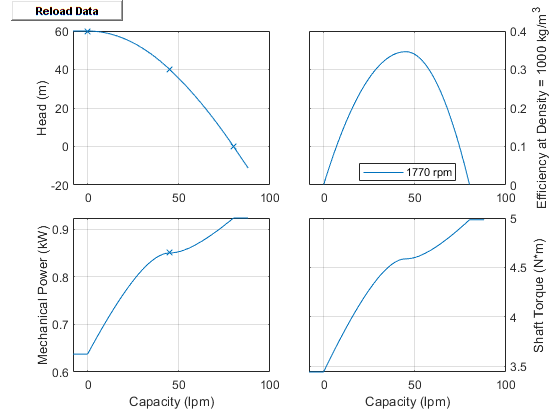
The reference brake power, Wbrake,ref, is calculated as capacity·head/efficiency. The pump efficiency curve is quadratic with its peak corresponding to the Nominal brake power parameter, and it falls to zero when capacity is zero or maximum as the pump curve figure demonstrates.
The block calculates the reference capacity as:
You can choose to be warned when the block flow rate becomes negative or exceeds
the maximum pump capacity by setting Check if operating beyond normal pump
operation to On.
1-D Tabulated Data Parameterization: Head and Brake Power as a Function of Capacity
When you set Pump parameterization to 1D tabulated data -
head and brake power vs. capacity at reference shaft speed, the
pressure gain over the pump functions with the Reference head
vector parameter, ΔHref,
which is a function of the reference capacity,
qref:
where g is the gravitational acceleration.
The block bases the shaft torque on the Reference brake power vector parameter, Wref, which is a function of the reference capacity:
where ρref is the Reference density parameter. The reference capacity is:
which the block uses to interpolate the values of the Reference capacity vector, Reference head vector, and Reference brake power vector parameters as a function of qref.
When the simulation is outside the range of the provided tables, the block extrapolates head based on the average slope of the pump curves and brake power to the nearest point.
2-D Tabulated Data Parameterization: Head and Brake Power as a Function of Capacity and Shaft Speed
When you set Pump parameterization to 2D tabulated data -
head and brake power vs. capacity and shaft speed, the pressure
gain over the pump is a function of the Head table, H(q,w)
parameter, ΔHref, which is a function of
the reference capacity, qref, and the
shaft speed, ω:
The shaft torque is a function of the Brake power table, Wb(q,w) parameter, Wref, which is a function of the reference capacity, qref, and the shaft speed, ω:
The reference capacity is:
When the simulation is outside the range of the provided tables, the block extrapolates head based on the average slope of the pump curves and brake power to the nearest point.
If your table has unknown data points, use NaN in place of these
values. The block fills in the NaN elements by extrapolating
based on the average slope of the pump curves. Do not use artificial numerical
values because these values distort pump behavior when operating in that region.
When using unknown data:
The
NaNelements in the table must be contiguous.The positions of the
NaNelements in the Head table, H(q,w) and Brake power table, Wb(q,w) parameters must match each other.NaNelements must be located in the lower-left portion of the table, which corresponds to the highest capacity and lowest shaft speed.
Visualizing the Pump Curve
You can check the parameterized pump performance by plotting the head, power, efficiency, and torque as a function of the flow. To generate a plot of the current pump settings, in the block dialog box, click the Plot button next to Pump characteristics. When you modify the block parameters, refresh the data by clicking Reload Data in the figure window.
The default block parameterization results in these plots:
Assumptions and Limitations
If the shaft rotates opposite to the specified mechanical orientation, pressure difference across the block drops to zero and the results may not be accurate.
The block does not account for dynamic pressure in the pump. The block only considers pump head due to static pressure.
Pre-defined parameterizations use available data and the block fills in missing data where necessary. Validate your model against expected results.
Examples
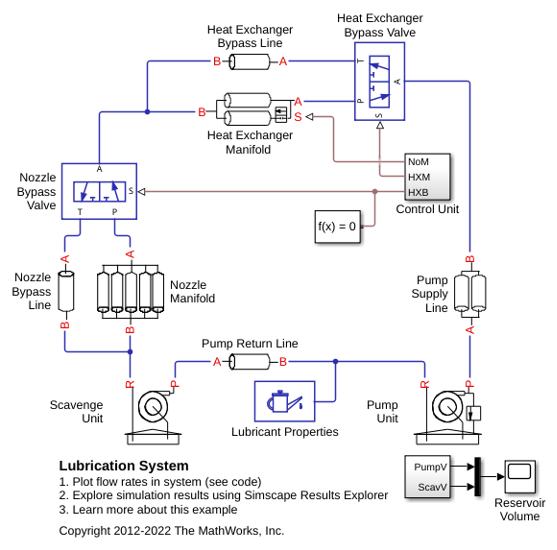
Lubrication System
A simplified version of a lubrication system fed with the centrifugal pump. The system consists of five major units: Pump Unit, Scavenge Unit, Heat Exchanger Manifold, Nozzle Manifold, and Control Unit. Both the pump and the scavenge unit are built around the centrifugal pump. The Scavenge Unit collects fluid discharged by nozzles and pumps it back into the reservoir of the Pump Unit. The Control Unit generates commands to bypass either the heat exchanger, represented as a local resistance, or the nozzles block. In a real system, these commands are generated by temperature sensors installed in lubrication cavities.
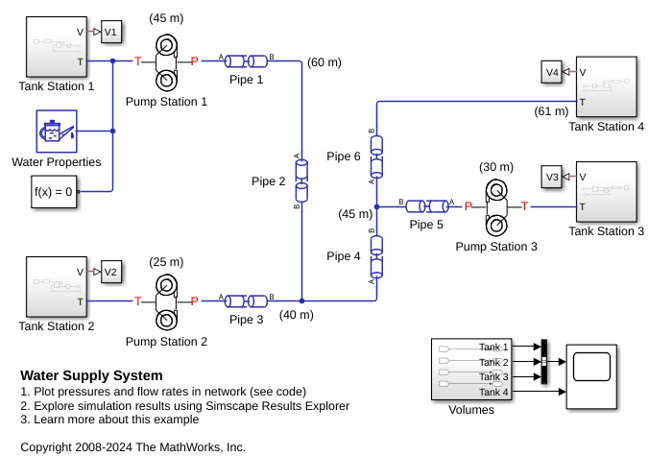
Water Supply System
A water supply system consisting of three pumping stations.

