Main Content

Double-Acting Actuator (IL-PB)

Position-based double-acting actuator in isothermal liquid systems

Since R2026a

Libraries:
Simscape / Fluids / Isothermal Liquid / Actuators

Description

The Double-Acting Actuator (IL-PB) block models the linear conversion of a pressure differential between two chambers to piston motion. The pressure differential that acts on the piston plate that separates the chambers controls the piston actuation. A hard stop limits the motion of the piston when it is near full extension or full retraction. You can model fluid compressibility in either piston chambers.

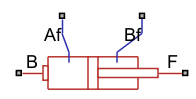
Ports Af and Bf are isothermal liquid inlets that control the pressure in both chambers. The block converts the pressure differential between the two chambers to a translation force at either port B or F. The Modeling option parameter controls whether port B or F connects to the piston.

Hard Stop Model

The block has three different options for the hard stop that you can use to model the extension limit of the actuator piston. For more information on the hard stop model options, see Translational Hard Stop (PB).

The block models the hard stop when the piston is at its upper or lower bound. Outside of this region, FHardStop=0.

Cushion

The block can model cushioning toward the extremes of the piston stroke. Select Enable cylinder Af end cushioning or Enable cylinder Bf end cushioning to slow the piston motion as it approaches the end cap. For more information on the functionality of a cylinder cushion, see the Cylinder Cushion (IL-PB) block.

Friction

The block can model friction against piston motion. When you select Enable cylinder friction effect, the friction is a combination of the Stribeck, Coulomb, and viscous effects. The block measures the pressure difference between the chamber pressure and the environment pressure. For more information on the friction model and its limitations, see the Cylinder Friction (IL-PB) block.

Numerically-Smoothed Area and Pressure

You can maintain numerical robustness in your simulation by adjusting the Smoothing factor parameter. If the Smoothing factor parameter is nonzero, the block smooths the cushion A and B orifice areas and the check valve pressure ranges. The orifice area is smoothly saturated between the cushion A and cushion B Leakage area between plunger and cushion sleeve and Cushion plunger cross-sectional area parameters while the valve pressure is saturated between the cushion A and cushion B Check valve cracking pressure differential and Check valve maximum pressure differential parameters. For more information, see Numerical Smoothing.

Block Sub-Components

The Single-Acting Actuator (IL-B) block is a composite component made from these Simscape Foundation and Fluids library blocks:

This figure shows the composite diagram when you set Modeling option to Port F connected to piston and you select Enable cylinder Af end cushioning, Enable cylinder Bf end cushioning, and Enable cylinder friction effect.
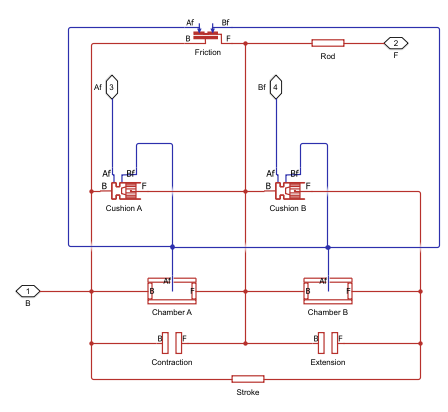
Diagram of composite component for block

Ports

Conserving

expand all

Isothermal liquid conserving port associated with chamber Af.

Isothermal liquid conserving port associated with the inlet to chamber Bf.

Position-based translational conserving port that represents the base connection.

Position-based translational conserving port that represents the follower connection. When the block has a nonzero length, port F has a more positive position than port B.

Output

expand all

Physical signal port associated with the piston position, in m.

Dependencies

To enable this port, select Enable position output.

Parameters

expand all

Whether port B or F connects to the piston.

Actuator

Whether to model the same fluid in both actuator chambers. If you select this parameter, the actuator propagates fluid properties through both chambers. Clear this parameter to model each chamber as a different fluid, where each chamber is connected to an isolated fluid network.

Cross-sectional area of the piston rod on the chamber Af side.

Cross-sectional area of the piston rod on the chamber Bf side.

Maximum piston travel distance.

Length between ports B and F when the volume of chamber Af is equal to the value of the Dead volume in chamber Af parameter.

Volume of the liquid when the piston displacement is 0 in chamber Af. This value is the liquid volume when the piston is up against the actuator end cap.

Volume of the liquid when the piston displacement is 0 in chamber B. This value is the liquid volume when the piston is up against the actuator end cap.

Environment reference pressure. When you set this parameter to Atmospheric pressure, the environmental pressure is 0.101325 MPa.

User-defined environmental pressure.

Dependencies

To enable this parameter, set Environment pressure specification to Specified pressure.

Option to output the piston position at port p.

Hard Stop

Select the hard stop model:

  • Stiffness and damping applied smoothly through transition region, damped rebound — Specify the transition region in which the force ramps up from zero. At the end of the transition region, the block applies the full stiffness and damping. This option applies damping on the rebound, but limits it to the value of the stiffness force. Therefore, damping can reduce or eliminate the force provided by the stiffness, but never exceed it. All equations are smooth and produce no zero crossings.

  • Full stiffness and damping applied at bounds, undamped rebound — This option applies full stiffness and damping with impact, and applies no damping on the rebound. The equations produce no zero crossings when velocity changes sign, but there are position-based zero crossings. This option uses nonlinear equations.

  • Full stiffness and damping applied at bounds, damped rebound — This model has full stiffness and damping applied with impact, with damping applied on the rebound as well. The equations are switched linear, but produce position-based zero crossings. Use this option if the simscape.findNonlinearBlocks function indicates that this block prevents the network from being switched linear.

Elastic property of the colliding bodies. The greater the value of this parameter, the less the bodies penetrate into each other and the more rigid the impact becomes. Setting this parameter to lesser values makes contact softer, but improves convergence and computational efficiency.

Dissipating property of the colliding bodies. The greater the value of this parameter, the more energy dissipates during impact.

Region where the force ramps up from zero to the full value. At the end of the transition region, the block applies full stiffness and damping.

Dependencies

To enable this parameter, set Hard stop model to Stiffness and damping applied smoothly through transition region, damped rebound.

Cushion Af

Whether to model piston slowdown at the maximum extension. See the Cylinder Cushion (IL-PB) block for more information.

Area of the plunger inside the actuator cushion element.

Dependencies

To enable this parameter, select Enable cylinder Af end cushioning.

Length of the cushion plunger.

Dependencies

To enable this parameter, select Enable cylinder Af end cushioning.

Area of the orifice between the cushion chambers.

Dependencies

To enable this parameter, select Enable cylinder Af end cushioning.

Gap area between the cushion plunger and sleeve. This value contributes to numerical stability by maintaining continuity in the flow.

Dependencies

To enable this parameter, select Enable cylinder Af end cushioning.

Pressure beyond which the valve operation triggers. When the pressure difference between port A and Penv meets or exceeds the value of this parameter, the cushion valve begins to open.

Dependencies

To enable this parameter, select Enable cylinder Af end cushioning.

Maximum cushion valve differential pressure. This parameter provides an upper limit to the pressure so that system pressures remain realistic.

Dependencies

To enable this parameter, select Enable cylinder Af end cushioning.

Cross-sectional area of the cushion valve in the fully open position.

Dependencies

To enable this parameter, select Enable cylinder Af end cushioning.

Sum of all gaps when the cushion check valve is in the fully closed position. Any area smaller than this value saturates to the specified leakage area. This value contributes to numerical stability by maintaining continuity in the flow.

Dependencies

To enable this parameter, select Enable cylinder Af end cushioning.

Continuous smoothing factor that introduces a layer of gradual change to the flow response when the variable orifice and check valve are in near-open or near-closed positions. Set this value to a nonzero value less than one to increase the stability of your simulation in these regimes.

Dependencies

To enable this parameter, select Enable cylinder Af end cushioning.

Cushion Bf

Whether to model piston slowdown at the maximum extension. See the Cylinder Cushion (IL-PB) block for more information.

Area of the plunger inside the actuator cushion element.

Dependencies

To enable this parameter, select Enable cylinder Bf end cushioning.

Length of the cushion plunger.

Dependencies

To enable this parameter, select Enable cylinder Bf end cushioning.

Area of the orifice between the cushion chambers.

Dependencies

To enable this parameter, select Enable cylinder Bf end cushioning.

Gap area between the cushion plunger and sleeve. This value contributes to numerical stability by maintaining continuity in the flow.

Dependencies

To enable this parameter, select Enable cylinder Bf end cushioning.

Pressure beyond which the valve operation triggers. When the pressure difference between port A and Penv meets or exceeds the value of this parameter, the cushion valve begins to open.

Dependencies

To enable this parameter, select Enable cylinder Bf end cushioning.

Maximum cushion valve differential pressure. This parameter provides an upper limit to the pressure so that system pressures remain realistic.

Dependencies

To enable this parameter, select Enable cylinder Bf end cushioning.

Cross-sectional area of the cushion valve in the fully open position.

Dependencies

To enable this parameter, select Enable cylinder Bf end cushioning.

Sum of all gaps when the cushion check valve is in the fully closed position. Any area smaller than this value saturates to the specified leakage area. This value contributes to numerical stability by maintaining continuity in the flow.

Dependencies

To enable this parameter, select Enable cylinder Bf end cushioning.

Continuous smoothing factor that introduces a layer of gradual change to the flow response when the variable orifice and check valve are in near-open or near-closed positions. Set this value to a nonzero value less than one to increase the stability of your simulation in these regimes.

Dependencies

To enable this parameter, select Enable cylinder Bf end cushioning.

Friction

Whether to model friction against the piston motion. The block accounts for Coulomb, Stribeck, and viscous friction. See the Cylinder Friction (IL-PB) block for more information.

Ratio of the breakaway force to the Coulomb friction force.

Dependencies

To enable this parameter, select Enable cylinder friction effect.

Threshold velocity for the motion against the friction force to begin.

Dependencies

To enable this parameter, select Enable cylinder friction effect.

Force on the cylinder when it is in the neutral position.

Dependencies

To enable this parameter, select Enable cylinder friction effect.

Coulomb force coefficient of friction.

Dependencies

To enable this parameter, select Enable cylinder friction effect.

Viscous friction coefficient.

Dependencies

To enable this parameter, select Enable cylinder friction effect.

Initial Conditions

Whether to model change in fluid density due to fluid compressibility. When you select Enable dynamic compressibility, the block calculates the changes due to the mass flow rate into the block in addition to density changes due to changes in pressure. In the Isothermal Liquid Library, all blocks calculate density as a function of pressure.

Starting liquid pressure for compressible fluids.

Dependencies

To enable this parameter, select Enable dynamic compressibility.

Starting liquid pressure for compressible fluids.

Dependencies

To enable this parameter, select Enable dynamic compressibility.

Liquid pressure at nominal operating conditions in chamber Af. The block uses this value to calculate the nominal density to use in the mass conservation equation when you disable dynamic compressibility.

Dependencies

To enable this parameter, clear the Enable dynamic compressibility check box.

Liquid pressure at nominal operating conditions in chamber Bf. The block uses this value to calculate the nominal density to use in the mass conservation equation when dynamic compressibility is disabled.

Dependencies

To enable this parameter, clear the Enable dynamic compressibility check box.

Extended Capabilities

expand all

C/C++ Code Generation
Generate C and C++ code using Simulink® Coder™.

Version History

Introduced in R2026a