Model a Simple CPU Cooling System
R2026bThis example demonstrates a model of a simple CPU cooling system that consists of a CPU board, heat sink, fan controller, and cooling fan.
Examine the Model
Open the model.
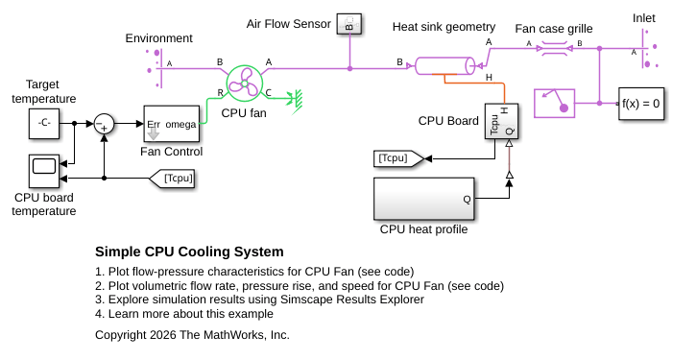
In this model, heat transfer occurs in two stages. First, the CPU Board, represented by the Thermal Mass block CPU within the CPU Board subsystem, generates heat that conducts to a parallel-plate heat sink, represented by the Thermal Mass blocks, Heat Sink Base and Heat Sink Fins within the CPU Board subsystem, and the Pipe (G) block, Heat sink geometry. The CPU fan, which is controlled by the Fan Control subsystem, then dissipates the heat to the environment.
The Pipe (G) block, Heat sink geometry, represents air flow through the parallel plate heat sink. The value of its Cross-sectional area parameter corresponds to the area between the heat sink fins where air flow occurs. The Flow Resistance (G) block, Fan case grille, models the pressure loss that occurs when air flows in through the fan case grille at the system inlet.
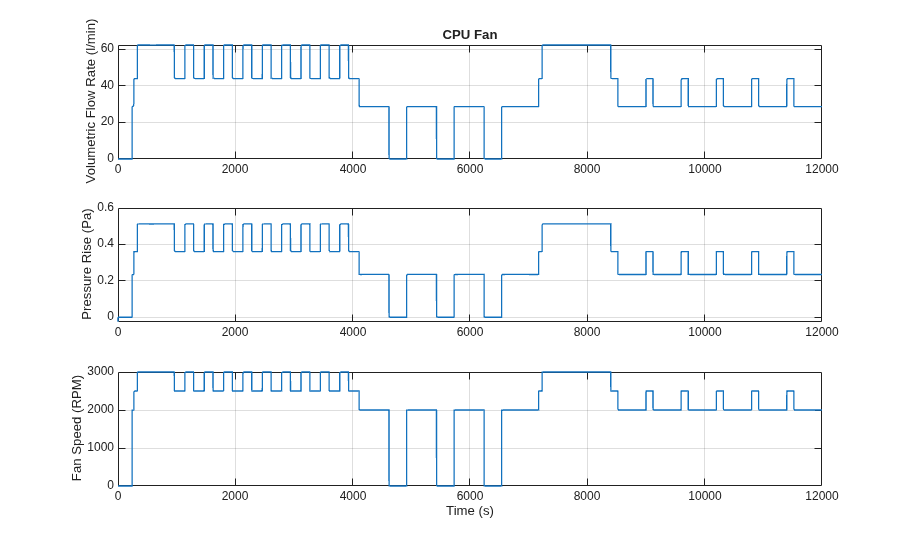
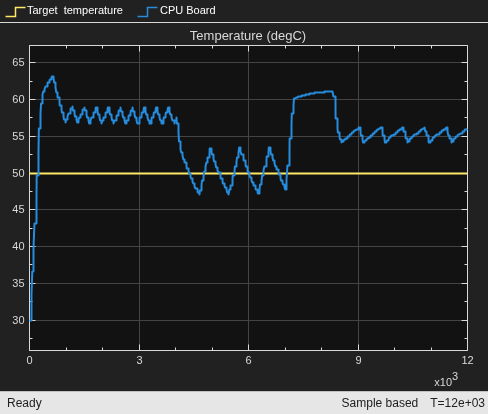
The CPU board temperature Scope block displays the CPU board temperature compared to the target temperature over the simulation time. The MATLAB program file SimpleCPUCoolingSystemPlot2FlowRate.m plots fan performance data over the simulation time.
Examine the CPU Board Subsystem
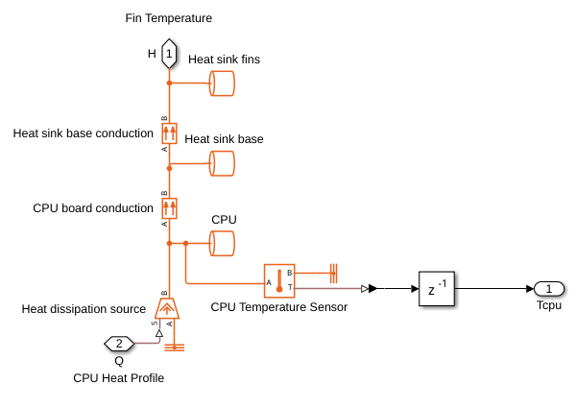
The CPU Board subsystem models the conductive heat transfer between the CPU and heat sink. The CPU heat profile subsystem models CPU heat generation as a function of its input power.
The CPU Board subsystem contains three Thermal Mass blocks that discretize the conduction into a coarse temperature gradient, with heat transfer occurring between them. Subsystem port H represents the temperature of the Thermal Mass block Heat sink fins, and port Tcpu represents the temperature of the Thermal Mass block CPU.
Examine the Fan Control Subsystem
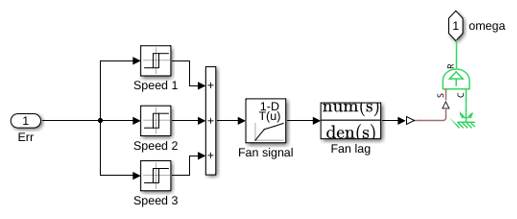
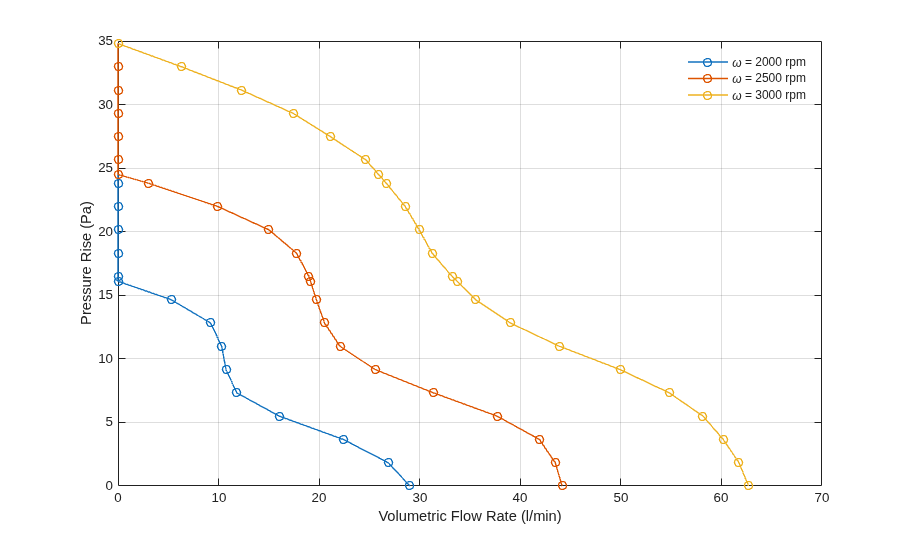
The Fan Control subsystem represents how the CPU fan moves air over the heat sink to promote convection cooling. The subsystem compares the CPU temperature, Tcpu, with a reference target temperature. Depending on the difference between the CPU temperature and the target temperature, the fan runs at speed 1, 2, 3, or turns off. Speed 1 is 2000 RPM, speed 2 is 2500 RPM, and speed 3 is 3000 RPM. The greater the temperature difference, the greater the fan speed. To change the temperature thresholds that trigger different fan speeds, in the top model, double click the Fan Control subsystem. You can adjust the values by using the block mask parameters.
Simulate the Model
The Scope block CPU board temperature plots the measured CPU temperature and the target temperature over the simulation time.
Plot the Flow-Pressure Characteristics of the CPU Fan
Click the Plot flow-pressure characteristics link to plot the volumetric flow rate against the pressure rise for the CPU fan at three speeds.
Plot the CPU Fan Volumetric Flow Rate, Pressure Rise, and Speed
Click the Plot volumetric flow rate, pressure rise, and speed link to plot volumetric flow rate and pressure rise for the fan, and the fan speed over time.