Neural State-Space Model of SI Engine Torque Dynamics
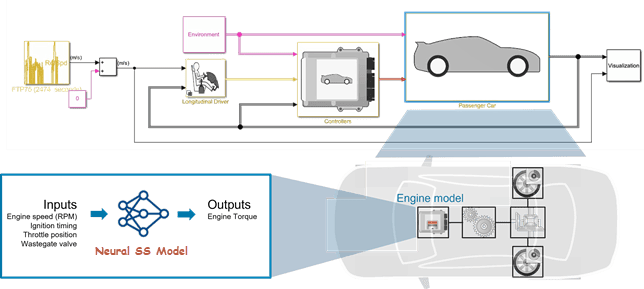
R2026bThis example describes reduced order modeling (ROM) of the nonlinear torque dynamics of a spark-ignition (SI) engine using a neural state-space model. The identified model can be used for hardware-in-the-loop (HIL) testing, powertrain control, diagnostics, and training algorithm design. For example, you can use the model for after-treatment control and diagnostic algorithm development. For more information on neural state-space models, see Neural State-Space Models.
You use measurements of the system inputs and outputs to identify the model. This data can come from measurements on a real engine or a high-fidelity model such as one created using the Powertrain Blockset™ SI Reference application.
Data Preparation
Load and display the engine data timetable.
load SIEngineData IOData
stackedplot(IOData)
title('SI Engine Signals')
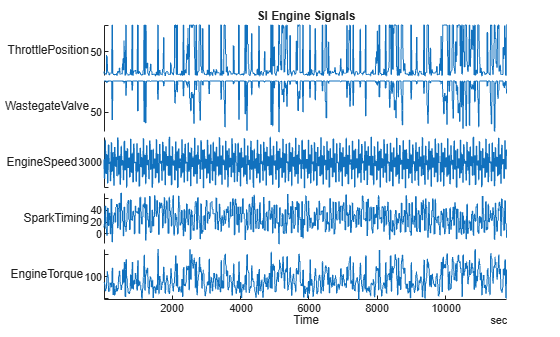
The timetable contains over one hundred thousands observations of five variables measured at 10 Hz.
Throttle position (degrees)
Wastegate valve area (aperture percentage)
Engine speed (RPM)
Spark timing (degrees)
Engine torque (N m)
Normalize the data.
IODataN = normalize(IOData);
Split the data into estimation (first 60000 data points) and validation (remaining data points) portions.
eData = IODataN(1:6e4,:);     % portion used for estimation
vData = IODataN(6e4+1:end,:); % portion used for validation
Downsample the training data by a factor of 10. This helps speed up the model training process and also limits the focus of the fit to a lower frequency region.
% Downsample datasets 10 times
eDataD = idresamp(eData,[1 10]);
vDataD = idresamp(vData,[1 10]);
eDataD.Properties.TimeStep
ans = duration
1 sec
height(eDataD)
ans =
6000
The model training objective is to generate a dynamic system that has the engine torque as output and the other four variables as inputs.
Neural State-Space Model Identification
About Neural State-Space Models
Neural state-space models are a type of nonlinear state-space models where the state-transition and measurement functions are modeled using neural networks. In System Identification Toolbox™, they are represented by the idNeuralStateSpace object. A nonlinear state-space model has the following form:
Here are the state variables, are the inputs, and are the outputs. Often, there is no explicit dependence on time, so the equations can be reduced to:
Furthermore, if there are no exogenous inputs, the equations further simplify to:
Here, and are multi-layer feedforward networks typically described by dlnetwork object of Deep Network Toolbox™. and are identifiable parameters consisting in the weights and biases associated with each layer of these networks. The nlssest command can be used to train the and networks (that is, estimate the values of parameters and ). The training requires that the states of the model be measured directly. Hence a portion of the outputs are the state variables, and the function is the identity function for the first outputs, where .
Model Training
Training a neural state-space model requires configuring the model structure by settings the input/output and state dimensions, and the type of the networks and . In this example, you train a one-state () model with four inputs. The state variable is the engine torque. It is measured directly and hence is also treated as the model output. Consequently, the model has one output ().
Begin by designating the input and output signals from the list of variables in the eData timetable.
Inputs = ["ThrottlePosition","WastegateValve","EngineSpeed","SparkTiming"];
Output = "EngineTorque";
Create a neural state-space model by using the idNeuralStateSpace constructor.
rng("default");
% Define a neural state-space model
nx = 1; % number of states = number of outputs
nssModel = idNeuralStateSpace(nx,NumInputs=4);
nssModel.InputName = Inputs;
nssModel.OutputName = Output;

% Configure the state network f()
nssModel.StateNetwork = createMLPNetwork(nssModel,"state", ...
    LayerSizes=[128 128], ...
    WeightsInitializer="glorot", ...
    BiasInitializer="zeros", ...
    Activations='tanh')
nssModel =
Continuous-time Neural ODE in 1 variables
     dx/dt = f(x(t),u(t))
      y(t) = x(t) + e(t)

f(.) network:
  Deep network with 2 fully connected, hidden layers
  Activation function: tanh

Variables: x1

Status:
Created by direct construction or transformation. Not estimated.

Model Properties
Specify training options using nssTrainingOptions. Specify the training solver as 'adam'. Set the maximum number of training epochs, learning rate, and data interpolation method using the respective properties. To create multiple data experiments for training, split the data set eDataD into overlapping segments using the WindowSize and Overlap properties. By spitting the data, you effectively reduce the prediction horizon from the length of the original data to the length of the individual segments. To enable mini-batch learning, set NumWindowFraction to 0.16. In each iteration, the software randomly selects 16% of data as one batch and updates the network parameters. This helps escape local minima and produces generalized results.
StateOpt = nssTrainingOptions('adam');
StateOpt.MaxEpochs = 90;
StateOpt.LearnRate = 0.005;
StateOpt.InputInterSample = 'pchip';
StateOpt.WindowSize = 20;
StateOpt.Overlap = 19;
StateOpt.NumWindowFraction = 0.16;
Update the learnable parameters of the neural state-space model nssModel by using the nlssest command by providing it the training data experiments (Expts) and the training options (StateOpt). Note that the measurement function and does not contain any learnable parameters.
UseTrainedModel = true;
if UseTrainedModel
    load modelB.mat nssModel
    nssModel
else
    % Train the neural state-space model
    nssModel = nlssest(eDataD,nssModel,StateOpt) %#ok<UNRCH>
end
nssModel =
Continuous-time Neural ODE in 1 variables
     dx/dt = f(x(t),u(t))
      y(t) = x(t) + e(t)

f(.) network:
  Deep network with 2 fully connected, hidden layers
  Activation function: tanh

Variables: x1

Status:
Estimated using NLSSEST on time domain data "eDataD".
Fit to estimation data: 90.15%
MSE: 0.009031

Model Properties
Result Validation
Run the compare command to compare the simulated response of the model against the estimation dataset (eDataD) and the validation dataset (vDataD). Note that while the model was trained on segments 20 samples long (effectively reducing the prediction horizon to 20), it is validated by running a full simulation (horizon of ~6000).
clf
subplot(211)
compare(eDataD,nssModel)  % compare against estimation data
title('Neural State-Space Model: Comparison to Estimation Data')
subplot(212)
compare(vDataD,nssModel)  % compare against validation data
title('Comparison to Validation Data (Downsampled)')
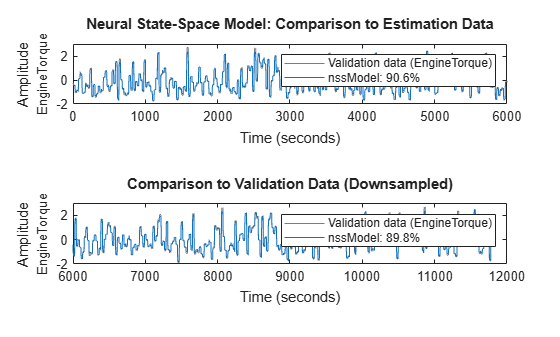
Note that the training and validation has been performed on the downsampled datasets. You can also validate the quality on the dataset with the original sample time of 0.1 seconds. This can be done by using the compare command again, as follows:
clf
compare(vData,nssModel)  % compare against original validation data (sample rate of 10 Hz)
title('Comparison to Original Validation Data (10 Hz)')
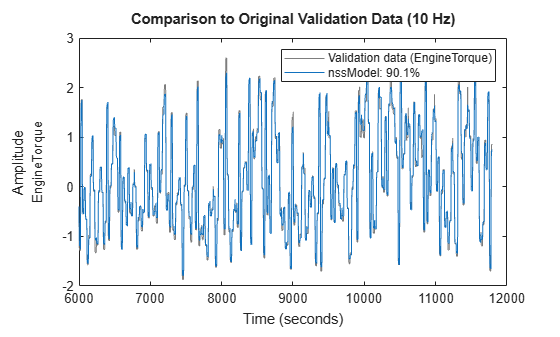
The comparison is possible because the model nssModel is a continuous-time model, which can be compared against a reference dataset of any sampling rate. The validation plots show the good quality of the identified model.
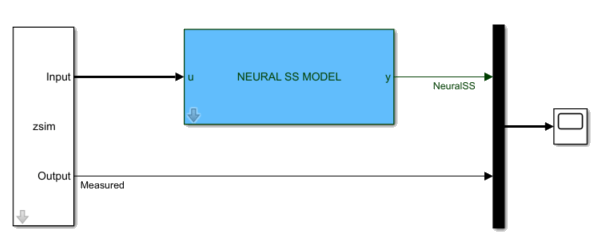
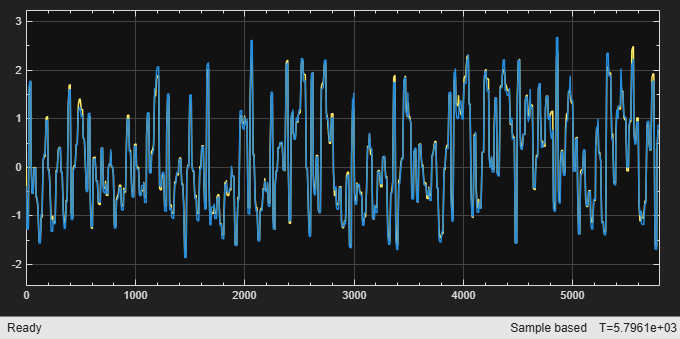
You can also verify the model quality by pure simulation using the sim command in MATLAB® or by putting it in a Simulink® model using the dedicated Neural SS Model block.
% Create an iddata representation of the data in vData to feed the signals to the Simulink
% model using an IDDATA Source block.
zsim = iddata(vData,InputName=Inputs,OutputName=Output);
zsim.Tstart = 0;

% Open the simulation model and simulate it using zsim as the source of input data.
mdl = 'nlss_simulator';
tstop = zsim.SamplingInstants(end);
Ts = zsim.Ts;
open_system(mdl)
sim(mdl);
See Also
Objects
Functions
createMLPNetwork|nssTrainingOptions|nlssest|generateMATLABFunction|idNeuralStateSpace/evaluate|idNeuralStateSpace/linearize|sim

