removeCustomBuildings
Description
removeCustomBuildings( removes
the buildings buildingsName)buildingsName from the list of buildings available for
use with geographic globes. Use this function to remove buildings that you added using the
addCustomBuildings
function.
Examples
Add buildings from an OpenStreetMap® file to the list of buildings available for use with geographic globes. Display the buildings in a geographic globe. Then, remove the buildings from the list of available buildings.
Read the buildings layer from an OpenStreetMap file [1] into the workspace by using the readgeotable function. The function derives information about the buildings from the file and stores the result in a geospatial table, where each row of the table represents a building. The buildings within the file have edited colors.
GT = readgeotable("shibuya.osm",Layer="buildings");
Add the buildings to the list of buildings available for use with geographic globes by using the addCustomBuildings function. After you add the buildings, you do not need to add them again in future sessions.
addCustomBuildings("shibuya",GT)Create a geographic globe in a figure created using the uifigure function. Display the buildings in the globe by specifying the Buildings name-value argument. The globe displays the buildings using the colors stored in the file.
uif = uifigure;
g = geoglobe(uif,Buildings="shibuya");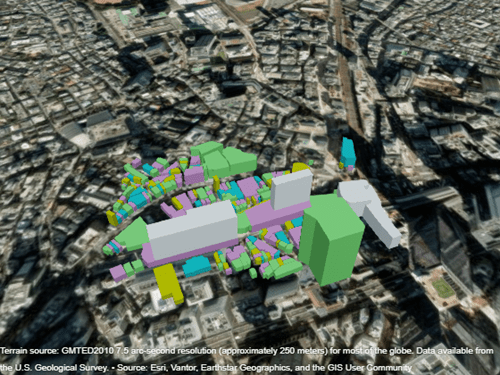
Close the figure. Remove the buildings from the list of available buildings by using the removeCustomBuildings function.
close(uif)
removeCustomBuildings("shibuya")
[1] You can download OpenStreetMap files from https://www.openstreetmap.org, which provides access to crowd-sourced map data all over the world. The data is licensed under the Open Data Commons Open Database License (ODbL), https://opendatacommons.org/licenses/odbl/.
Input Arguments
Version History
Introduced in R2026a

