checkCollision
R2026bCheck if two geometries are in collision
Syntax
Description
collisionStatus = checkCollision(geom1,geom2)geom1
and geom2. If the two geometries are in collision at their specified
poses, collisionStatus is 1. If the function does
not find a collision, collisionStatus is 0.
[
returns the minimal distance collisionStatus,sepdist,witnesspts] = checkCollision(geom1,geom2)sepdist and witness points
witnesspts of each geometry when the function does not find a
collision between the two geometries.
[
returns the negative signed distance whose magnitude is the minimum distance required to
separate the two geometries when they are in collision, and the corresponding witness
points.collisionStatus,sepdist,witnesspts] = checkCollision(___,UsePenetration=true)
Examples
This example shows how to check the collision status of two collision geometries.
Create a box collision geometry.
bx = collisionBox(1,2,3);
Create a cylinder collision geometry.
cy = collisionCylinder(3,1);
Translate the cylinder along the x-axis by 2.
T = trvec2tform([2 0 0]);
cy.Pose = T;
Plot the two geometries.
show(cy)
hold on
show(bx)
xlim([-5 5])
ylim([-5 5])
zlim([-5 5])
hold off
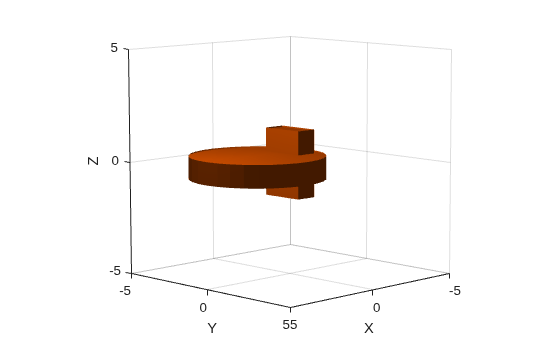
Check the collision status. Confirm the status is consistent with the plot.
[areIntersecting,dist,witnessPoints] = checkCollision(bx,cy)
areIntersecting =
1
dist =
NaN
witnessPoints = 3×2

   NaN   NaN
   NaN   NaN
   NaN   NaN
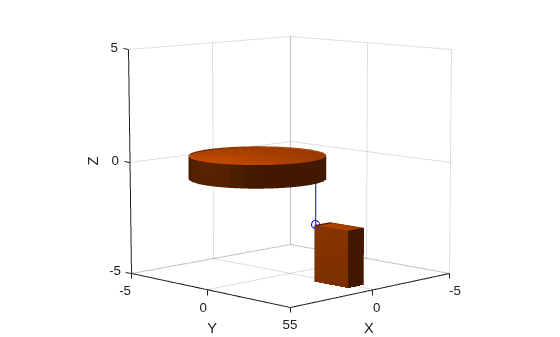
Translate the box along the x-axis by 3 and down the z-axis by 4. Confirm the box and cylinder are not colliding.
T = trvec2tform([0 3 -4]);
bx.Pose = T;
[areIntersecting,dist,witnessPoints] = checkCollision(bx,cy)
areIntersecting =
0
dist =
2
witnessPoints = 3×2

    0.4286    0.4286
    2.0000    2.0000
   -2.5000   -0.5000
Plot the box, cylinder, and the line segment representing the minimum distance between the two geometries.
show(cy)
hold on
show(bx)
wp = witnessPoints;
plot3([wp(1,1) wp(1,2)], [wp(2,1) wp(2,2)], [wp(3,1) wp(3,2)], 'bo-')
xlim([-5 5])
ylim([-5 5])
zlim([-5 5])
hold off
Create two collision capsules. Center one at the origin, and set the pose of the other capsule to 3 meters away from the origin on the y-axis. Display the capsules.
cc1 = collisionCapsule(1,4);
cc2 = collisionCapsule(1,4);
cc2.Pose = trvec2tform([0 3 0]);
show(cc1);
hold on
show(cc2);
axis auto
hold off
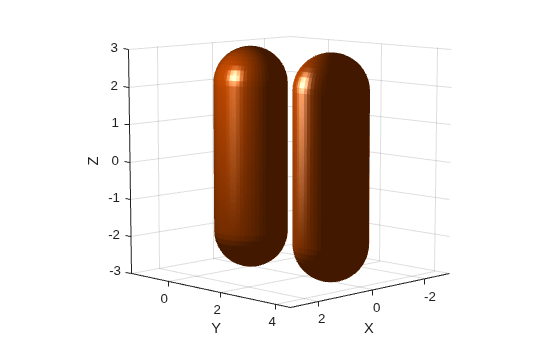
Check for collision between the two collision capsules. Because they are not visually colliding, the function should return real-valued separation distances and witness points. Display the separation distances and witness points.
[isColliding,separationDist,witnessPts] = checkCollision(cc1,cc2);
disp("Separation Distance: " + num2str(separationDist))
Separation Distance: 1
disp("Capsule 1 Witness Point (X Y Z): " + num2str(witnessPts(:,1)'))Capsule 1 Witness Point (X Y Z): 4.6135e-05 1 0
disp("Capsule 2 Witness Point (X Y Z): " + num2str(witnessPts(:,2)'))Capsule 2 Witness Point (X Y Z): -4.6135e-05 2 0
Rotate the second capsule 90 degrees on the z-axis.
cc2.Pose(1:3,1:3) = eul2rotm([0 0 pi/2]);
show(cc1);
hold on
show(cc2);
axis auto
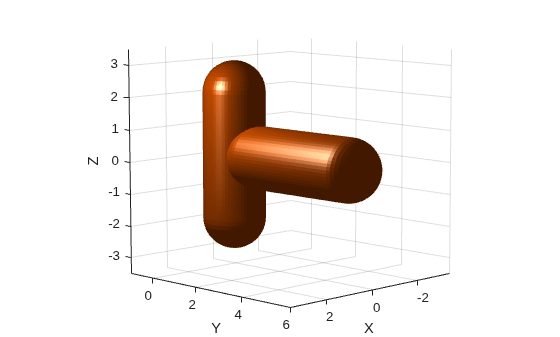
Check again for collision between the capsules. Because they are in collision, the function returns the separation distance and witness points as NaN.
[isColliding,separationDist,witnessPts] = checkCollision(cc1,cc2);
disp("Separation Distance: " + num2str(separationDist))
Separation Distance: NaN
disp("Capsule 1 Witness Point (X Y Z): " + num2str(witnessPts(:,1)'))Capsule 1 Witness Point (X Y Z): NaN NaN NaN
disp("Capsule 2 Witness Point (X Y Z): " + num2str(witnessPts(:,2)'))Capsule 2 Witness Point (X Y Z): NaN NaN NaN
Create two collision geometries and set their poses such that they are in collision with each other. Then check for collision and compute the penetration depth by specifying UsePenetration as true.
cyl = collisionCylinder(0.15,0.3,Pose=trvec2tform([-0.18 0.23 0.0]));
box = collisionBox(0.25,0.25,0.25,Pose=eul2tform([0 pi/6 pi/6]));
[collStatus,sepDist,witPts] = checkCollision(cyl,box,UsePenetration=true)
collStatus =
1
sepDist =
-0.0732
witPts = 3×2

   -0.0839   -0.1311
    0.1148    0.1708
    0.0229    0.0229
Plot the collision geometries and the penetration depth line between the witness points. Set the face alpha of the collision geometries to 0.25 so that the penetration depth line is visible.
[~,patches] = showCollisionArray({cyl,box});
hold on
plot3(witPts(1,:),witPts(2,:),witPts(3,:),LineWidth=3);
patches(1).FaceAlpha = 0.25;
patches(2).FaceAlpha = 0.25;
title(["Penetration Depth Between","Colliding Geometries"])
legend("Geometry 1","Geometry 2","Penetration Depth")
axis equal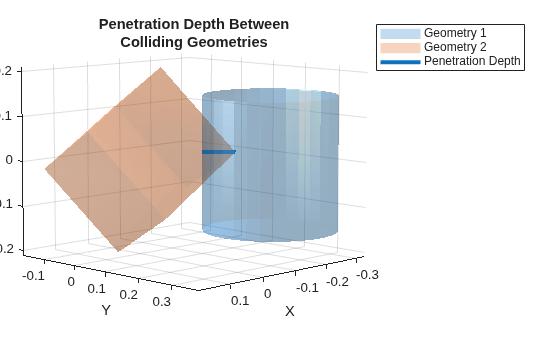
Input Arguments
Output Arguments
Limitations
Collision checking results are unreliable when the minimal distance is below 10-5 m.
References
[1] Gilbert, E.G., D.W. Johnson, and S.S. Keerthi. "A fast procedure for computing the distance between complex objects in three-dimensional space." IEEE Journal on Robotics and Automation 4, no. 2 (April 1988): 193–203. https://doi.org/10.1109/56.2083.
Extended Capabilities
Version History
Introduced in R2019bSee Also
collisionBox | collisionCapsule | collisionCylinder | collisionMesh | collisionSphere

