GPIO Read
R2026bRead GPIO pin status
GPIO Read block

To add a block to a model, double-click the canvas and start typing the block name. Then, select the block from the list.
Libraries:
Raspberry Pi Blockset /
Basic
Description
Use the GPIO Read block to read the logical value of a digital pin of your Raspberry Pi® board.
Warning
You can damage your target hardware by:
Exceeding the maximum voltage that can be applied to GPIO pins.
Shorting a GPIO pin to ground.
Shorting a GPIO pin with high voltage to another GPIO pin with low voltage.
Connecting a GPIO pin to a voltage source greater than the maximum voltage.
Exceeding the maximum current by driving multiple GPIO pins high simultaneously.
Note
To generate C/C++ code for this block, you must have an Embedded Coder® license.
Examples
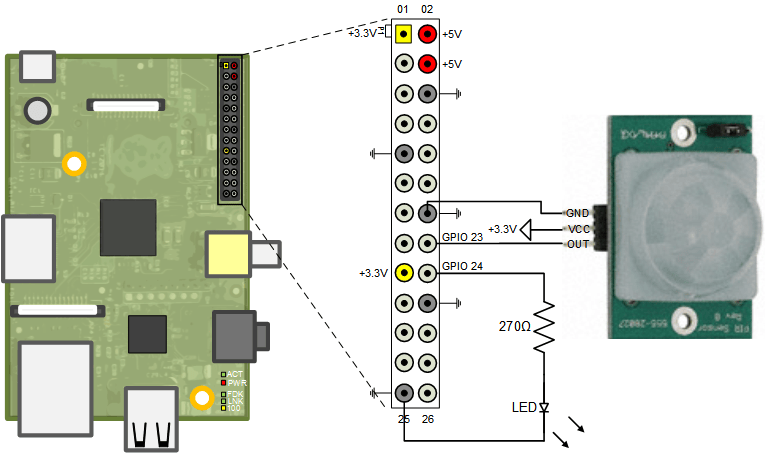
Detect Motion Using Passive Infra-Red Sensor Interfaced with Raspberry Pi
Use Raspberry Pi® hardware to interface to a motion sensor and control an external LED.
Ports
Output
Parameters
Programmatic Use: Add Block
To add the block programmatically, use the add_block function with one of these library block paths as the source.
"raspberrypiBasiclib/GPIO Read"
Example: add_block("raspberrypiBasiclib/GPIO Read","myModel/myBlock",MakeNameUnique="on")
Extended Capabilities
Version History
Introduced in R2013a

