Main Content

DeltaGapFeed

R2026b

Create delta gap feed

Since R2024b

    Description

    Use the DeltaGapFeed object to specify the FeedDefinitions property in a parent pcbComponent object.

    The DeltaGapFeed object applies an idealized lumped excitation across an infinitesimally small gap between the two conductors.

    Creation

    Description

    f1 = DeltaGapFeed creates a default DeltaGapFeed object.

    f1 = DeltaGapFeed(PropertyName=Value) sets object properties using one or more name-value arguments. PropertyName is the property name, and Value is the corresponding value. You can specify several name-value arguments in any order as PropertyName1=Value1,...,PropertyNameN=ValueN. Properties that you do not specify retain their default values.

    example

    Properties

    expand all

    Center location of the delta-gap feed, specified as a 1-by-2 vector in meters. The location must lie within the chosen metal layer. The first and second elements are the x- and y-coordinates, respectively. The location must lie within the chosen metal layer.

    Example: [0.01,0.01]

    Data Types: double

    Layer index for the excitation site, specified as a positive integer scalar. SignalLayers is the layer index into the pcbComponent layer stack.

    Example: 2

    Data Types: double

    Width of the delta-gap feed, specified as a positive scalar in meters. Typically, the width must be large enough for the feed to reach the metal edges nearest the feed site. Reaching these edges divides the metal layer into two isolated regions, preventing a short-circuit current path that can readily wrap around the feed.

    Example: 0.002

    Data Types: double

    Direction of the current produced by the delta-gap feed, specified as a 1-by-2 unit vector or "auto". The first and second elements contain the x and y values, respectively, of the unit vector. When you specify "auto", the delta-gap feed orients automatically based on its width and the nearest metal layer edges.

    Example: [0.6,0.8]

    Data Types: double | string

    Examples

    collapse all

    This example shows how to use a DeltaGapFeed object to define an internal port on a pcbComponent object.

    Start with the Wilkinson splitter catalog element and convert it to a pcbComponent.

    p = pcbComponent(wilkinsonSplitter);

    The catalog element has a lumped load bridging the two output terminals. Save its location, then replace it by the placeholder lumpedElement.

    internalPortLocation = p.Load.Location;
    p.Load = lumpedElement;

    To expose the FeedDefinitions property wwitch the pcbComponent object's FeedFormat property to FeedDefinitions. Instantiate a DeltaGapFeed at the saved lumped load site and add it to the list of feeds.

    p.FeedFormat = 'FeedDefinitions';
    f = DeltaGapFeed('SignalLocations', internalPortLocation(1:2), 'SignalLayers', 1, 'SignalWidths', 0.5e-3, 'CurrentDirection', [0 1]);
    p.FeedDefinitions(end+1) = f;
    figure; show(p);
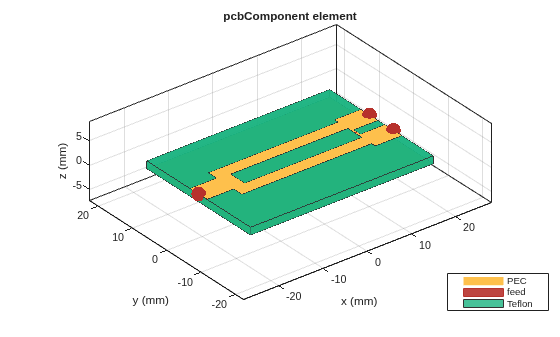
    Figure contains an axes object. The axes object with title pcbComponent element, xlabel x (mm), ylabel y (mm) contains 9 objects of type patch, surface. These objects represent PEC, feed, Teflon.

    Calculate 4-port S-parameters for the splitter. Terminate the internal port into a 100-ohm resistance and plot the result.

    s = sparameters(p, linspace(1e9, 5e9, 51));
    s100 = snp2smp(s, 1:3, 100);
    figure; rfplot(s100)
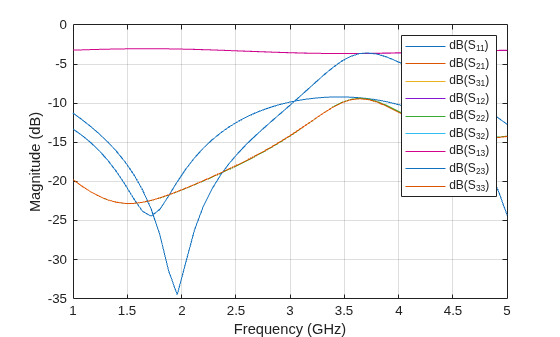
    Figure contains an axes object. The axes object with xlabel Frequency (GHz), ylabel Magnitude (dB) contains 9 objects of type line. These objects represent dB(S_{11}), dB(S_{21}), dB(S_{31}), dB(S_{12}), dB(S_{22}), dB(S_{32}), dB(S_{13}), dB(S_{23}), dB(S_{33}).

    Version History

    Introduced in R2024b

    See Also

    Objects

    Topics