delete
R2026bRemove rosbag writer object from memory
Syntax
Description
delete( removes the bagWriter)rosbagwriter object
from memory. The function closes the opened rosbag file before deleting the object.
If multiple references to the rosbagwriter object exist in the
workspace, deleting the rosbagwriter object invalidates the remaining
reference. Use the clear command to delete the remaining references to
the object from the workspace.
Note
The rosbagwriter object locks the created bag file for use, it is
necessary to delete and clear the rosbagwriter object in order to use
the bag file with a reader or perform other operations.
Examples
Retrieve all the information from the rosbag log file.
rosbag('info','path_record.bag')
Path:     /tmp/Bdoc26b_3351752_2774996/tpa813e002/ros-ex73035957/path_record.bag
Version:  2.0
Duration: 10.5s
Start:    Jul 05 2021 08:09:52.86 (1625486992.86)
End:      Jul 05 2021 08:10:03.40 (1625487003.40)
Size:     13.3 KB
Messages: 102
Types:    geometry_msgs/Point [4a842b65f413084dc2b10fb484ea7f17]
Topics:   /circle  51 msgs  : geometry_msgs/Point
          /line    51 msgs  : geometry_msgs/Point
Create a rosbagreader object of all the messages in the rosbag log file.
reader = rosbagreader('path_record.bag');Select all the messages related to the topic '/circle'.
bagSelCircle = select(reader,'Topic','/circle');
Retrieve the list of timestamps from the topic.
timeStamps = bagSelCircle.MessageList.Time;
Retrieve the messages in the selection as a cell array.
messages = readMessages(bagSelCircle);
Create a rosbagwriter object to write the messages to a new rosbag file.
circleWriter = rosbagwriter('circular_path_record.bag');Write all the messages related to the topic '/circle' to the new rosbag file.
write(circleWriter,'/circle',timeStamps,messages);Remove the rosbagwriter object from memory and clear the associated object.
delete(circleWriter)
clear circleWriter
Retrieve all the information from the new rosbag log file.
rosbag('info','circular_path_record.bag')
Path:     /tmp/Bdoc26b_3351752_2774996/tpa813e002/ros-ex73035957/circular_path_record.bag
Version:  2.0
Duration: 10.4s
Start:    Jul 05 2021 08:09:52.86 (1625486992.86)
End:      Jul 05 2021 08:10:03.29 (1625487003.29)
Size:     8.8 KB
Messages: 51
Types:    geometry_msgs/Point [4a842b65f413084dc2b10fb484ea7f17]
Topics:   /circle  51 msgs  : geometry_msgs/Point
Load the new rosbag log file.
readerCircle = rosbagreader('circular_path_record.bag');Create a time series for the coordinates.
tsCircle = timeseries(readerCircle,'X','Y');
Plot the coordinates.
plot(tsCircle.Data(:,1),tsCircle.Data(:,2))
axis equal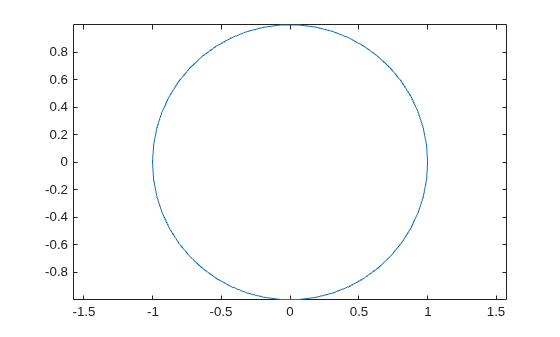
Create a rosbagwriter object and a rosbag file in the current working directory. Specify the compression format of the message chunks and the size of each message chunk.
bagwriter = rosbagwriter("bagfile.bag", ...
    "Compression","lz4",...
    "ChunkSize",1500)
bagwriter =
  rosbagwriter with properties:

       FilePath: '/tmp/Bdoc26b_3351752_2719827/tpd9dbf837/ros-ex26181333/bagfile.bag'
      StartTime: 0
        EndTime: 0
    NumMessages: 0
    Compression: 'lz4'
      ChunkSize: 1500                                                                    Bytes
       FileSize: 4117                                                                    Bytes
Start node and connect to ROS master.
rosinit
The value of the ROS_MASTER_URI environment variable, http://172.23.65.36:59698, will be used to connect to the ROS master.
Initializing global node /matlab_global_node_97709 with NodeURI http://172.23.65.36:44647/ and MasterURI http://172.23.65.36:59698.
Write a single log to the rosbag file.
timeStamp = rostime("now");
rosMessage = rosmessage("nav_msgs/Odometry");
write(bagwriter,"/odom",timeStamp,rosMessage);
bagwriter
bagwriter =
  rosbagwriter with properties:

       FilePath: '/tmp/Bdoc26b_3351752_2719827/tpd9dbf837/ros-ex26181333/bagfile.bag'
      StartTime: 1.7861e+09
        EndTime: 1.7861e+09
    NumMessages: 1
    Compression: 'lz4'
      ChunkSize: 1500                                                                    Bytes
       FileSize: 4172                                                                    Bytes
Shut down the ROS network.
rosshutdown
Shutting down global node /matlab_global_node_97709 with NodeURI http://172.23.65.36:44647/ and MasterURI http://172.23.65.36:59698.
Remove rosbag writer object from memory and clear the associated object.
delete(bagwriter)
clear bagwriter
Create a rosbagreader object and load all the messages in the rosbag log file. Verify the recently written log.
bagreader = rosbagreader('bagfile.bag')bagreader =
rosbagreader with properties:
FilePath: '/tmp/Bdoc26b_3351752_2719827/tpd9dbf837/ros-ex26181333/bagfile.bag'
StartTime: 1.7861e+09
EndTime: 1.7861e+09
NumMessages: 1
AvailableTopics: [1×3 table]
AvailableFrames: {0×1 cell}
MessageList: [1×4 table]
bagreader.AvailableTopics
ans = 1×3 table
             NumMessages       MessageType                                                                                                                                                                                                                                                                                                           MessageDefinition
             ___________    _________________    __________________________________________________________________________________________________________________________________________________________________________________________________________________________________________________________________________________________________________________________________________________________________________________________________________________________________________________________________________________________________________________________________________________________________________________________________________________________

    /odom         1         nav_msgs/Odometry    {'std_msgs/Header Header↵  uint32 Seq↵  Time Stamp↵  char FrameId↵char ChildFrameId↵geometry_msgs/PoseWithCovariance Pose↵  geometry_msgs/Pose Pose↵    geometry_msgs/Point Position↵      double X↵      double Y↵      double Z↵    geometry_msgs/Quaternion Orientation↵      double X↵      double Y↵      double Z↵      double W↵  double[36] Covariance↵geometry_msgs/TwistWithCovariance Twist↵  geometry_msgs/Twist Twist↵    geometry_msgs/Vector3 Linear↵      double X↵      double Y↵      double Z↵    geometry_msgs/Vector3 Angular↵      double X↵      double Y↵      double Z↵  double[36] Covariance↵'}
Input Arguments
Version History
Introduced in R2021b

