Deployment and Custom Blocks
R2026bShare your model with a third party and conceal its proprietary contents by enabling model protection mode and creating a protected model in the SLXP file format. Speed up iterative, long-running, computationally expensive simulations such as Monte Carlo simulation or system optimizations on your RF system using rapid accelerator and model reference accelerator modes.
Create your own RF blocks and models using the Simscape language.
Blocks
 | Configuration | Define system simulation settings |
 | Inport | Convert Simulink input signal to RF Blockset signal |
 | Outport | Convert RF Blockset signal to Simulink output signals |
 | Ground | Simulate connection to electrical ground |
Topics
- Enable Model Protection and Accelerator Modes in RF Blockset Models
Conceal implementation details and enable accelerator modes in your RF Blockset model. (Since R2023a)
Featured Examples
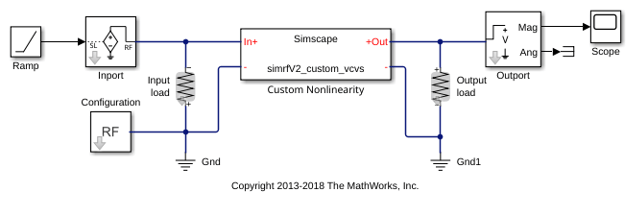
Create Custom RF Blockset Models
Write your own RF Blockset Circuit Envelope model in Simscape language for complex baseband simulation.

