eisModel
R2026bCreate fractional-order equivalent circuit model object for analyzing battery impedance data
Since R2025a
Description
Use eisModel to create a fractional-order equivalent circuit
model EISModel object. Use this object to analyze or interpret battery or
fuel cell impedance data.
You can obtain the impedance data at different frequencies from multiple techniques, including electrochemical impedance spectroscopy (EIS). Fractional-order equivalent circuit models are the equivalent circuit models used to fit EIS or frequency-domain data. This object models a fractional-order equivalent circuit model because the Laplacian in the impedance expression of the electrical elements has a fractional exponent.
The EISModel object allows you to specify the type, amount, and connectivity of the
electrical circuit elements that comprise the equivalent circuit by using the
CircuitTopology property. You define the circuit topology by using a
string value. Use a "+" sign to indicate a series connection. Use a
"( , )" sign to indicate a parallel connection. There is no limit
to the amount of nested parallel or series connections.
The CircuitTopology property supports these electrical circuit
elements:
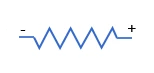
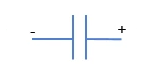
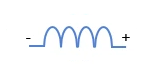
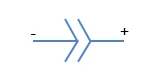
| Circuit Element | Icon | Identifier String | Impedance Value | Mechanism |
|---|---|---|---|---|
| Resistor |
| R |
| Ohmic resistance of the electrolyte, electrodes, and other conductors |
| Capacitor |
| C |
| Double layer at the electrode or electrolyte interface, for example battery or supercapacitor |
| Inductor |
| L |
| Inductive effects due to leads, conductors, and wirings in the measuring device |
| Constant Phase Element |
| CPE |
| Accounts for non-ideal capacitive behavior, often due to surface roughness, inhomogeneity, or porous electrodes |
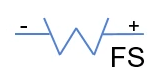
| Finite-Space Warburg |
| FSW |
| Diffusion processes that occur inside a finite region, for example within a solid-state battery electrolyte |
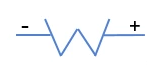
| Semi-Infinite Warburg |
| SIW |
| Diffusion processes in an unbounded medium, such as diffusion of redox species in the bulk electrolyte of a redox flow battery |
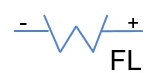
| Finite-Length Warburg |
| FLW |
| Diffusion processes in a medium with a defined length, for example in a thin-layer cell |
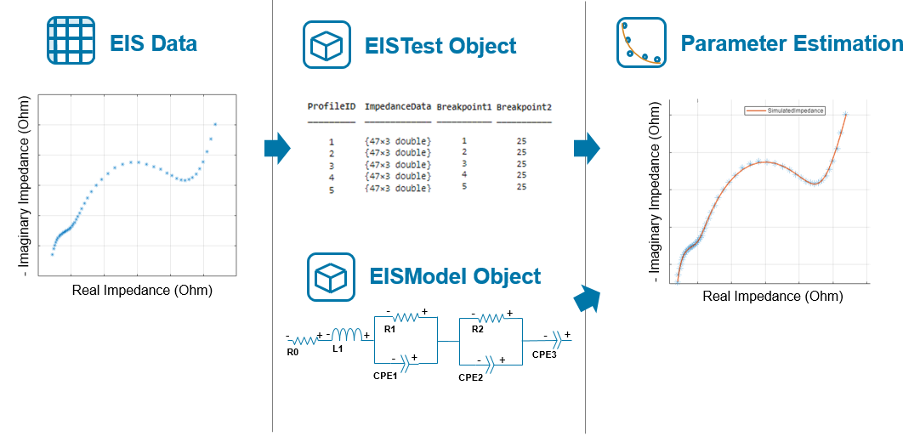
To estimate model parameters over a defined frequency range, use this object and an
EISTest object as
input to the fitEISModel
function. This figure shows the typical workflow to estimate the parameters of a
fractional-order equivalent circuit model:
Creation
Syntax
Description
eisfom = eisModelEISModel object with default property values.
eisfom = eisModel(CircuitTopology)EISModel object with the type and number of electrical circuit
elements specified in the CircuitTopology argument.
eisfom = eisModel(CircuitTopology,PropertyName=Value)eisfom properties using one or more name-value
arguments.
Input Arguments
Type and number of the electrical circuit elements and their interconnectivity inside the fractional-order equivalent circuit model, specified as a string scalar or character vector.
To define series connections, use the + symbol. To define
parallel connections, use the (x,y) syntax, where
x and y are one of these circuit elements:
R— ResistorC— CapacitorL— InductorCPE— Constant phase elementSIW— Semi-infinite Warburg impedanceFSW— Finite-space Warburg impedanceFLW— Finite-length Warburg impedance
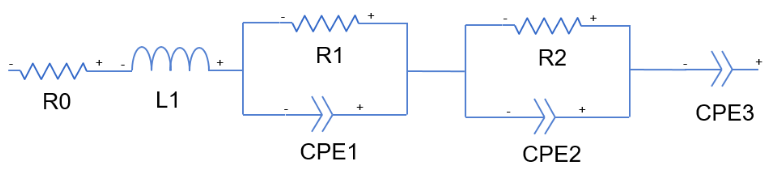
The default value represents this 2-ZARC circuit topology:
This argument sets the CircuitTopology property.
Data Types: char | string
Properties
Type and number of the electrical circuit elements and their interconnectivity inside the fractional-order equivalent circuit model, specified as a string scalar or character vector.
To define series connections, use the + symbol. To define
parallel connections, use the (x,y) syntax, where
x and y are one of these circuit elements:
R— ResistorC— CapacitorL— InductorCPE— Constant phase elementSIW— Semi-infinite Warburg impedanceFSW— Finite-space Warburg impedanceFLW— Finite-length Warburg impedance
The default value represents this 2-ZARC circuit topology:
Data Types: char | string
Parameter values of the electrical circuit elements of the fractional-order model,
specified as a vector of nonnegative elements. These values are used for frequency-based
simulation when you use the simulateFrequencyResponse function.
Data Types: double
Sum of the squared errors from the optimization algorithm, returned as a nonnegative scalar or vector.
Data Types: double
Since R2026b
Order of the Oustaloup approximation for constant phase elements and semi-infinite Warburg impedances.
Note
Use the modifyStateSpaceTransferFunction function to change the Oustaloup and
Padé approximation properties and regenerate the corresponding state-space and
transfer function representations. Setting the OustaloupOrder,
OustaloupFrequencyRange, and
PadeApproximant properties directly does not update the
system representation.
Data Types: double
Since R2026b
Frequency range, in Hertz, used in approximating constant phase elements and semi-infinite Warburg impedances.
Note
Use the modifyStateSpaceTransferFunction function to change the Oustaloup and
Padé approximation properties and regenerate the corresponding state-space and
transfer function representations. Setting the OustaloupOrder,
OustaloupFrequencyRange, and
PadeApproximant properties directly does not update the system
representation.
Data Types: double
Since R2026b
Order of the Pade approximation for finite-space and finite-length Warburg impedances.
Note
Use the modifyStateSpaceTransferFunction function to change the Oustaloup and
Padé approximation properties and regenerate the corresponding state-space and
transfer function representations. Setting the OustaloupOrder,
OustaloupFrequencyRange, and
PadeApproximant properties directly does not update the system
representation.
Data Types: double
Since R2026b
State-space representation generated from the fractional-order equivalent circuit
model. The value of this property must be a structure with fields A,
B, C, and D, representing the
state matrix, input matrix, output matrix, and direct transmission matrix of a
state-space representation, respectively.
Since R2026b
Transfer function representation generated from the fractional-order equivalent
circuit model. The value of this property must be a structure with fields
Numerator and Denominator, representing the
numerator and denominator of a transfer function, respectively.
This property is read-only.
Total number of parameters in the fractional-order equivalent circuit model, returned as a scalar.
Data Types: double
This property is read-only.
Test parameter values over the specified dimensions, returned as a structure.
Data Types: struct
This property is read-only.
List of parameters in the fractional-order equivalent circuit model, returned as a string scalar or character vector.
Data Types: char | string
This property is read-only.
Impedance expression of the circuit, returned as a string scalar or character vector.
Data Types: char | string
This property is read-only.
Summary of the parameters and related data, returned as a table.
Object Functions
plot | Plot measured and simulated impedance for profile at specific index |
simulateFrequencyResponse | Simulate circuit in frequency domain and obtain real and imaginary impedance |
modifyStateSpaceTransferFunction | Modify system representation for state-space and transfer function of fractional-order equivalent circuit model |
parameterizeImpedanceBlock | Parameterize Impedance (State-Space) block with EISModel
state-space matrices |
plotMagnitudeAndPhase | Plot magnitude and phase for profile at specific index |
simulateMagnitudeAndPhase | Simulate circuit in frequency domain and obtain magnitude and phase data |
visualizeAlgebraicTopologyTree | Visualize tree node of algebraic topology |

