Reservoir (2P)
Boundary conditions for two-phase fluid network

Libraries:
Simscape /
Foundation Library /
Two-Phase Fluid /
Elements
Description
The Reservoir (2P) block sets boundary conditions in a two-phase fluid network. The reservoir is assumed infinite in size, causing its pressure and specific internal energy to remain constant.
Port A represents the reservoir inlet. The flow resistance between port A and the reservoir interior is assumed negligible. The pressure at port A is therefore equal to the pressure inside the reservoir.
The specific enthalpy and specific internal energy at the reservoir inlet depend on the direction of flow. Fluid leaves the reservoir at the reservoir pressure and specific internal energy. Fluid enters the reservoir at the reservoir pressure, but the specific internal energy is determined by the two-phase fluid network upstream.
The block provides independent selection of pressure specification and energy specification, by using the Reservoir pressure specification and Reservoir energy specification parameters. Depending on the selected options, the block exposes additional parameters to specify values for the selected quantities. You specify the reservoir pressure and specific internal energy with block parameter values or physical signals.
This block also serves as a reference connection for the Pressure & Internal Energy Sensor (2P) block. In this case, the measured pressure and specific internal energy are relative to the reservoir pressure and specific internal energy.
Assumptions and Limitations
The flow resistance between port A and the reservoir interior is negligible. Pressure is the same at port A and in the reservoir interior.
Examples
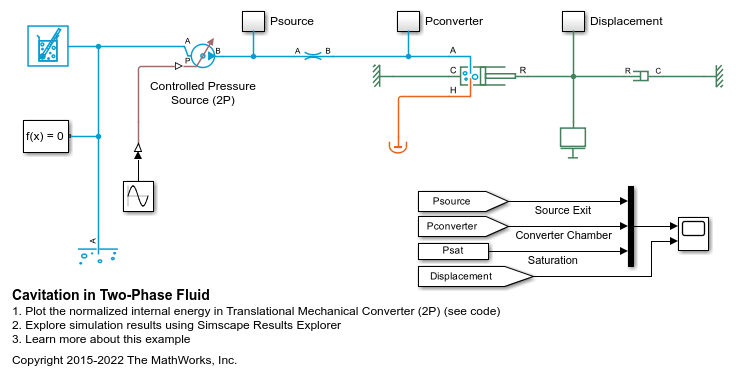
Cavitation in Two-Phase Fluid
How two-phase fluid components can be used to simulate cavitation. The model is a translational mechanical converter driven by an oscillating pressure source. During the negative portion of the pressure source cycle, the fluid cavitates, reducing the force produced by the converter. As a result, the converter displacement drifts and does not return to the starting position.
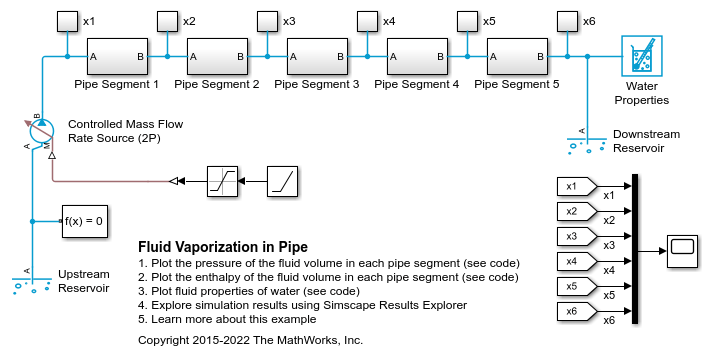
Fluid Vaporization in Pipe
Model the vaporization of water to generate steam. Liquid water enters the pipe at 370 K at a rate of 1 kg/s. The pipe is heated to 1000 K, causing the water flowing inside pipe to saturate.
Ports
Input
Physical signal port that provides the reservoir pressure control signal.
Dependencies
To enable this port, select Provide input signal for the selected
pressure specification and set Reservoir pressure
specification to Specified pressure.
Physical signal port that provides the reservoir condensing temperature control signal.
Dependencies
To enable this port, select Provide input signal for the selected
pressure specification and set Reservoir pressure
specification to Saturation pressure at specified
condensing temperature.
Physical signal port that provides the reservoir evaporating temperature control signal.
Dependencies
To enable this port, select Provide input signal for the selected
pressure specification and set Reservoir pressure
specification to Saturation pressure at specified
evaporating temperature.
Physical signal port that provides either the subcooled liquid temperature or the superheated vapor temperature control signal, based on the Reservoir temperature specification parameter setting.
Dependencies
To enable this port, select Provide input signal for the selected
energy specification and set Reservoir energy
specification to Temperature.
Physical signal port that specifies the mass fraction of vapor in the reservoir.
Dependencies
To enable this port, select Provide input signal for the selected
energy specification and set Reservoir energy
specification to Vapor quality.
Physical signal port that specifies the volume fraction of vapor in the reservoir.
Dependencies
To enable this port, select Provide input signal for the selected
energy specification and set Reservoir energy
specification to Vapor void fraction.
Physical signal port that specifies the specific enthalpy of the fluid in the reservoir.
Dependencies
To enable this port, select Provide input signal for the selected
energy specification and set Reservoir energy
specification to Specific enthalpy.
Physical signal port that specifies the specific internal energy of the fluid in the reservoir.
Dependencies
To enable this port, select Provide input signal for the selected
energy specification and set Reservoir energy
specification to Specific internal
energy.
Physical signal port that specifies the degree of subcooling of the fluid in the reservoir, that is, the difference between the liquid saturation temperature and the fluid temperature.
This input signal specifies a temperature difference, in units of
deltaK, rather than an absolute temperature. Therefore, if you
connect a Simulink-PS Converter block directly to this
port, do not select the Apply affine conversion check
box.
Dependencies
To enable this port, select Provide input signal for the selected
energy specification and set Reservoir energy
specification to Degree of
subcooling.
Physical signal port that specifies the degree of superheating of the fluid in the reservoir, that is, the difference between the fluid temperature and the vapor saturation temperature.
This input signal specifies a temperature difference, in units of
deltaK, rather than an absolute temperature. Therefore, if you
connect a Simulink-PS Converter block directly to this
port, do not select the Apply affine conversion check
box.
Dependencies
To enable this port, select Provide input signal for the selected
energy specification and set Reservoir energy
specification to Degree of
superheating.
Conserving
Two-phase fluid conserving port associated with the reservoir inlet.
Parameters
Method to use to specify the pressure in the reservoir. If you clear this check box, the block models pressure based on the value of the corresponding block parameter. If you select this check box, the block models pressure based on the value of the signal at the corresponding input port.
Specification method for the reservoir pressure:
Specified pressure— Specify a value by using the Reservoir pressure parameter or the signal value at port P, or use the atmospheric pressure specified by a Two-Phase Fluid Properties (2P) block connected to the circuit.Saturation pressure at specified condensing temperature— Use the pressure along the liquid saturation curve that corresponds to the temperature specified by the Reservoir condensing temperature parameter or the signal value at port Tc.Saturation pressure at specified evaporating temperature— Use the pressure along the vapor saturation curve that corresponds to the temperature specified by using the Reservoir evaporating temperature parameter or the signal value at port Te.
If you select this check box, the block uses the atmospheric pressure specified by a Two-Phase Fluid Properties (2P) block connected to the circuit. If you clear this check box, the block uses the Reservoir pressure parameter value.
Dependencies
To enable this parameter, clear the Provide input signal for the
selected pressure specification check box and set Reservoir
pressure specification to Specified
pressure.
Absolute pressure inside the reservoir. This pressure remains constant during simulation. The default value corresponds to atmospheric pressure at mean sea level.
Dependencies
To enable this parameter, clear the Specify reservoir pressure as atmospheric check box.
Pressure of the fluid inside the reservoir is equal to the saturation pressure, along the liquid saturation curve, that corresponds to this condensing temperature. The condensing temperature must be less than the critical temperature because the saturation curves are not defined above the critical point.
Dependencies
To enable this parameter, clear the Provide input signal for the
selected pressure specification check box and set Reservoir
pressure specification to Saturation pressure at specified
condensing temperature.
Pressure of the fluid inside the reservoir is equal to the saturation pressure, along the vapor saturation curve, that corresponds to this evaporating temperature. The evaporating temperature must be less than the critical temperature because the saturation curves are not defined above the critical point.
Dependencies
To enable this parameter, clear the Provide input signal for the
selected pressure specification check box and set Reservoir
pressure specification to Saturation pressure at specified
evaporating temperature.
Method to use to specify the specific internal energy in the reservoir. If you clear this check box, the block models energy based on the value of the corresponding block parameter. If you select this check box, the block models energy based on the value of the signal at the corresponding input port.
Thermodynamic variable to use for energy specification:
Temperature— Specify the absolute temperature inside the reservoir by using the Reservoir temperature parameter or the signal value at port T. You can specify a state that is a subcooled liquid or superheated vapor. You cannot specify a liquid-vapor mixture because the temperature is constant across the liquid-vapor mixture region.Vapor quality— Specify the mass fraction of vapor in the reservoir by using the Reservoir vapor quality parameter or the signal value at port X. You can use this option only when the pressure is less than the critical pressure because this quantity does not exist above the critical point. You can specify a state that is a liquid-vapor mixture. You cannot specify a subcooled liquid or a superheated vapor because the vapor quality is 0 and 1, respectively, across the whole region. Additionally, the block limits the pressure to below the critical pressure.Vapor void fraction— Specify the volume fraction of vapor in the reservoir by using the Reservoir void fraction parameter or the signal value at port a. You can use this option only when the pressure is less than the critical pressure because this quantity does not exist above the critical point. You can specify a state that is a liquid-vapor mixture. You cannot specify a subcooled liquid or a superheated vapor because the vapor quality is 0 and 1, respectively, across the whole region. Additionally, the block limits the pressure to below the critical pressure.Specific enthalpy— Specify the specific enthalpy of the fluid in the reservoir by using the Reservoir specific enthalpy parameter or the signal value at port H. This option does not limit the fluid state.Specific internal energy— Specify the specific internal energy of the fluid in the reservoir by using the Reservoir specific internal energy parameter or the signal value at port U. This option does not limit the fluid state.Degree of subcooling— Specify the degree of subcooling of the fluid in the reservoir by using the Reservoir subcooling parameter or the signal value at port SC. You can use this option only when the pressure is less than the critical pressure because the saturation curves are not defined above the critical point.Degree of superheating— Specify the degree of superheating of the fluid in the reservoir by using the Reservoir superheating parameter or the signal value at port SH. You can use this option only when the pressure is less than the critical pressure because the saturation curves are not defined above the critical point.
Absolute temperature inside the reservoir. This temperature remains constant during simulation. The specified temperature maps to a specific enthalpy in either the subcooled liquid region or the superheated vapor region. For most fluids, the temperature in the liquid-vapor mixture region of a P-H diagram is constant, therefore a temperature value does not correspond one-to-one to a specific enthalpy value within the liquid-vapor mixture region.
Dependencies
To enable this parameter, clear the Provide input signal for the
selected energy specification check box and set Reservoir
energy specification to Temperature.
Specify whether temperature control signal at port T provides the subcooled liquid temperature or the superheated vapor temperature value.
Dependencies
To enable this parameter, select the Provide input signal for the
selected energy specification check box and set Reservoir
energy specification to Temperature.
Mass fraction of vapor in the reservoir. This value remains constant during simulation.
Dependencies
To enable this parameter, clear the Provide input signal for the
selected energy specification check box and set Reservoir
energy specification to Vapor quality.
Volume fraction of vapor in the reservoir. This value remains constant during simulation.
Dependencies
To enable this parameter, clear the Provide input signal for the
selected energy specification check box and set Reservoir
energy specification to Vapor void
fraction.
Specific enthalpy of the fluid in the reservoir. This value remains constant during simulation.
Dependencies
To enable this parameter, clear the Provide input signal for the
selected energy specification check box and set Reservoir
energy specification to Specific
enthalpy.
Specific internal energy of the fluid in the reservoir. This value remains constant during simulation.
Dependencies
To enable this parameter, clear the Provide input signal for the
selected energy specification check box and set Reservoir
energy specification to Specific internal
energy.
Degree of subcooling of the fluid in the reservoir, that is, the difference between the liquid saturation temperature and the fluid temperature. This value remains constant during simulation.
Dependencies
To enable this parameter, clear the Provide input signal for the
selected energy specification check box and set Reservoir
energy specification to Degree of
subcooling.
Degree of superheating of the fluid in the reservoir, that is, the difference between the fluid temperature and the vapor saturation temperature. This value remains constant during simulation.
Dependencies
To enable this parameter, clear the Provide input signal for the
selected energy specification check box and set Reservoir
energy specification to Degree of
superheating.
Flow area of the reservoir inlet, represented by port A.
Action for the block to take when the input signal values are outside of valid range:
Limit to valid values― The block limits the input signal to the minimum or maximum valid values, but does not issue a warning.Warn and limit to valid values― The block issues a warning and limits the input signal to the minimum or maximum valid values.Error― Simulation stops with an error.
Dependencies
To enable this parameter, select at least one of these check boxes:
Provide input signal for the selected pressure specification
Provide input signal for the selected energy specification
Extended Capabilities
C/C++ Code Generation
Generate C and C++ code using Simulink® Coder™.
Version History
Introduced in R2015bThe Controlled Reservoir (2P) and Reservoir (2P) blocks have been combined into the Reservoir (2P) block. Select the Provide input signal for the selected pressure specification and Provide input signal for the selected energy specification check boxes to control the reservoir conditions by using input signals. Otherwise, you can control the reservoir conditions by using the block parameters.
If you use a Controlled Reservoir (2P) block in your custom composite components, you must update the composite component code:
Old syntax:
source =
                foundation.two_phase_fluid.elements.controlled_reservoir;
New syntax:
source =
                foundation.two_phase_fluid.elements.reservoir;
See Also
MATLAB Command
You clicked a link that corresponds to this MATLAB command:
Run the command by entering it in the MATLAB Command Window. Web browsers do not support MATLAB commands.


Select a Web Site
Choose a web site to get translated content where available and see local events and offers. Based on your location, we recommend that you select: .
You can also select a web site from the following list
How to Get Best Site Performance
Select the China site (in Chinese or English) for best site performance. Other MathWorks country sites are not optimized for visits from your location.
Americas
- América Latina (Español)
- Canada (English)
- United States (English)
Europe
- Belgium (English)
- Denmark (English)
- Deutschland (Deutsch)
- España (Español)
- Finland (English)
- France (Français)
- Ireland (English)
- Italia (Italiano)
- Luxembourg (English)
- Netherlands (English)
- Norway (English)
- Österreich (Deutsch)
- Portugal (English)
- Sweden (English)
- Switzerland
- United Kingdom (English)