DateTime Clock
R2026bOutput current simulation calendar date and time as DateTime data
type
Since R2026b
DateTime Clock block
To add a block to a model, double-click the canvas and start typing the block name. Then, select the block from the list.
Libraries:
Simulink /
DateTime
Description
The DateTime Clock block outputs the current simulation calendar date and time as
DateTime data type. Specify characteristics such as time point, storage
data type, and time standard.
Use these other DateTime blocks to interact with the DateTime Clock
block.
| Description | Block |
|---|---|
Convert time points, storage data types, or time points and storage data
types, of | |
Convert between | |
Convert | |
Output | |
Extract value of | |
Convert |
Time Standards
Collectively, the DateTime blocks support these time
standards:
International Atomic Time (TAI) — Atomic time based on the International System of Units (SI) second computed and reported by scientific laboratories. TAI has no leap seconds.
Coordinated Universal Time (UTC) — Atomic time computed by subtracting a particular number of leap seconds from TAI. Leap seconds keep UTC as close to Universal Time as possible while still ticking at the rate specified by TAI.
Terrestrial Time (TT) — Time standard that astronomers use to tag measurements taken at the Earth surface. TT is 32.184 seconds ahead of TAI.
Examples
This example shows how the calendar representation of a DateTime signal corresponds to its stored value for each value of the Time point parameter.
For more information on the allowed values of the Time point parameter, see the DateTime Clock block documentation.
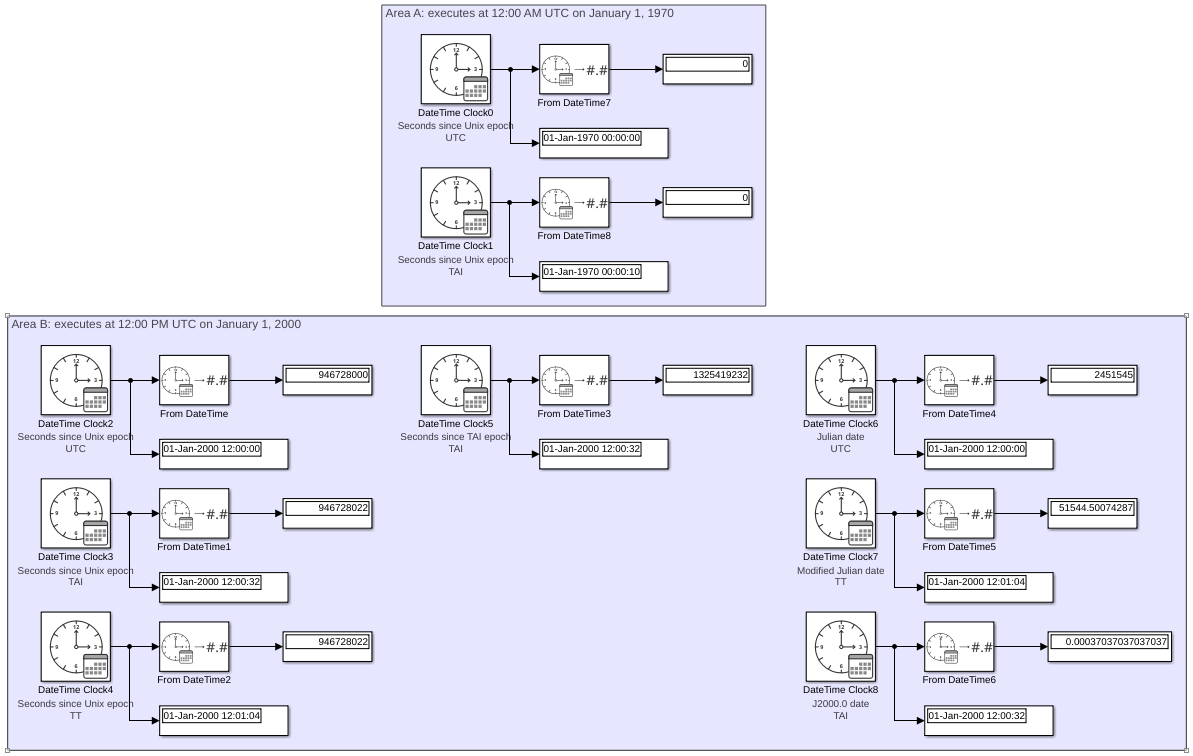
Both DateTime Clock blocks in "Area A" of model ex_datetime_clock_block_time_points are set to 12:00 AM UTC, January 1, 1970 at simulation time 0. This is the UNIX epoch, the time at which DateTime Clock blocks with Time point set to Seconds since Unix epoch output a stored value of 0. This value is interpreted differently depending on whether the DateTime Clock block's Time standard is set to TAI or UTC. The UTC clock block reads 01-Jan-1970 00:00:00, while the TAI clock block accounts for a 10-second offset between TAI and UTC at the inception of UTC and reads 01-Jan-1970 00:00:10.
All DateTime Clock blocks in "Area B" of model ex_datetime_clock_block_time_points are set to 12:00 PM UTC, January 1, 2000 at simulation time 0. The TAI clock readings are exactly 32 seconds ahead of the UTC clocks. The TT clock readings are 64.184 seconds ahead of the UTC clocks, which is truncated to 64 seconds by the Display block.
Time points can be split into two categories:
DateTimesignals withTime pointset toSeconds since Unix epoch,Seconds since NTP epoch, orSeconds since TAI epochreport elapsed time since a universal real-world instant.Example: DateTime Clock2, DateTime Clock3, and DateTimeClock4 all report the elapsed time since the UNIX epoch. However, DateTime Clock3 and DateTime Clock4 output a stored value that is 22 seconds greater than the output of DateTime Clock2 because the TAI and TT clocks count the 22 leap seconds that elapsed between 1970 and 2000. The TAI and TT clock readings include additional 10-second and 32.184-second offsets, respectively, which are accounted for by blocks that interpret
DateTimesignals. DateTime Clock3 and DateTime Clock4 differ from DateTime Clock2 both in their clock readings and in how many seconds they count since the UNIX epoch, but they agree about the universal real-world instant corresponding to a stored value of 0 (the UNIX epoch; see Area A).
DateTimesignals withTime pointset toJulian date,Modified Julian date, orJ2000.0 datereport elapsed time since a particular day and time of day on their own time standard.Example: DateTime Clock8 outputs a stored value of 0.00037037.... This value includes offsets for both the 22 elapsed leap seconds and the 10-second difference between TAI and UTC at the inception of UTC. This is because the time corresponding to a stored value of 0 for DateTime Clock8 is 01-Jan-2000 12:00:00 TAI. The clock is set to 01-Jan-2000 12:00:00 UTC, 32 seconds later, and records an elapsed time since the epoch of 32/86400 = 0.00037037... days.
Block | Time point | Time standard | Clock reading at 01-Jan-2000 12:00:00 UTC | Stored value at 01-Jan-2000 12:00:00 UTC | Explanation of stored value |
|---|---|---|---|---|---|
DateTime Clock2 | Seconds since Unix epoch | UTC | 01-Jan-2000 12:00:00 | 946728000 | 86400 seconds per day × 10957.5 days elapsed between 12:00 AM on 01-Jan-1970 and 12:00 PM on 01-Jan-2000. |
DateTime Clock3 | Seconds since Unix epoch | TAI | 01-Jan-2000 12:00:32 | 946728022 | The stored value is 22 seconds greater than DateTime Clock2 because 22 leap seconds have elapsed, but the clock reading is 32 seconds later than DateTime Clock2 because of the initial TAI-UTC offset. |
DateTime Clock4 | Seconds since Unix epoch | TT | 01-Jan-2000 12:01:04 | 946728022 | The stored value is 22 seconds greater than DateTime Clock2 because 22 leap seconds have elapsed, but the clock reading is 64 seconds later than DateTime Clock2 because of the initial TT-UTC offset. |
DateTime Clock5 | Seconds since TAI epoch | TAI | 01-Jan-2000 12:00:32 | 1325419232 | |
DateTime Clock6 | Julian date | UTC | 01-Jan-2000 12:00:00 | 2451545 | 2451545 days elapsed between 12:00 PM on 24-Nov-4714 BC and 12:00 PM on 01-Jan-2000. |
DateTime Clock7 | Modified Julian date | TT | 01-Jan-2000 12:01:04 | 51544.50074287 | |
DateTime Clock8 | J2000.0 date | TAI | 01-Jan-2000 12:00:32 | 0.00037037037037037 |
model='ex_datetime_clock_block_time_points';
load_system(model)
sim(model);
open_system(model)
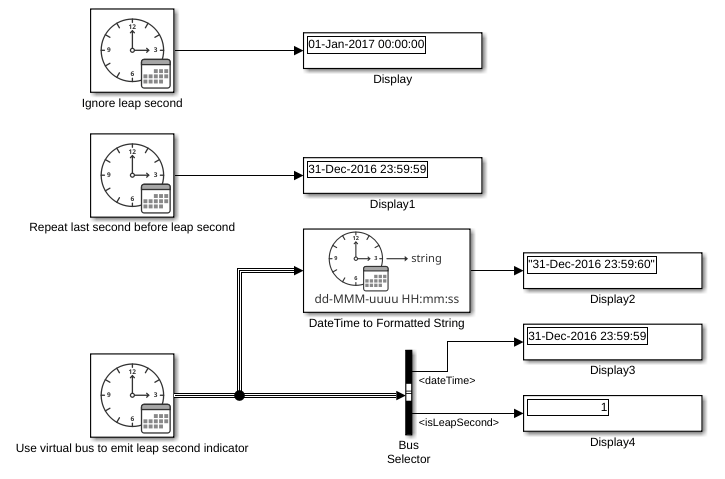
This example shows the behavior of three DateTime Clock blocks with Time standard set to UTC. Each block steps through the leap second that occurred on December 31, 2016.
The first block's Account for new leap seconds after simulation start parameter is cleared. This block ignores the leap second and immediately rolls over to January 1, 2017 (Display block).
The second block's Account for new leap seconds after simulation start parameter is selected and its Output DateTime as bus with leap second indicator parameter is cleared. During the leap second, this block repeats the preceding 23:59:59 second (Display1 block).
The third block's Account for new leap seconds after simulation start and Output DateTime as bus with leap second indicator parameters are both selected. This block outputs a two-element virtual bus whose first element is a DateTime signal and whose second element is a boolean signal. Use a Bus Selector block to separate the virtual bus into its constituent signals. During a leap second, the DateTime signal repeats the preceding 23:59:59 timestamp (Display3 block) and the boolean signal is true (Display4 block). The DateTime to Formatted String block accepts the virtual bus as input and treats it as a DateTime signal with a 23:59:60 timestamp (Display2 block).
model='ex_datetime_clock_block_leap_seconds';
load_system(model)
sim(model);
open_system(model)
Ports
Output
Simulation calendar date and time, returned as a scalar
DateTime signal.
Parameters
To edit block parameters interactively, use the Property Inspector. From the Simulink® Toolstrip, on the Simulation tab, in the Prepare gallery, select Property Inspector.
Main
Initial date and time source, specified as Inherit from
model or Specify value.
Inherit from model— The block output at simulation time 0 corresponds to the date and time specified by the model configuration parameter Date and time at simulation time zero.Specify value— The block uses the block Date and time at simulation time zero parameter to calibrate its output.
Dependencies
To set the Date and time at simulation time zero
parameter, select Specify value.
Programmatic Use
To set the block parameter value programmatically, use
the set_param function.
To get the block parameter value
programmatically, use the get_param function.
| Parameter: | InitialDateTimeSource |
| Values: | Inherit from model (default) | Specify value |
Date and time at simulation time zero, specified as a scalar datetime object.
This parameter must resolve to a date between January 1, 1400 and December 31, 9999.
Tip
The
datetimeobject must be either unzoned or have the same correct time standard as the DateTime Clock block.If the DateTime Clock block Initial date and time source is set to
Specify value, the DateTime Clock block Date and time at simulation time zero parameter value takes precedence over the Date and time at simulation time zero model configuration parameter.
Dependencies
To set the date and time at simulation time zero, select Specify
value.
Programmatic Use
To set the block parameter value programmatically, use
the set_param function.
To get the block parameter value
programmatically, use the get_param function.
| Parameter: | DateTimeAtSimulationTimeZero |
| Values: | datetime(2000,1,1,0,0,0) (default) | scalar datetime object |
Specify the diagnostic for when clock rolls over its storage data type maximum
value as None, Warning, or
Error.
Programmatic Use
To set the block parameter value programmatically, use
the set_param function.
To get the block parameter value
programmatically, use the get_param function.
| Parameter: | DiagnosticForClockRollOver |
| Values: | None (default) | Warning | Error |
Select to enable zero-crossing detection. For more information, see Zero-Crossing Detection.
Programmatic Use
Parameter:
ZeroCross |
| Type: character vector, string |
Values:
'on' | 'off' |
Default:
'on' |
Signal Attributes
Specify the current clock time point as Seconds since Unix
epoch, Seconds since NTP epoch,
Seconds since TAI epoch, Julian
date, Modified Julian date, or J2000.0
date. The DateTime Clock block uses this value to determine the clock
epoch.
The Seconds since Unix epoch, Seconds
since NTP epoch, and Seconds since TAI
epoch options describe time elapsed since a universal instant in time.
The Julian date, Modified Julian
date, and J2000.0 date options are the
number of days elapsed since their respective epochs.
This table lists the epoch corresponding to each possible value for the Time point parameter. The epoch for the currently selected Time point is displayed on the dialog box.
| Time Point | Epoch |
|---|---|
|
|
|
|
|
|
|
|
|
|
|
|
For more information on storage type constraints, see Simulink.DateTimeType.
Dependencies
To change the current clock epoch, select a different Time point value.
Programmatic Use
To set the block parameter value programmatically, use
the set_param function.
To get the block parameter value
programmatically, use the get_param function.
| Parameter: | TimePoint |
| Values: | Seconds since Unix epoch (default) | Seconds since NTP epoch | Seconds since TAI epoch | Julian date | Modified Julian date | J2000.0 date |
Select the DateTime storage data type:
doubleint32uint32fixdt(0,64,32)fixdt(1,64,32)fixdt(0,128,64)fixdt(1,128,64)
For more information on storage type constraints, see Simulink.DateTimeType.
Programmatic Use
To set the block parameter value programmatically, use
the set_param function.
To get the block parameter value
programmatically, use the get_param function.
| Parameter: | StorageDataType |
| Values: | double (default) | int32 | uint32 | fixdt(0,64,32) | fixdt(1,64,32) | fixdt(0,128,64) | fixdt(1,128,64) |
Specify the current clock time standard:
TAI— International Atomic TimeUTC— Coordinated Universal TimeTT— Terrestrial Time
For more information on storage type constraints, see Simulink.DateTimeType.
Programmatic Use
To set the block parameter value programmatically, use
the set_param function.
To get the block parameter value
programmatically, use the get_param function.
| Parameter: | TimeStandard |
| Values: | TAI (default) | UTC | TT |
Option to account for new leap seconds after model simulation starts.
If Account for new leap seconds after simulation start is selected, the DateTime Clock block inserts an extra second at the end of days that experienced a positive leap second. For more information, see the Output DateTime as bus with leap second indicator parameter.
Dependencies
To enable this parameter, set the Time standard parameter
to UTC.
Programmatic Use
To set the block parameter value programmatically, use
the set_param function.
To get the block parameter value
programmatically, use the get_param function.
| Parameter: | AccountForLeapSeconds |
| Values: | "off" (default) | "on" |
Option to output leap second indicator as a virtual bus or a signal. The block behavior is:
If the Output DateTime as bus with leap second indicator parameter is selected, the DateTime Clock block outputs a two-element virtual bus. The first element is a
DateTimesignal and the second element is a Boolean signal.During a leap second, the
DateTimesignal repeats the preceding23:59:59timestamp and the Boolean signal is true. Otherwise, the Boolean signal is false. DateTime blocks can accept this virtual bus as input. DateTime blocks that receive a virtual bus of a23:59:59timestamp and a Boolean signal with value true treat the bus as aDateTimesignal with a23:59:60timestamp.If Output DateTime as bus with leap second indicator is cleared, the DateTime Clock block outputs a
DateTimesignal. During a leap second, the signal repeats the preceding23:59:59timestamp.
Dependencies
To enable this parameter:
Set the Time standard parameter to
UTC.Select the Account for new leap seconds after simulation start parameter.
Programmatic Use
To set the block parameter value programmatically, use
the set_param function.
To get the block parameter value
programmatically, use the get_param function.
| Parameter: | OutputLeapSecondIndicator |
| Values: | "on" (default) | "off" |
Block Characteristics
Data Types |
|
Direct Feedthrough |
|
Multidimensional Signals |
|
Variable-Size Signals |
|
Zero-Crossing Detection |
|
Extended Capabilities
C/C++ Code Generation
Generate C and C++ code using Simulink® Coder™.
Version History
Introduced in R2026b
See Also
Blocks
- DateTime Data Type Converter | DateTime Time Standard Converter | DateTime to Calendar Time | DateTime to Formatted String | From DateTime | To DateTime
Objects
Model Settings
MATLAB Command
You clicked a link that corresponds to this MATLAB command:
Run the command by entering it in the MATLAB Command Window. Web browsers do not support MATLAB commands.
Select a Web Site
Choose a web site to get translated content where available and see local events and offers. Based on your location, we recommend that you select: .
You can also select a web site from the following list
How to Get Best Site Performance
Select the China site (in Chinese or English) for best site performance. Other MathWorks country sites are not optimized for visits from your location.
Americas
- América Latina (Español)
- Canada (English)
- United States (English)
Europe
- Belgium (English)
- Denmark (English)
- Deutschland (Deutsch)
- España (Español)
- Finland (English)
- France (Français)
- Ireland (English)
- Italia (Italiano)
- Luxembourg (English)
- Netherlands (English)
- Norway (English)
- Österreich (Deutsch)
- Portugal (English)
- Sweden (English)
- Switzerland
- United Kingdom (English)