Interval Test Dynamic
Determine if signal is in specified interval
Libraries:
Simulink /
Logic and Bit Operations
Description
The Interval Test Dynamic block outputs true (1) if
the input is between the values of the external signals up and
lo. The block outputs false (0) if the input
is outside those values. To control how the block handles input values that are equal to
the signal lo or the signal up, use the
Interval closed on left and Interval closed on
right check boxes.
Examples
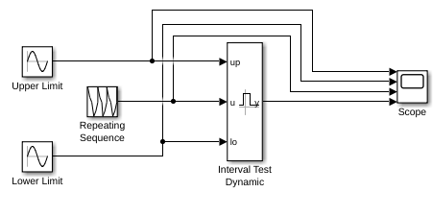
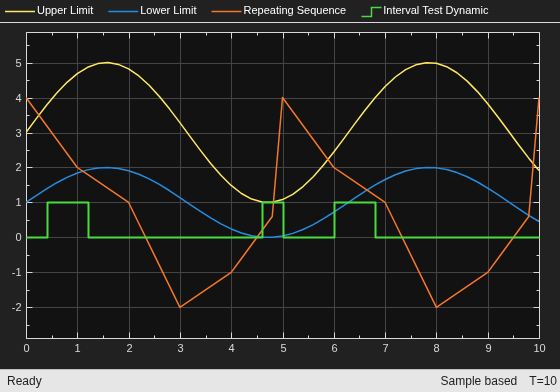
This example shows how to detect when an input signal falls within a dynamically specified interval. The interval is defined by two Sine Wave blocks. When the input to the Interval Test Dynamic block falls between those sine waves, the Interval Test Dynamic block outputs true (1).
Ports
Input
Upper limit of interval, specified as a scalar, vector, matrix, or N-D array.
Limitations
When the input signal is an enumerated type, the up and lo signals must be of the same enumerated type.
Data Types: single | double | int8 | int16 | int32 | int64 | uint8 | uint16 | uint32 | uint64 | Boolean | fixed point | enumerated
Input signal, specified as a scalar, vector, matrix, or N-D array.
Limitations
When the input signal is an enumerated type, the up and lo signals must be of the same enumerated type.
Data Types: single | double | int8 | int16 | int32 | int64 | uint8 | uint16 | uint32 | uint64 | Boolean | fixed point | enumerated
Lower limit of interval, specified as a scalar, vector, matrix, or N-D array.
Limitations
When the input signal is an enumerated type, the up and lo signals must be of the same enumerated type.
Data Types: single | double | int8 | int16 | int32 | int64 | uint8 | uint16 | uint32 | uint64 | Boolean | fixed point | enumerated
Output
Output signal indicating whether the input values fall within the
specified interval. You can specify the Output data
type as boolean or
uint8.
Data Types: uint8 | Boolean
Parameters
When you select this check box, the value of the signal connected to the
up input port is included in the interval for which
the block outputs true (1).
Programmatic Use
Block Parameter:
IntervalClosedRight |
| Type: character vector |
Values:
'on' | 'off' |
Default:
'on' |
When you select this check box, the value of the signal connected to the
lo input port is included in the interval for which
the block outputs true (1).
Programmatic Use
Block Parameter:
IntervalClosedLeft |
| Type: character vector |
Values:
'on' | 'off' |
Default:
'on' |
Specify the output data type as boolean or
uint8.
Programmatic Use
Block Parameter:
OutDataTypeStr |
| Type: character vector |
Values:
'boolean' | 'uint8' |
Default:
'boolean' |
Block Characteristics
Data Types |
|
Direct Feedthrough |
|
Multidimensional Signals |
|
Variable-Size Signals |
|
Zero-Crossing Detection |
|
Extended Capabilities
C/C++ Code Generation
Generate C and C++ code using Simulink® Coder™.
HDL Coder™ provides additional configuration options that affect HDL implementation and synthesized logic.
This block has one default HDL architecture.
| ConstrainedOutputPipeline | Number of registers to place at
the outputs by moving existing delays within your design. Distributed
pipelining does not redistribute these registers. The default is
|
| InputPipeline | Number of input pipeline stages
to insert in the generated code. Distributed pipelining and constrained
output pipelining can move these registers. The default is
|
| OutputPipeline | Number of output pipeline stages
to insert in the generated code. Distributed pipelining and constrained
output pipelining can move these registers. The default is
|
| SynthesisAttributes |
Specifies the synthesis attributes for the blocks and block output signals in the model. The generated HDL code contains these attributes. For more information, see SynthesisAttributes (HDL Coder). |
PLC Code Generation
Generate Structured Text code using Simulink® PLC Coder™.
Fixed-Point Conversion
Design and simulate fixed-point systems using Fixed-Point Designer™.
Version History
Introduced before R2006aUse the SynthesisAttributes HDL block property to specify the synthesis attributes for the block and its output signals. HDL Coder includes these attributes in the generated HDL code.
See Also
MATLAB Command
You clicked a link that corresponds to this MATLAB command:
Run the command by entering it in the MATLAB Command Window. Web browsers do not support MATLAB commands.
Select a Web Site
Choose a web site to get translated content where available and see local events and offers. Based on your location, we recommend that you select: .
You can also select a web site from the following list
How to Get Best Site Performance
Select the China site (in Chinese or English) for best site performance. Other MathWorks country sites are not optimized for visits from your location.
Americas
- América Latina (Español)
- Canada (English)
- United States (English)
Europe
- Belgium (English)
- Denmark (English)
- Deutschland (Deutsch)
- España (Español)
- Finland (English)
- France (Français)
- Ireland (English)
- Italia (Italiano)
- Luxembourg (English)
- Netherlands (English)
- Norway (English)
- Österreich (Deutsch)
- Portugal (English)
- Sweden (English)
- Switzerland
- United Kingdom (English)