Packet-Based ADS-B Transceiver
R2026bPacket-based systems are common in wireless communications. Data is received over the air and decoded as discrete packet data on a compute device. For given system requirements, it is difficult to design a system and implement directly on an SoC, as this process often involves multiple iterations of debugging and integration on hardware. Hardware effects are difficult to account for at design time. In this example, you design a packet-based airplane tracking application based on the Automatic Dependent Surveillance Broadcast (ADS-B) standard, partitioned between the FPGA and the embedded processor. Unlike traditional methods, you simulate the application design with a memory interface before implementation on hardware using SoC Blockset™ for AMD to shorten development time. You then validate the design on hardware using automatically generated code from the model.
Supported Hardware Platforms:
Xilinx® Zynq® ZC706 evaluation kit + Analog Devices® FMCOMMS2/3/4 card.
Xilinx Zynq UltraScale+™ MPSoC ZCU102 evaluation kit + Analog Devices FMCOMMS2/3/4 card.
ZedBoard™ + Analog Devices FMCOMMS2/3/4 card.
Design Task and System Requirements
According to the ADS-B standard, a message packet contains a total of 120 bits, which has an 8-bit preamble and 112 bits of information about the aircraft, including its position and velocity. For an introduction to the Mode-S signaling scheme and ADS-B technology for tracking aircraft, refer to the Airplane Tracking Using ADS-B Signals example in Communications Toolbox™.
The task is to design a system to receive ADS-B messages off the air and decode with the following performance requirements:
Latency: 0.5 seconds
Drop sample rate: < 1 in 105 messages
Throughput: 0.125 MBps (for capacity of maximum 300 aircraft)
Design Using SoC Blockset for AMD
Design Parameters: Data is transferred from the FPGA to processor across shared memory as a frame of samples. There are two key design parameters, Frame Size and Number of Buffers, which affect the performance requirements above.
Frame Size: Frame Size is the number of samples in a frame. It is used to determine the buffer size in memory.
Number of Buffers: Number of frame buffers in memory. Data is continuously written into memory as frame buffers by the FPGA algorithm. These buffers are then read by the processor to execute its identification algorithm.
Select the design parameters to satisfy the system requirements as follows:
Design to Meet Latency Requirement: Latency is the time period between when the data is received by the FPGA logic and when the data is ready to be processed by the processor. It consists of two parts: the latency through the FPGA logic and the latency for the processor to become available to process the data.
Latency through the FPGA logic is the time required for data processing through the FPGA. This is typically on the order of several clock cycles, with the clock running in the MHz range. The latency for the processor to become available to process data is determined by the time it takes for samples to transfer from the FPGA to the processor through the FIFO and memory frame buffers. If the FPGA FIFO is sized to be equivalent to one frame buffer, then the maximum latency can be written as follows:

As the time required to gather a frame is directly proportional to the frame size, the maximum latency in data transfer is also directly proportional to the frame size and the number of buffers.
The time required to gather a frame is constant for continuously streaming applications and is equal to the frame size multiplied by the FPGA output sample time. However, for asynchronous packet-based systems, this time also depends on the frequency of packet arrivals. If you choose a frame size larger than the packet size, you may have to wait an indeterminate amount of time for arrival of all the packets required to make a frame. If you choose a frame size smaller than the packet size, it adversely affects the throughput. Therefore, for asynchronous packet based systems, setting the frame size equal to the packet size is a reasonable choice. This allows each packet to be transferred to the processor as soon as FPGA processing is complete, thereby reducing latency.
For this example, the decoded packet length is 112 bits, which is packed into four 32-bit samples. Therefore, the frame size is 4.
Design to Meet Throughput Requirement: Throughput is the amount of data produced as output per unit of time. It depends on data processing in the FPGA and data transfer and processing by the processor. For the FPGA logic, data is processed at clock frequencies on the order of MHz, and an output is produced every few clock cycles. For data transfer and processing by the processor, throughput depends on the frame size. A typical trade-off is that a larger frame size results in higher throughput but increased latency. Conversely, a smaller frame size results in lower latency but decreased throughput.
Design to Meet Drop Samples Requirement: An application may tolerate occasional data drops caused by variations in task execution durations. Frame buffers in memory hold data when it cannot be immediately processed by the processor. Therefore, increasing the number of frame buffers reduces sample dropouts, but it adversely affects latency, as explained earlier.
Choose the number of buffers so that you meet the drop samples requirement without affecting the maximum latency requirement.
For this example, the mean task duration, as measured on ZC706 is 114 us. Each packet duration is 120 us. Even if the packets arrive back to back, they can be processed with a minimal number of frame buffers since, on average, the task is processed before the new packet arrives. So, set the number of frame buffers to the minimum possible, which is three.
Create an SoC Model: Use the SDR Template for creating an SoC model for wireless communications applications.
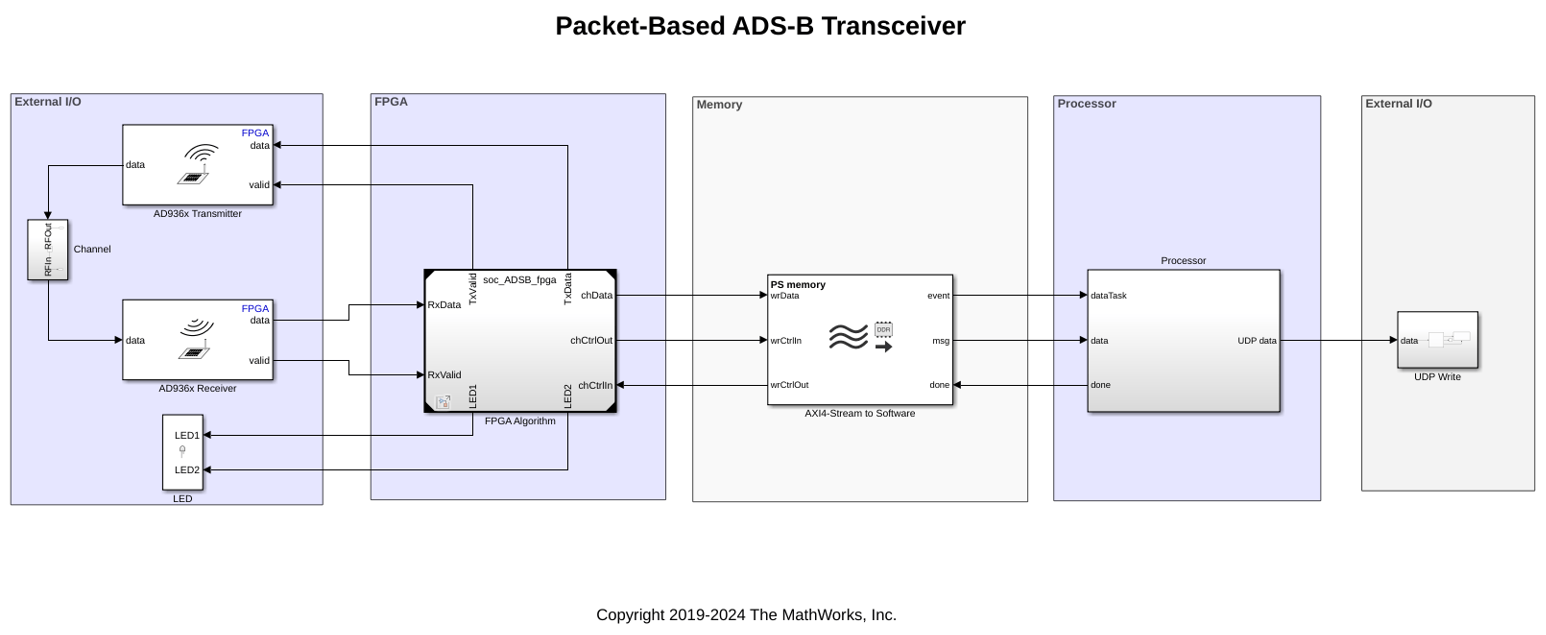
The top model appears with bounding boxes that segment the model as follows:
External I/O: This part of the model contains the AD9361 RF Input and Output blocks, which connect to each other using a simplified channel model. This region also has LED blocks that connect to the FPGA logic.
FPGA: The FPGA section of the model contains the FPGA algorithms, which are designed in a separate model and instantiated here using model reference.
Memory: This section models the memory between the FPGA and the processor. It simulates the latencies in the hardware and software connection.
Register Channel: This section models three FPGA registers that the processor configures.
Processor: This section contains the Task Manager, which connects to the processor model. The Task Manager controls the scheduling of processor tasks. The processor algorithm and initialization tasks are modeled in a separate model and instantiated here using model references.
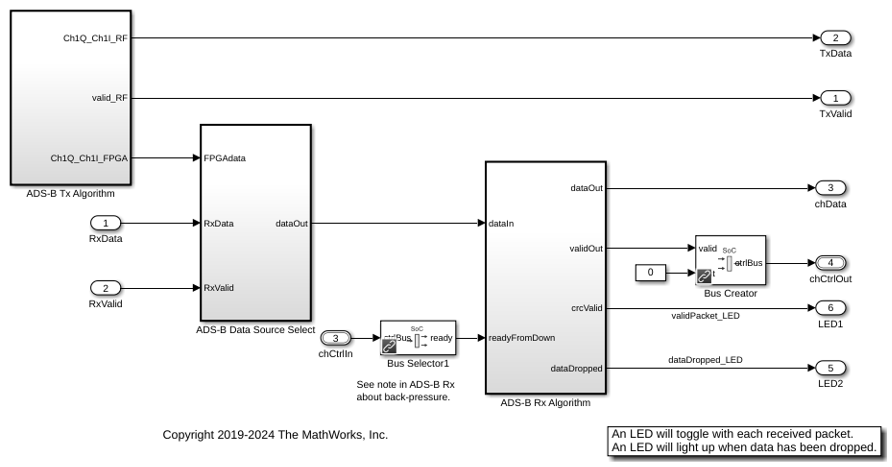
FPGA model contains the ADS-B Transmitter Algorithm that transmits test ADS-B packets at a variable rate, and the ADS-B Receiver Algorithm that decodes received ADS-B messages.
The processor model contains the Processor Algorithm that unpacks the received ADS-B packets into information bits and sends them to another system using the UDP Send block to report aircraft information. The processor algorithm task is denoted as dataTask in the Task Manager block and is specified as event-driven. The Task Manager schedules data asynchronously using a buffer ready event, rdEvent, in the memory.
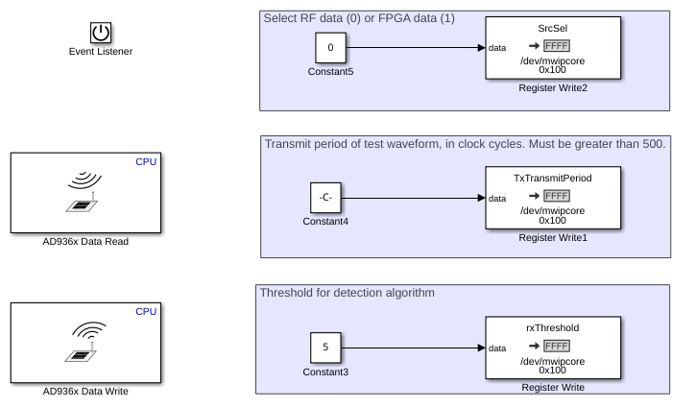
The Initialize Function subsystem initializes the appropriate hardware configuration registers. The AD9361 blocks set the center frequency, gain mode, and baseband sample rate of the attached FMC RF board. The other blocks model three memory-mapped configurations of the ADS-B packet detector datapath. These configurations include the selection of input to the receiver algorithm, the transmit period of test packets from the FPGA, and the threshold value for the detection algorithm.
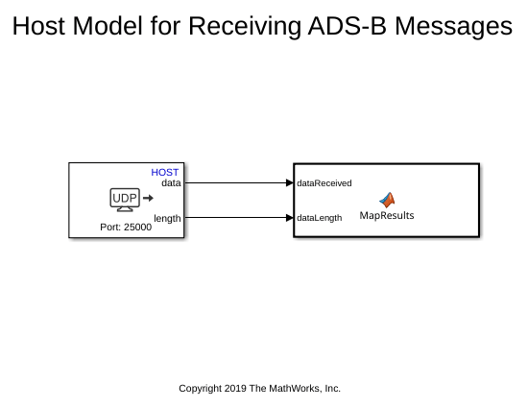
The model soc_ADSB_UDP_HostPrintout is a host UDP-based receive model that decodes ADS-B messages. Run this model in parallel with the ADS-B simulation or deployment model to display the decoded ADS-B messages and optionally map the aircraft location.
Simulate
Run the model to visualize data transfer between the FPGA and the processor. The time period between the arrival of packets depends on the number of aircraft. For a system that detects 300 aircraft, there are on average 300*6.2 = 1860 messages per second (or a message every 1/1860 = 0.54 ms). You can set the number of aircraft using the variable NumAircraft, which also sets the period in the Initialize Function subsystem. The default setting is 300 to match the allowable system capacity.
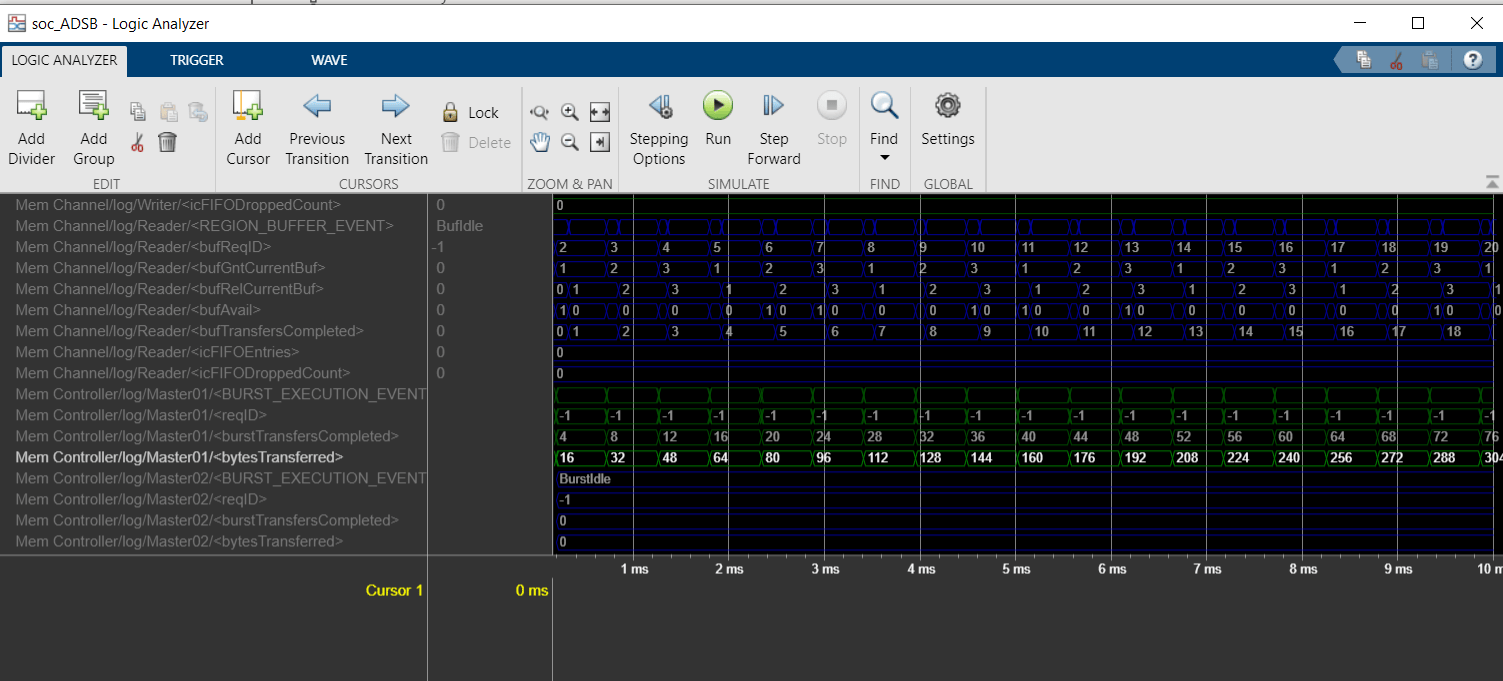
Open the Logic Analyzer window to see the waveforms, and notice that the memory transfers take place in buffers of four samples, or 16 bytes.
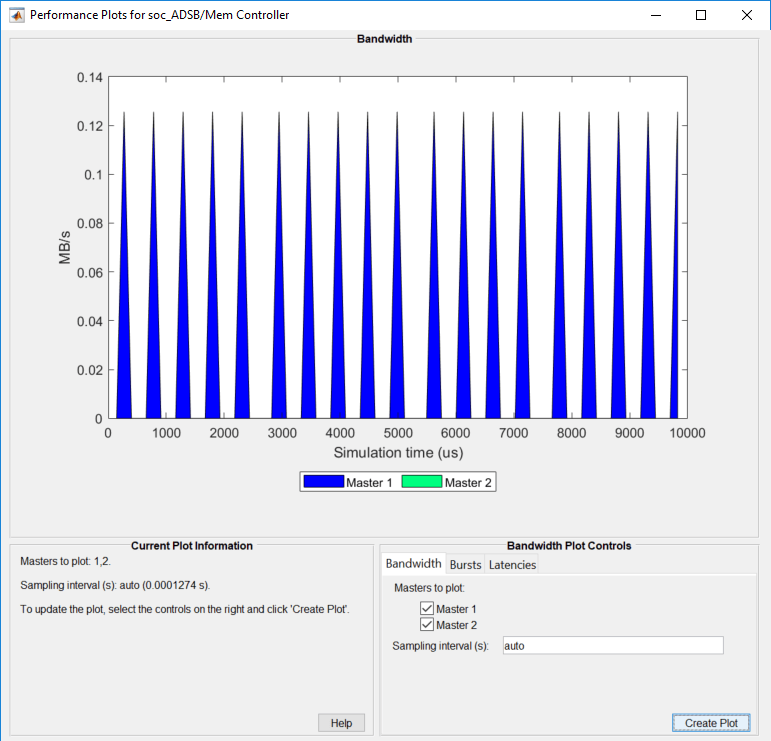
To view the external memory bandwidth usage, open the AXI4-Stream to Software block, select the Performance tab, and click View performance plots under Memory Controller. Select all the masters and click Create Plot. The plot shows a bandwidth of 0.125 MBps. Since four bytes of data transfer every 32 us, the expected bandwidth is 4/32e-6 = 0.125 MBps.
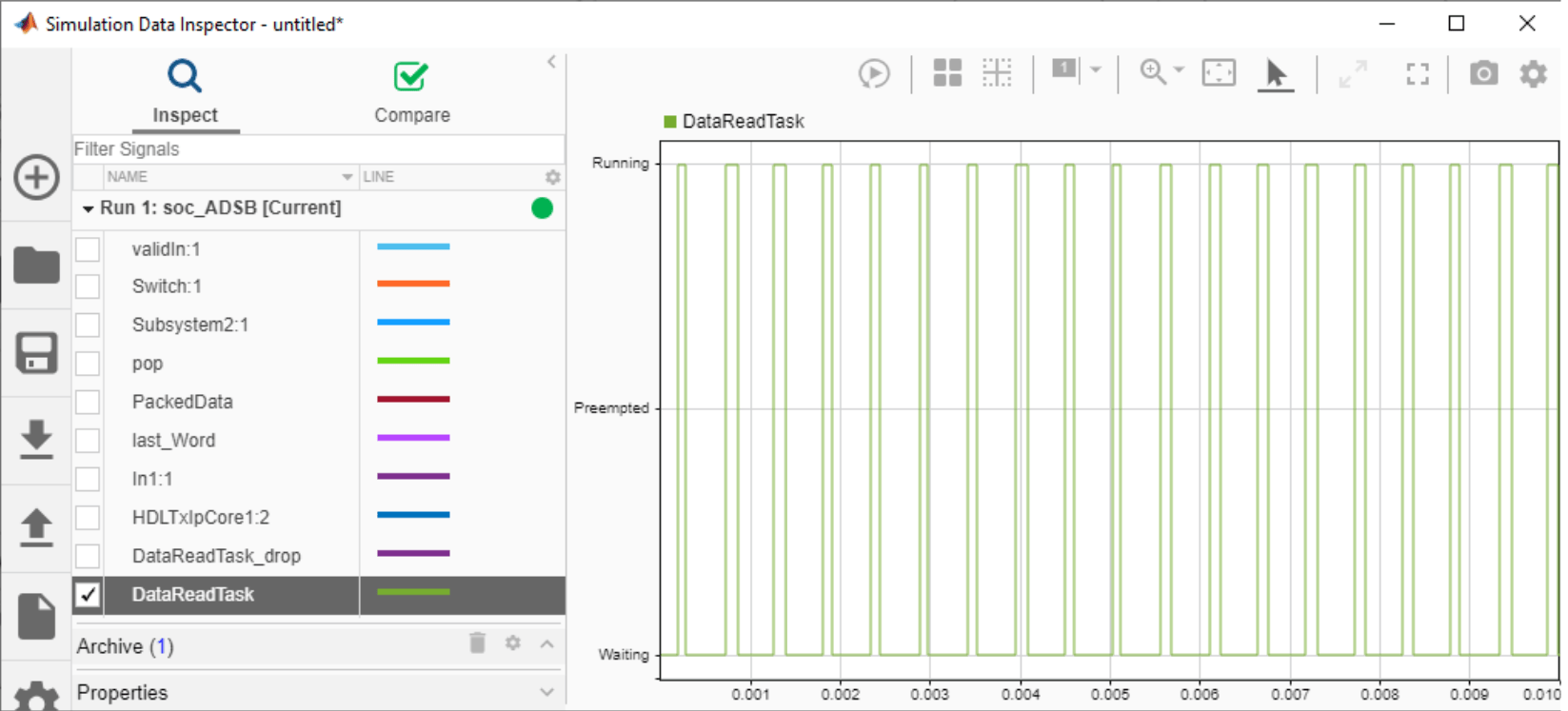
Using the Simulation Data Inspector, you can visualize the task execution schedule. The data task is driven by an event from the FPGA that notifies the processor when a packet has been decoded by the FPGA, written to external memory, and read by the DMA driver.
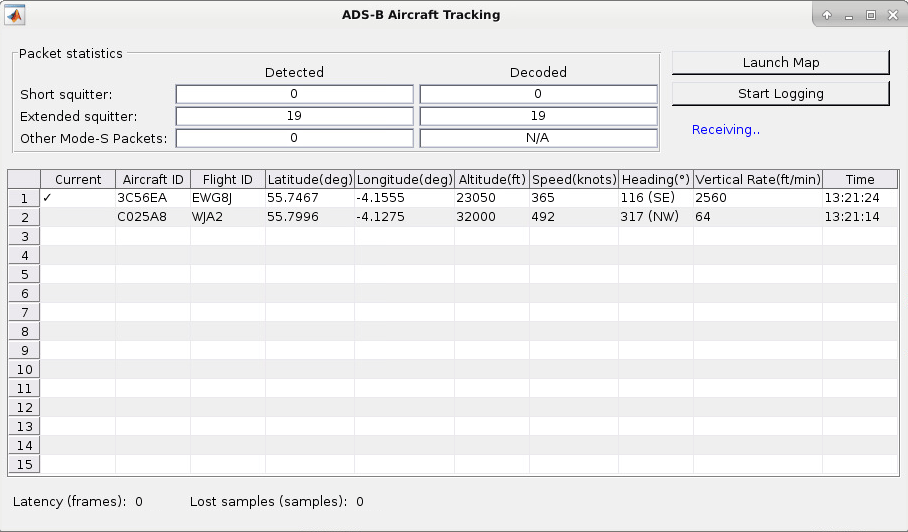
To see the decoded messages, run the companion UDP receive model. This model displays the aircraft tracking information on a GUI.
Hardware Requirements Analysis
As discussed earlier, since the mean task duration of 114 us is less than the packet duration of 120 us, the messages are not dropped on average during the transfer to the processor. You can confirm this by checking the number of dropped samples at the FIFO using the signal icFIFODroppedCount in the Simulation Data Inspector.

The SoC model helps you explore the design space. Consider the worst-case scenario when plane messages are received densely and the processor has more computation load. You can modify the model settings, run simulations, and determine whether packets are dropped in this more aggressive scenario.
Set the NumAircraft to 990 (a new message every 163us) to simulate back-to-back arrival of plane messages. Modify the task specification in the Task Manager block to simulate more computation load on the processor. On the Simulation tab, choose the second distribution by setting the Percent value to 100 on the second row and 0 on the first row. This assigns a mean task duration of 163 us, which results in some task executions taking longer than allowed. Set the simulation time to 0.1 ms and run the simulation. For 990 planes, the messages arrival rate is 990*6.2 = 6138 messages per second. The drop packet requirement is 6138/105 = 58 messages per second, or 5.8 messages in 0.1 seconds. After simulation, notice in the Logic Analyzer that this requirement is violated, as 18 messages are dropped.
Implement and Run on Hardware
Following products are required for this section:
HDL Coder™
Embedded Coder®
SoC Blockset Support Package for AMD® FPGA and SoC Devices
To implement the model on a supported SoC board, use the SoC Builder tool. By default, the model is set up for the Xilinx Zynq Ultrascale+ MPSoC ZCU102 evaluation kit. To open SoC Builder, in the Simulink® toolstrip, on the System on Chip tab, click Configure, Build, & Deploy. When SoC Builder opens, follow these steps:
On the Setup screen, select Build model. Click Next.
On the Select Build Action screen, select Build, load, and run. Click Next.
On the Select Project Folder screen, specify the project folder. Click Next.
On the Review Hardware Mapping screen, click Next.
On the Review Memory Map screen, view the memory map by clicking View/Edit. Click Next.
On the Validate Model screen, check the compatibility of the model for implementation by clicking Validate. Click Next.
On the Build Model screen, begin building the model by clicking Build. An external shell opens when FPGA synthesis begins. Click Next.
On the Connect Hardware screen, test the connectivity of the host computer with the SoC board by clicking Test Connection. To go to the Run Application screen, click Next.
The FPGA synthesis can take more than 30 minutes to complete. To save time, you may want to use the provided pre-generated bitstream by following these steps:
Close the external shell to terminate synthesis.
Copy the pre-generated bitstream to your project folder by running the command below, and then continue with the next step.
Load the pre-generated bitstream and run the model on the SoC board by clicking Load and Run.
copyfile(fullfile(matlabshared.supportpkg.getSupportPackageRoot,'toolbox','soc',...
         'supportpackages','xilinxsoc','xilinxsocexamples','bitstreams',...
         'soc_ADSB-zcu102.bit'),'./soc_prj');
To see the decoded messages, run the companion UDP receive model. This model displays the aircraft tracking information on a GUI.
Implementation on ZC706 Evaluation Kit: To implement the model on the ZC706 evaluation kit, first configure the model for the ZC706 evaluation kit and set the following example parameters.
In the Simulink toolstrip, on the System on Chip tab, open Configuration Parameters window by clicking Hardware Settings.
In the Configuration Parameters window, in Hardware Implementation, select
Xilinx Zynq ZC706 evaluation kitfrom the Hardware board drop-down list for both the top model and the processor model.In the Hardware board settings section, expand Target hardware resources. Under Groups, click FPGA design (top level). Select Include 'AXI Manager' IP for host-based interaction and specify IP core clock frequency (MHz) as
4.Under Groups, click FPGA design (debug). Select Include AXI interconnect monitor.
Expand Device details. Select Support long long for both the top model and the processor model.
In the Simulink toolstrip of the processor model, on the System on Chip tab, open the Configuration Parameters window by clicking Hardware Settings. In the Configuration Parameters window, in Hardware Implementation, under Hardware board settings, select
APUfrom the Processing Unit drop-down list.
Next, open SoC Builder and follow the steps as previously stated for the Xilinx Zynq Ultrascale+ MPSoC ZCU102 evaluation kit above, generate the bitstream and target it to the hardware.
Implementation on ZedBoard: To implement the model on ZedBoard, first configure the model for ZedBoard and set the following example parameters.
In the Simulink toolstrip, on the System on Chip tab, open the Configuration Parameters window by clicking Hardware Settings.
In the Configuration Parameters window, in Hardware Implementation, select
ZedBoardfrom the Hardware board drop-down list for both the top model and the processor model.In the Hardware board settings section, expand Target hardware resources. Under Groups, click FPGA design (top level). Select Include 'AXI Manager' IP for host-based interaction and specify IP core clock frequency (MHz) as
4.Under Groups, click FPGA design (debug). Select Include AXI interconnect monitor.
Expand Device details. Select Support long long for both the top model and the processor model.
In the Simulink toolstrip of the processor model, on the System on Chip tab, open the Configuration Parameters window by clicking Hardware Settings. In the Configuration Parameters window, in Hardware Implementation, under Hardware board settings, select
APUfrom the Processing Unit drop-down list.
Next, open SoC Builder and follow the steps as previously stated for the Xilinx Zynq Ultrascale+ MPSoC ZCU102 evaluation kit. Generate the bitstream and target it to the hardware.
Profiling Results
To enable processor task profiling, open Configuration Parameters window and navigate to Hardware Implementation > Hardware Board settings > Task Profiling on processor. Select both Show in SDI and Save to file. Set the Simulation stop time to 10 seconds and run the model in external mode.
After the simulation is complete, open the Simulation Data Inspector (SDI), navigate to the latest run, and add the signal DataReadTask to the plot. Observe that the simulation model accurately predicts how the application performs on the hardware.

Summary
This example shows how SoC Blockset for AMD can be used to design a packet-based ADS-B standard to meet system requirements. By simulating the design with memory as the interface between the FPGA and the processor, you validate that the system requirements for throughput and dropped packets are met at design time. You then implement the design on an SoC device from the model and verify the results on hardware.
Although ADS-B is not a computationally intensive standard, it serves as a useful example to demonstrate the design process for packet-based systems intended for implementation on an SoC device. You can follow the same design procedure for more computationally intensive requirements, whether for this application or for other packet-based applications.

