Control Parallel State Execution Order
R2026bIn Stateflow® charts, you can control the execution order of parallel state execution.
By default, the execution order for parallel (AND) states is based on the order that you make the states. You can view the execution order of parallel states by looking at the number in the upper right corner of each state. Lower numbered states execute before higher numbered states.
Modify Execution Order
To change the execution order of parallel states:
Right-click a state and select Execution Order from the context menu.
Select the new execution order. For example, select Execution Order > 1 to make a state execute first.
Alternatively, you can set the execution order by using the Stateflow API. For more informations, see Stateflow.State.
Impact on Chart Behavior
When states process events, the state with the lowest execution order responds to the event first. This sequence matters when multiple states need to respond to the same event. Each state reads and writes data only when it executes. As a result, states may read or overwrite data already written to by another state.
Control Execution Order in Nested States
For charts that have nested parallel states, each level of the hierarchy has its own execution order. A parent state executes before its children, and sibling states execute according to their assigned order.
Changing the execution order of a parent state does not change the relative order of its children.
Traffic Light Control Example
This chart represents a traffic light controller. The chart has two parallel states,
NormalControl and EmergencyVehicleDetection.
NormalControl controls the traffic lights as they cycle between green,
yellow, and red. The EmergencyVehicleDetection state changes the chart
execution when it detects an emergency.
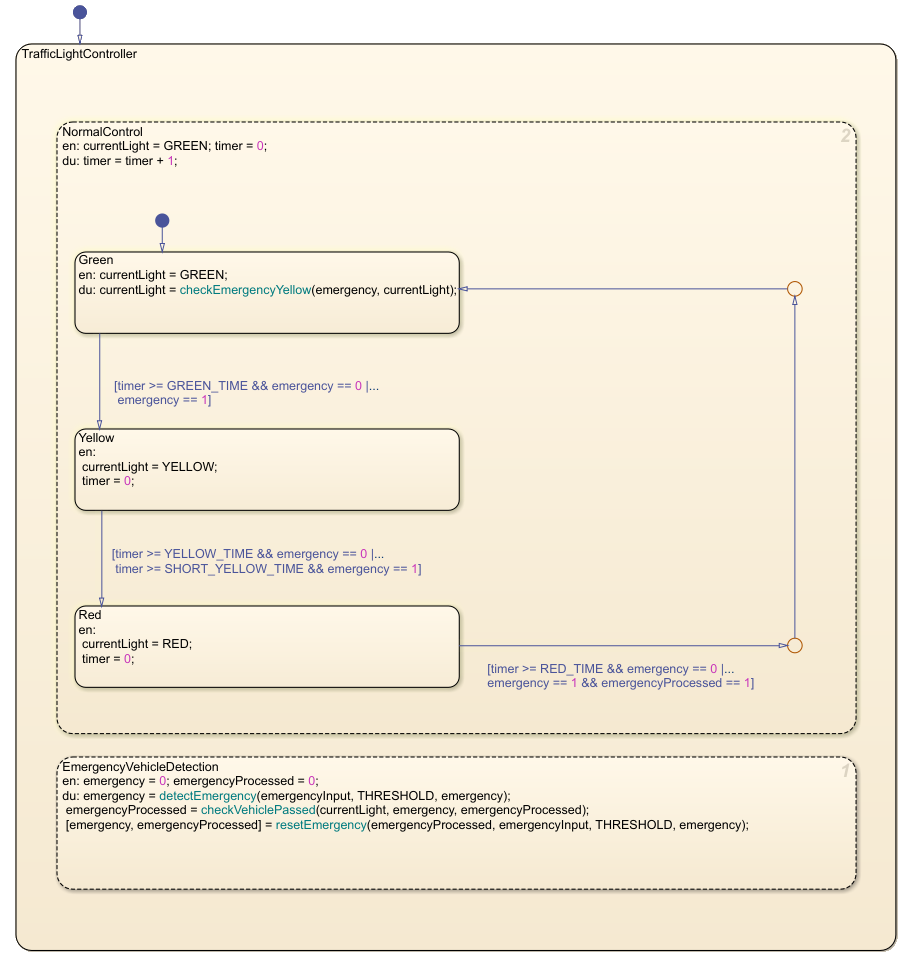
In the parent state, TrafficLightController, the two parallel states,
NormalControl and EmergencyVehicleDetection are
active simultaneously. However, EmergencyVehicleControl executes first,
while NormalControl executes second. This configuration allows the system
to update the color of the lights based on whether or not an emergency vehicle is
present.

