
Simple tab panel

A simple way to create tab panels using GUIDE

You are now following this Submission

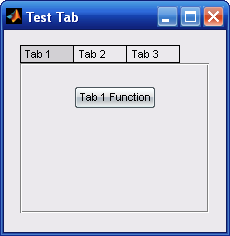
This script provides a template on how to create simple tab panels within a GUI. Each tab panel should be a different panel with different components and can be easily created with GUIDE. By using GUIDE, you can create as many different panels as you want and layout them in a comfortable way for building. When the script initiates, it places them one behind the other and handles their visibilities accordingly.

The main idea behind simpletab is that you can create the tab labels by creating an equal number of static text uicontrols and layout them properly over an empty panel of proper defined size (see simpletab.fig in GUIDE). You can use then their positions to create axes objects (so that an edge line can be displayed around tabs without having to define the 'CData' property) and then create text objects (which are also more customizable than static text uicontrols) inside them. The control and highlighting of different tabs is performed through properly defined object callbacks (see code). The initial static text uicontrols are invisible in the final window. They are only used inside GUIDE for positioning purposes only.

Make sure that the panel which is used for the proper placement of the static text uicontrols is the bigger one as the others will acquire its position. Ideally, the other panels should not be designed to be very different from the first one in terms of their dimensions because normally, in a multitab window all tabs should have the same size and the desired uicontrols should be fitted into them.

Cite As

Panagiotis Moulos (2026). Simple tab panel (https://ch.mathworks.com/matlabcentral/fileexchange/15193-simple-tab-panel), MATLAB Central File Exchange. Retrieved .

Acknowledgements

Inspired by: a new way to tab for GUIDE

Inspired: Simple Optimized GUI Tabs

General Information

MATLAB Release Compatibility

  • Compatible with any release

Platform Compatibility

  • Windows
  • macOS
  • Linux
Version Published Release Notes Action
1.0.0.0

Fixed a bug remaining from the testing version: changed 'testTab' to 'simpletab' in the code.