DIFFERENTIAL EQ. SOLUTION THROUGH S-FUNCTION

Solution of differential equation through S-Function

You are now following this Submission

Basic example for beginners, that shows how to solve the differential equation through S-Function
****************DIFFERENTIAL EQ. SOLUTION THROUGH S-FUNCTION******************

***************"Instructions for Simulink"*************************

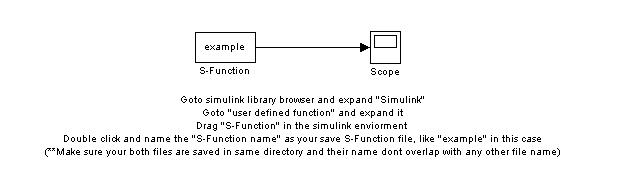
1.Goto simulink library browser and expand "Simulink"

2.Goto "user defined function" and expand it

3.Drag "S-Function" in the simulink enviorment

4.Double click and name the "S-Function name" as your save S-Function file, like "example" in this case

(**Make sure your both files are saved in same directory and their name dont overlap with any other file name)

*************Instruction for Matlab*******************

1.Type "open sfunctmpl" in command to open new S-Function
2.Save it as your own file,like "example" in this case;
3.Change the function name as your file name
4.In "function sys=mdlDerivatives(t,x,u)" you will define the differential eq
5.In "function [sys,x0,str,ts]=mdlInitializeSizes" you will define the continous states, inputs from simulink block and output.
6.In "function [sys,x0,str,ts]=mdlInitializeSizes" you will define Initial conditions of differential eq
7.In "function sys=mdlOutputs(t,x,u)", you will declare the outputs

*************************************************************************************

Cite As

Qadeer Ahmed (2026). DIFFERENTIAL EQ. SOLUTION THROUGH S-FUNCTION (https://ch.mathworks.com/matlabcentral/fileexchange/21885-differential-eq-solution-through-s-function), MATLAB Central File Exchange. Retrieved .

Categories

Find more on Block and Blockset Authoring in Help Center and MATLAB Answers

General Information

MATLAB Release Compatibility

  • Compatible with any release

Platform Compatibility

  • Windows
  • macOS
  • Linux
Version Published Release Notes Action
1.0.0.0