num2eng
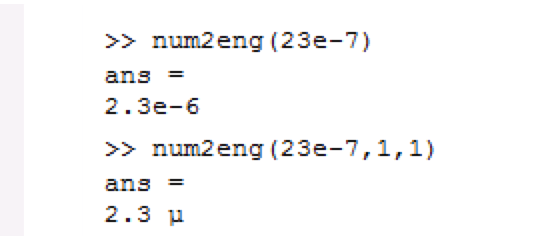
Convert numbers to engineering notation strings, or use SI-prefixes instead. Offers extensive customisation. Also works on axes tick labels.

You are now following this Submission
- You will see updates in your followed content feed
- You may receive emails, depending on your communication preferences
Cite As
Harry Dymond (2020). num2eng (https://www.mathworks.com/matlabcentral/fileexchange/67740), MATLAB Central File Exchange.
Acknowledgements
Inspired by: Number to Scientific Prefix, NUM2ENG: Fast number to engineering notation (SI) conversion
General Information
- Version 7.0.0 (645 KB)
MATLAB Release Compatibility
- Compatible with R2014b and later releases
Platform Compatibility
- Windows
- macOS
- Linux
| Version | Published | Release Notes | Action |
|---|---|---|---|
| 7.0.0 | Added support for SI prefixes Q (quetta, 10^30), R (ronna, 10^27), r (ronto, 10^-27), and q (quecto, 10^-30) |
||
| 6.1.1 | Fixed bug where input number of 0 could sometimes give an output of '-0' |
||
| 6.1.0 | Improved error handling/reporting |
||
| 6.0.0 | Added the useComma option |
||
| 5.8.2 | -- Fixed bug in get_datacursor_manager subroutine
|
||
| 5.8.1 | Fixed bugs in save routine for figures that have been processed by num2eng |
||
| 5.8.0 | -- Datatips now formatted to use same font as that specified for the parent axes of the line on which the datatip appears
|
||
| 5.7.4 | Documentation update |
||
| 5.7.3 | Documentation update |
||
| 5.7.2 | Documentation fixes |
||
| 5.7.1 | Minor performance tweaks |
||
| 5.7.0 | - Datatips formatted with units, if supplied
|
||
| 5.6.0 | Added custom data-tip formatting for axes that are processed by num2eng |
||
| 5.5.0 | -- Fixed bug with handling non-double numeric inputs (e.g. integer data types): these are now converted to double before processing |
||
| 5.4.0 | Options trailZeros and expForce are now respected when input number is zero |
||
| 5.3.1 | Improved documentation |
||
| 5.3.0 | Added workaround for MATLAB memory-leak bug related to listener lifecycle |
||
| 5.2.0 | Can now handle arrays of figure handles |
||
| 5.1.0 | Added support for colorbars |
||
| 5.0.1 | Documentation fix |
||
| 5.0.0 | Can now process axes tick labels directly. Creates listeners to keep tick labels up-to-date if the ticks are changed. |
||
| 3.3.0 | - Added options capE, smallCapE, and fracMant
|
||
| 3.0.0 | - Added options noExp4Tenths, expWidth, expSign, expForce, unit, and noPlural. (only available with optionStruct call syntax).
|
||
| 2.2.0 | - Infinite inputs now return strings with Inf correctly capitalised.
|
||
| 2.1.0 | - Now uses repmat to generate space padding (no change in functionality; code just easier to read)
|
||
| 2.0.2 | Documentation update |
||
| 2.0.1 | Documentation fix |
||
| 2.0.0 | - New trailZeros, pad, and cellOutput options.
|
||
| 1.1.4 | - Reverted to using U+03BC (greek letter mu) for micro character.
|
||
| 1.1.3 | If input number is minus infinity, the useMinus option is now respected |
||
| 1.1.2 | Minor code cleanup (no changes in functionality) |
||
| 1.1.1 | Changed icon |
||
| 1.1.0 | Added the option to use the true minus character (U+2212) in returned strings. The new option is added in such a way that the function will remain backwards compatible - code using earlier versions of num2eng does not need to be changed. |
||
| 1.0.6 | function input no longer uses varargin, to make function hints more useful. Inputs 2 to 6 remain optional. |
||
| 1.0.4 | Function should no longer require the Image Processing Toolbox |
||
| 1.0.3 | Option "fullName" now overrides option "useMu"
|
||
| 1.0.2 | Updated description |
||
| 1.0.1 | Updated description |
||
| 1.0.0 |

