Main Content

OptimizerSADEA

Access SADEA optimizer and its properties

Since R2025a

    Description

    Use the OptimizerSADEA object to create a SADEA optimizer. Use the object's properties and functions to set up and tune the optimizer parameters. Then, integrate the SADEA optimizer as a black box into your workflow using a function handle.

    You can use the SADEA optimizer for moderate-dimensional global optimization problems (with 30 or fewer design variables) where function evaluations are costly. It is particularly effective for applications such as optimizing antenna designs with limited tunable parameters, wideband or multi-band antenna optimization, and multi-objective optimization.

    The SADEA optimizer aims to find a global minimum of the objective function across several design variables within a bounded domain. For more information, see Antenna and Array Optimization Algorithms.

    Creation

    Description

    s = OptimizerSADEA(bounds) creates a SADEA optimizer object using default property values and the bounds specified in bounds.

    example

    s = OptimizerSADEA(bounds,PropertyName=Value) sets properties using one or more name-value arguments. PropertyName is the property name and Value is the corresponding value. You can specify the name-value arguments in any order as PropertyName1=Value1,...,PropertyNameN=ValueN. Properties that you do not specify retain their default values.

    For example, s = OptimizerSADEA([1;3],UseParallel=1) creates a SADEA optimizer object with a single design variable with a lower bound of 1 and upper bound of 3 and uses a parallel pool for optimization.

    Input Arguments

    expand all

    Lower and upper bounds of the design variables, specified as a 2-by-N matrix, where N is the number of design variables for optimization. Each column represents one design variable, with the first row representing the lower bound and the second row the upper bound.

    This argument sets the Bounds property.

    Example: [3 0.11; 7 0.13]

    Data Types: double

    Properties

    expand all

    Lower and upper bounds of design variables, specified as a 2-by-N matrix. N is the number of design variables for optimization. Each column represents one design variable, with first row as lower bound and second row as upper bound.

    Example: [3 0.11; 7 0.13]

    Data Types: double

    Objective of antenna or array optimization, specified as one of these options:

    • Custom objective function — Optimizes the antenna or array as per the user-defined objective function.

    • Anonymous function handle — Optimizes the antenna or array for the objectives defined using the anonymous function handle.

    Example: @MinimizeArraySpacing

    Data Types: function_handle

    Weight or penalty of each constraint function, specified as a vector of positive integers in the range (0,100]. The summation of all the weights must be 100. If you specify a high value, the function gives a higher priority to the constraint when optimizing multiple constraints.

    When optimizing multiple constraints, the function prioritizes constraint functions based on the weights.

    Example: [20 50 30]

    Data Types: double

    Option to enable parallel pool, specified as a logical value. The default value is 0. Set this option to 1 to enable the parallel pool. Use parallel pool to speed up the optimization for computationally large antennas and arrays, or in case of high number of design variables. To use this feature, you need a license for Parallel Computing Toolbox™.

    Use the canUseParallelPool function to check if Parallel Computing Toolbox is installed and licensed for use, a default parallel pool is configured and supported, and automatic creation of parallel pools is enabled.

    Example: 1

    Data Types: logical

    Geometric constraints for optimization, specified as a structure containing six fields representing linear and nonlinear equality and inequality constraints. You can create an empty geometric constraints structure and then set the field values. Create an empty geometric constraints structure using the using the initGeomConstraint function:

    >>gc = initGeomConstraint
    
    gc = 
    
      struct with fields:
    
            A: []
            b: []
          Aeq: []
          beq: []
        nlcon: []
         nrlv: []
    

    In this structure:

    • A holds the coefficients of the linear inequality constraints defined using the design variables. A is a real M-by-N matrix where M is the number of inequalities, and N is the number of design variables.

    • b holds the constants of inequalities. b is a real M-element column vector.

    • Aeq holds the coefficients of the linear equality constraints defined using the design variables. Aeq is a Me-by-N matrix, where Me is the number of equalities, and N is the number of design variables.

    • beq holds the constants of equalities. beq is a real Me-element column vector.

    • nlcon holds the nonlinear constraints. nlcon is a handle to a function of design variables defining nonlinear constraints with two output arguments. First argument, c, stores nonlinear inequality and second argument, ceq, stores nonlinear equality.

    • nrlv holds the information on relevance of a design variable from nlcon for optimization. nrlv is a 1-by-N vector of 0 and 1, where N is the number of design variables in nlcon. Each index in nrlv corresponds to a design variable in nlcon in that sequence. A value of 1 at an index in nrlv indicates to the optimize function that the corresponding design variable is relevant for optimization, whereas a value of 0 indicates that it is not relevant.

    For examples on how to specify geometric constraints, see How to specify geometric constraints?. For additional information on linear, nonlinear equalities and nonlinear inequalities, see the fmincon (Optimization Toolbox) function documentation.

    Data Types: struct

    Option to print iteration number and value of convergence at the command line, specified as a logical 1 to enable or 0 to disable. By default, this option is disabled.

    Example: 1

    Data Types: logical

    Object Functions

    checkExitConditionCheck exit status of optimizer
    defineInitialPopulationSet initial population size
    getBestMemberDataView best member data after optimization
    getInitializationDataView optimizer member data at initialization
    getIterationDataView optimization data for completed iterations
    getNumberOfEvaluationsGet number of function evaluations performed
    isConvergedCheck convergence status of optimizer
    isFunctionEvaluationsExhaustedCheck function evaluations completion status
    optimizeOptimize custom evaluation function using specified parameters
    optimizeWithPlotsOptimize custom evaluation function and plot population density and convergence
    performRestoreRestore optimizer parameters to values from the previous successful iteration
    setMaxFunctionEvaluationsSet upper limit for number of function evaluations
    showConvergenceTrendPlot optimization convergence trend
    validateSetupValidate optimizer setup

    Examples

    collapse all

    Create a dipole antenna resonating at 75 MHz and calculate its maximum directivity.

    Choose its length and width as design variables. Provide lower and upper bounds of length and width.

    referenceAnt = design(dipole,75e6);
    InitialDirectivity = max(max(pattern(referenceAnt,75e6)))
    InitialDirectivity = 
    2.1002
    
    length_lb = 3; % Lower bound for length
    length_ub = 7; % Upper bound for length
    width_lb = 0.11; % Lower bound for width
    width_ub = 0.13; % Upper bound for width
    Bounds = [length_lb width_lb; length_ub width_ub];

    Use the SADEA optimizer to optimize this dipole antenna for its directivity. Specify an evaluation function for optimization using the CustomEvaluationFunction property of the OptimizerSADEA object. The evaluation function used in this example is defined at the end of this example.

    s = OptimizerSADEA(Bounds);
    s.CustomEvaluationFunction = @customEvaluationOnlyObjective;

    Validate the optimizer setup.

    validateSetup(s)
    ans = logical
       1


    Run the optimization for 100 iterations.

    figure
    optimizeWithPlots(s,100);
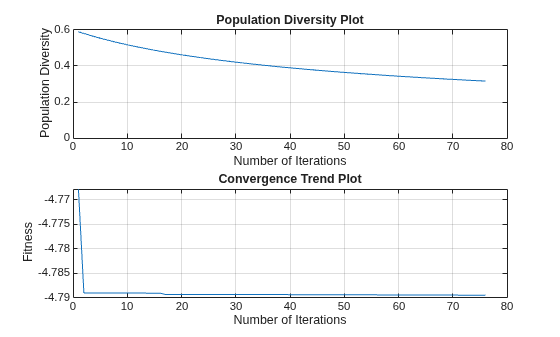
    Figure contains 2 axes objects. Axes object 1 with title Population Diversity Plot, xlabel Number of Iterations, ylabel Population Diversity contains an object of type line. Axes object 2 with title Convergence Trend Plot, xlabel Number of Iterations, ylabel Fitness contains an object of type line.

    View the best member data.

    bestDesign = s.getBestMemberData
    bestDesign = 
      bestMemberData with properties:
    
                 member: [4.8004 0.1100]
           performances: -4.7895
                fitness: -4.7895
        bestIterationId: 72
    
    
    bestDesignValues = bestDesign.member
    bestDesignValues = 1×2
    
        4.8004    0.1100


    Update the reference antenna with best design values from the optimizer. Calculate directivity of the optimized design.

    Observe an increase in directivity value after optimization.

    referenceAnt.Length = bestDesignValues(1);
    referenceAnt.Width = bestDesignValues(2);
    postOptimizationDirectivity = max(max(pattern(referenceAnt,75e6)))
    postOptimizationDirectivity = 
    4.7895
    

    View the surrogate model data used for prediction.

    InitialData = s.getInitializationData
    InitialData = 
      initializationData with properties:
    
             members: [30×2 double]
        performances: [30×1 double]
             fitness: [30×1 double]


    View the data for all iterations.

    iterData = s.getIterationData
    iterData = 
      iterationData with properties:
    
             members: [75×2 double]
        performances: [75×1 double]
             fitness: [75×1 double]


    Check if the algorithm has converged.

    ConvergenceFlag = s.isConverged
    ConvergenceFlag = logical
       1


    Check how many times the evaluation function is computed.

    numEvaluations = s.getNumberOfEvaluations
    numEvaluations = 
    105
    

    Plot the convergence trend.

    s.showConvergenceTrend
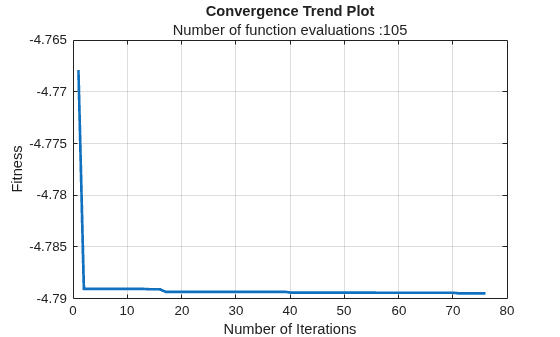
    Figure contains an axes object. The axes object with title Convergence Trend Plot, xlabel Number of Iterations, ylabel Fitness contains an object of type line.

    This code defines the evaluation function used in this example.

    function fitness = customEvaluationOnlyObjective(designVariables)
        
            % Create geometry
            ant = design(dipole,75e6);
            ant.Length = designVariables(1);
            ant.Width = designVariables(2);
        
            % Calculate directivity
            % Optimizer always minimizes the objective hence reverse the sign to maximize gain.
            objective = max(max(pattern(ant,75e6)));
            objective = -objective; 
            
            % As there are no constraints, fitness equals objective.
            fitness = objective;
        
    end

    More About

    expand all

    Version History

    Introduced in R2025a

    expand all