I2C Controller Write
R2026bI2C Controller Write block
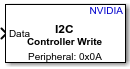
To add a block to a model, double-click the canvas and start typing the block name. Then, select the block from the list.
Libraries:
NVIDIA Jetson and NVIDIA DRIVE /
Communication
Description
Add-On Required: This feature requires the MATLAB Coder Support Package for NVIDIA Jetson and NVIDIA DRIVE Platforms add-on.
The I2C Controller Write block writes to an I2C peripheral device connected to an NVIDIA® Jetson™ hardware board.
Examples
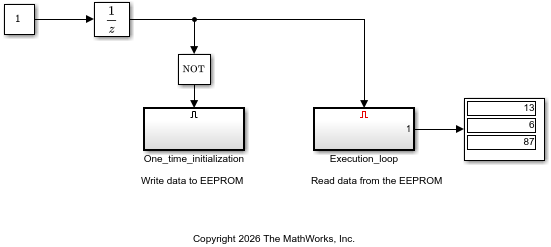
Communicate with EEPROM Device From NVIDIA Jetson Hardware
Read from and write to an EEPROM device by using I2C communication from NVIDIA Jetson hardware.
- Since R2026b
- Open Live Script
Ports
Input
Data to write to the I2C device, specified as a vector.
Data Types: single | double | int8 | int16 | int32 | uint8 | uint16 | uint32
Output
Transmission status, returned as a scalar. If the transmission is
successful, the block outputs 0. If
the transmission generates an error, the block outputs 8.
Dependencies
To enable this port, enable Output error status.
Data Types: uint8
Parameters
To edit block parameters interactively, use the Property Inspector. From the Simulink® Toolstrip, on the Simulation tab, in the Prepare gallery, select Property Inspector.
Hardware board to deploy the model to.
Programmatic Use
To set the block parameter value programmatically, use
the set_param (Simulink) function.
To get the block parameter value
programmatically, use the get_param (Simulink) function.
| Parameter: | Board |
| Values: |
"NVIDIA Jetson Orin Nano Developer Kit"
(default) |
"NVIDIA Jetson Nano Developer Kit"
|
"NVIDIA Jetson Orin NX Developer Kit"
|
"NVIDIA Jetson Xavier NX Developer Kit"
|
"NVIDIA Jetson AGX Xavier Developer Kit"
|
"NVIDIA Jetson AGX Orin Developer Kit"
|
"NVIDIA Jetson TX2 Developer Kit"
|
Example:
get_param(gcb,"Board")
I2C module to use on the board.
The setting for the Board parameter determines the available settings for this parameter and its programmatic parameter settings. This table shows the available I2C Module parameter settings and programmatic parameter names for each board:
| Board Parameter Setting | Available I2C Module Parameter Settings | Programmatic Parameter Name |
|
| I2CModule_1_7 |
|
| I2CModule_0_1 |
|
| I2CModule_1_8 |
Programmatic Use
To set the block parameter value programmatically, use
the set_param (Simulink) function.
To get the block parameter value
programmatically, use the get_param (Simulink) function.
| Parameter: | I2CModule_1_7 |
| Values: |
"7"
(default) |
"1"
|
Example:
get_param(gcb,"I2CModule_1_7")
| Parameter: | I2CModule_0_1 |
| Values: |
"0"
(default) |
"1"
|
Example:
get_param(gcb,"I2CModule_0_1")
| Parameter: | I2CModule_1_8 |
| Values: |
"8"
(default) |
"1"
|
Example:
get_param(gcb,"I2CModule_1_8")
Address of the peripheral device on the I2C module.
Tips
To obtain the device address, use the scanI2CBus
function. For example, for a live connection object named hwObj,
enter:
addresses = scanI2CBus(hwObj);
addresses{:}
ans =
struct with fields:
Bus: 'i2c-1'
Devices: {'74'}
ans =
struct with fields:
Bus: 'i2c-8'
Devices: {'74'}The function returns addresses in the hexadecimal format. Convert the address to
decimal format by using the hex2dec function. For example, to
connect to the device at hexadecimal address 74, set
Peripheral address to hex2dec("74").
Programmatic Use
To set the block parameter value programmatically, use
the set_param (Simulink) function.
To get the block parameter value
programmatically, use the get_param (Simulink) function.
| Parameter: | SubAddress |
| Values: |
"10"
(default) | positive integer in quotes |
Example: set_param(gcb,SubAddress="116")
Example:
set_param(gcb,SubAddress=string(hex2dec("74"))) sets the address
to the hexadecimal value 74.
Order in which to transmit bytes between the Jetson board and the peripheral device.
Programmatic Use
To set the block parameter value programmatically, use
the set_param (Simulink) function.
To get the block parameter value
programmatically, use the get_param (Simulink) function.
| Parameter: | SubByteOrder |
| Values: |
"BigEndian"
(default) |
"LittleEndian"
|
Example:
set_param(gcb,SubByteOrder="LittleEndian")
Select this parameter to write to a specific register on the peripheral device.
Programmatic Use
To set the block parameter value programmatically, use
the set_param (Simulink) function.
To get the block parameter value
programmatically, use the get_param (Simulink) function.
| Parameter: | RegisterAddressMode |
| Values: | "on" (default) | "off" |
Example: get_param(gcb,"RegisterAddressMode")
Register address the block writes to on the peripheral device, specified as a nonnegative integer scalar or a 2-element vector. Each element must be between 0 and 255.
For devices that use 1-byte register addressing, specify the register address as a scalar. For devices that use 2-byte register addressing, specify the register address as a 2-element vector, where each element represents one byte of the address.
Dependencies
To enable this parameter, select the Enable register access parameter.
Programmatic Use
To set the block parameter value programmatically, use
the set_param (Simulink) function.
To get the block parameter value
programmatically, use the get_param (Simulink) function.
| Parameter: | RegisterAddress |
| Values: | "0" (default) | nonnegative integer or 2-element vector in quotes |
Example: set_param(gcb,"RegisterAddress","7")
Example: set_param(gcb,"RegisterAddress","[1 2]")
Select this parameter to send a Not Acknowledge (NACK) signal at the end of data transfer. If the block follows the NACK signal with a STOP bit, the block stops writing and releases the bus. Alternatively, if you select this parameter and select the Remove stop bit at the end of data transfer parameter, the block continues writing without releasing the bus. In this situation, the block sends a NACK signal followed by a START bit.
Dependencies
To enable this parameter, clear the Enable register access parameter.
Programmatic Use
To set the block parameter value programmatically, use
the set_param (Simulink) function.
To get the block parameter value
programmatically, use the get_param (Simulink) function.
| Parameter: | NoAck |
| Values: | "off" (default) | "on" |
Example: set_param(gcb,NoAck="on")
Select this parameter to replace the STOP bit at the end of data transfer with a START bit. When the block sends a START bit, the does not release the bus and continues writing.
If you clear this parameter, the block sends a STOP bit at the end of the data transfer.
Dependencies
To enable this parameter, clear the Enable register access parameter.
Programmatic Use
To set the block parameter value programmatically, use
the set_param (Simulink) function.
To get the block parameter value
programmatically, use the get_param (Simulink) function.
| Parameter: | RepeatedStart |
| Values: | "off" (default) | "on" |
Example: set_param(gcb,RepeatedStart="on")
Select this parameter to output the error status of the data transfer.
Programmatic Use
To set the block parameter value programmatically, use
the set_param (Simulink) function.
To get the block parameter value
programmatically, use the get_param (Simulink) function.
| Parameter: | OutputStatus |
| Values: | "off" (default) | "on" |
Example: get_param(gcb,"OutputStatus")
Extended Capabilities
C/C++ Code Generation
Generate C and C++ code using Simulink® Coder™.
Version History
Introduced in R2026b
MATLAB Command
You clicked a link that corresponds to this MATLAB command:
Run the command by entering it in the MATLAB Command Window. Web browsers do not support MATLAB commands.


Select a Web Site
Choose a web site to get translated content where available and see local events and offers. Based on your location, we recommend that you select: .
You can also select a web site from the following list
How to Get Best Site Performance
Select the China site (in Chinese or English) for best site performance. Other MathWorks country sites are not optimized for visits from your location.
Americas
- América Latina (Español)
- Canada (English)
- United States (English)
Europe
- Belgium (English)
- Denmark (English)
- Deutschland (Deutsch)
- España (Español)
- Finland (English)
- France (Français)
- Ireland (English)
- Italia (Italiano)
- Luxembourg (English)
- Netherlands (English)
- Norway (English)
- Österreich (Deutsch)
- Portugal (English)
- Sweden (English)
- Switzerland
- United Kingdom (English)