trainAutoencoder
R2026b(To be removed) Train an autoencoder
trainAutoencoder will be removed in a future release. For more information,
see Transition Legacy Neural Network Code to dlnetwork Workflows.
For advice on updating your code, see Version History.
Syntax
Description
autoenc = trainAutoencoder(X,hiddenSize)autoenc, with the hidden
representation size of hiddenSize.
autoenc = trainAutoencoder(___,Name=Value)UseGPU to
"on".
Examples
Load the sample data.
X = abalone_dataset;
X is an 8-by-4177 matrix defining eight attributes for 4177 different abalone shells: sex (M, F, and I (for infant)), length, diameter, height, whole weight, shucked weight, viscera weight, shell weight. For more information on the dataset, type help abalone_dataset in the command line.
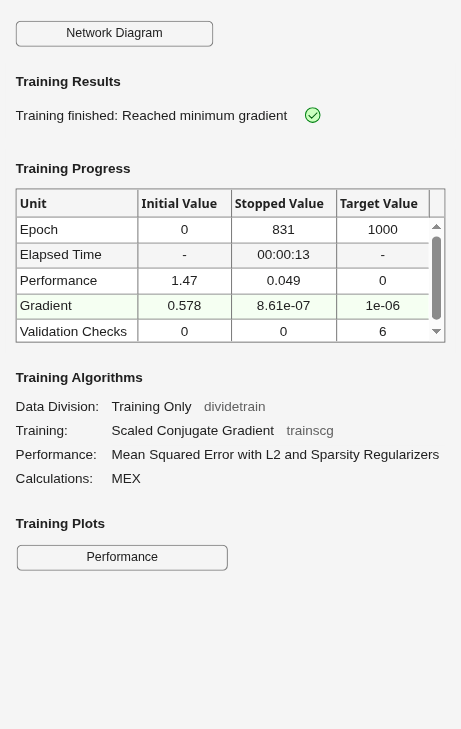
Train a sparse autoencoder with default settings.
autoenc = trainAutoencoder(X);
Reconstruct the abalone shell ring data using the trained autoencoder.
XReconstructed = predict(autoenc,X);
Compute the mean squared reconstruction error.
mseError = mse(X-XReconstructed)
mseError =
0.0167
Input Arguments
Training data, specified as a matrix of training samples or
a cell array of image data. If X is a matrix,
then each column contains a single sample. If X is
a cell array of image data, then the data in each cell must have the
same number of dimensions. The image data can be pixel intensity data
for gray images, in which case, each cell contains an m-by-n matrix.
Alternatively, the image data can be RGB data, in which case, each
cell contains an m-by-n-3 matrix.
Data Types: single | double | cell
Size of hidden representation of the autoencoder, specified as a positive integer value. This number is the number of neurons in the hidden layer.
Data Types: single | double
Name-Value Arguments
Specify optional pairs of arguments as
Name1=Value1,...,NameN=ValueN, where Name is
the argument name and Value is the corresponding value.
Name-value arguments must appear after other arguments, but the order of the
pairs does not matter.
Before R2021a, use commas to separate each name and value, and enclose
Name in quotes.
Example: EncoderTransferFunction="satlin",L2WeightRegularization=0.05
specifies the transfer function for the encoder as the positive
saturating linear transfer function and the L2 weight regularization
as 0.05.
Transfer function for the encoder, specified as one the values listed in this table.
| Transfer Function Option | Definition |
|---|---|
"logsig" | Logistic sigmoid function
|
"satlin" | Positive saturating linear transfer function
|
This argument sets the
EncoderTransferFunction
training parameter property of the output
Autoencoder object as a character
vector.
Example: EncoderTransferFunction="satlin"
Transfer function for the decoder, specified as one the values listed in this table.
| Transfer Function Option | Definition |
|---|---|
"logsig" | Logistic sigmoid function
|
"satlin" | Positive saturating linear transfer function
|
"purelin" | Linear transfer function
|
This argument sets the
DecoderTransferFunction
training parameter property of the output
Autoencoder object as a character
vector.
Example: DecoderTransferFunction="purelin"
Maximum number of training epochs or iterations, specified as a positive integer value.
Example: MaxEpochs=1200
The coefficient for the L2 weight
regularizer in the cost function
(LossFunction), specified as
a positive scalar value.
Example: L2WeightRegularization=0.05
Loss function to use for training, specified
as "msesparse". It corresponds
to the mean squared error function adjusted for
training a sparse autoencoder as follows:
where λ is the coefficient
for the
L2
regularization term and β is
the coefficient for the sparsity regularization
term. You can specify the values of
λ and β by
using the
L2WeightRegularization and
SparsityRegularization
name-value arguments, respectively, while training
an autoencoder.
This argument sets the
LossFunction training parameter
property of the output
Autoencoder object as a character
vector.
Indicator to show the training window,
specified as numeric or logical
1 (true) or
0
(false).
Example: ShowProgressWindow=false
Desired proportion of training examples a
neuron reacts to, specified as a positive scalar
value. Sparsity proportion is a parameter of the
sparsity regularizer. It controls the sparsity of
the output from the hidden layer. A low value for
SparsityProportion usually
leads to each neuron in the hidden layer
"specializing" by only giving a high output for a
small number of training examples. Hence, a low
sparsity proportion encourages higher degree of
sparsity.
Example: SparsityProportion=0.01
is equivalent to saying that each neuron in the
hidden layer should have an average output of 0.1
over the training examples.
Coefficient that controls the impact of the sparsity regularizer in the cost function, specified as a positive scalar value.
Example: SparsityRegularization=1.6
The algorithm to use for training the
autoencoder, specified as
"trainscg". It stands for
scaled conjugate gradient descent [1].
This argument sets the
TrainingAlgorithm training
parameter property of the output
Autoencoder object as a character
vector.
Indicator to rescale the input data, specified
as numeric or logical 1
(true) or 0
(false).
Autoencoders attempt to replicate their input at their output.
For it to be possible, the range of the input data must match the
range of the transfer function for the decoder. trainAutoencoder automatically
scales the training data to this range when training an autoencoder.
If the data was scaled while training an autoencoder, the predict, encode,
and decode methods also scale the data.
Example: ScaleData=false
Option to use GPU for training, specified as one of these values:
"off"— Use the local CPU."on"— Use the local GPU."auto"— Use the local GPU if one is available. Otherwise, use the local CPU.
To use a GPU to accelerate computations in MATLAB®, you must have Parallel Computing Toolbox™ and a supported GPU device. For more information on supported devices, see GPU Computing Requirements (Parallel Computing Toolbox).
Before R2026a: Specify
the UseGPU option as numeric or
logical 0
(false) or 1
(true). These correspond to
"off" and
"auto", respectively.
Example: UseGPU="on"
Output Arguments
Trained autoencoder, returned as an
Autoencoder object. For
information on the properties and methods of this
object, see Autoencoder class
page.
More About
An autoencoder is a neural network which is trained to replicate its input at its output. Training an autoencoder is unsupervised in the sense that no labeled data is needed. The training process is still based on the optimization of a cost function. The cost function measures the error between the input x and its reconstruction at the output .
An autoencoder is composed of an encoder and a decoder. The encoder and decoder can have multiple layers, but for simplicity consider that each of them has only one layer.
If the input to an autoencoder is a vector , then the encoder maps the vector x to another vector as follows:
where the superscript (1) indicates the first layer. is a transfer function for the encoder, is a weight matrix, and is a bias vector. Then, the decoder maps the encoded representation z back into an estimate of the original input vector, x, as follows:
where the superscript (2) represents the second layer. is the transfer function for the decoder, is a weight matrix, and is a bias vector.
Encouraging sparsity of an autoencoder is possible by adding a regularizer to the cost function [2]. This regularizer is a function of the average output activation value of a neuron. The average output activation measure of a neuron i is defined as:
where n is the total number of training examples. xj is the jth training example, is the ith row of the weight matrix , and is the ith entry of the bias vector, . A neuron is considered to be ‘firing’, if its output activation value is high. A low output activation value means that the neuron in the hidden layer fires in response to a small number of the training examples. Adding a term to the cost function that constrains the values of to be low encourages the autoencoder to learn a representation, where each neuron in the hidden layer fires to a small number of training examples. That is, each neuron specializes by responding to some feature that is only present in a small subset of the training examples.
Sparsity regularizer attempts to enforce a constraint on the sparsity of the output from the hidden layer. Sparsity can be encouraged by adding a regularization term that takes a large value when the average activation value, , of a neuron i and its desired value, , are not close in value [2]. One such sparsity regularization term can be the Kullback-Leibler divergence.
Kullback-Leibler divergence is a function for
measuring how different two distributions are. In this case, it
takes the value zero when and are equal to each other, and becomes larger as
they diverge from each other. Minimizing the cost function forces
this term to be small, hence and to be close to each other. You can define the
desired value of the average activation value using the
SparsityProportion name-value pair
argument while training an autoencoder.
When training a sparse autoencoder, it is possible to make the sparsity regulariser small by increasing the values of the weights w(l) and decreasing the values of z(1) [2]. Adding a regularization term on the weights to the cost function prevents it from happening. This term is called the L2 regularization term and is defined by:
where L is the number of hidden layers, nl is the output size of layer l, and kl is the input size of layer l. The L2 regularization term is the sum of the squared elements of the weight matrices for each layer.
The cost function for training a sparse autoencoder is an adjusted mean squared error function as follows:
where λ is the coefficient for
the L2 regularization term
and β is the coefficient for the sparsity
regularization term. You can specify the values of
λ and β by using the
L2WeightRegularization and
SparsityRegularization name-value pair
arguments, respectively, while training an autoencoder.
References
[1] Moller, M. F. “A Scaled Conjugate Gradient Algorithm for Fast Supervised Learning”, Neural Networks, Vol. 6, 1993, pp. 525–533.
[2] Olshausen, B. A. and D. J. Field. “Sparse Coding with an Overcomplete Basis Set: A Strategy Employed by V1.” Vision Research, Vol.37, 1997, pp.3311–3325.
Version History
Introduced in R2015btrainAutoencoder will be removed in a future release.
To learn more about autoencoder workflows, see these examples and topics:
Train an autoencoder using the trainnet function or a custom training loop.
To design and customize your own neural network for these workflows, you can create a network using an array of deep learning layers or a dlnetwork object. To create and edit neural networks interactively and generate code, use the Deep Network Designer app. For a list of layers, see List of Deep Learning Layers.
For more information, see Transition Legacy Neural Network Code to dlnetwork Workflows.
Specifying the UseGPU options as numeric or logical
0 (false) or
1 (true) is not
recommended. Set UseGPU to
"off", "on", or
"auto" instead.
This table shows how to update your code:
| Not recommended | Recommended |
|---|---|
trainAutoencoder(X,UseGPU=false)
(default) | trainAutoencoder(X,UseGPU="off")
(default) |
trainAutoencoder(X,UseGPU=true) | trainAutoencoder(X,UseGPU="auto") |
There are no plans to remove the numeric or logical
0 (false) or
1 (true)
options.
MATLAB Command
You clicked a link that corresponds to this MATLAB command:
Run the command by entering it in the MATLAB Command Window. Web browsers do not support MATLAB commands.


Select a Web Site
Choose a web site to get translated content where available and see local events and offers. Based on your location, we recommend that you select: .
You can also select a web site from the following list
How to Get Best Site Performance
Select the China site (in Chinese or English) for best site performance. Other MathWorks country sites are not optimized for visits from your location.
Americas
- América Latina (Español)
- Canada (English)
- United States (English)
Europe
- Belgium (English)
- Denmark (English)
- Deutschland (Deutsch)
- España (Español)
- Finland (English)
- France (Français)
- Ireland (English)
- Italia (Italiano)
- Luxembourg (English)
- Netherlands (English)
- Norway (English)
- Österreich (Deutsch)
- Portugal (English)
- Sweden (English)
- Switzerland
- United Kingdom (English)