Multichannel FIR Filter for FPGA
R2026bThis example shows how to implement a discrete FIR filter with multiple input data streams for hardware and then increase the area efficiency of the filter on hardware.
In many DSP applications, multiple data streams are filtered by the same filter. The straightforward solution is to implement a separate filter for each channel. You can create a more area-efficient structure by sharing one filter implementation across multiple channels. The resulting hardware requires a faster clock rate compared to the clock rate used for a single channel filter.
Model a Multichannel FIR Filter
modelname = "dspmultichannelhdl";
open_system(modelname);
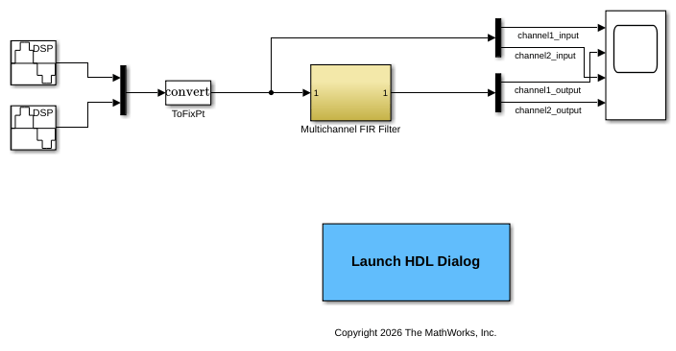
The model contains a two-channel FIR filter. The input data vector includes two streams of sinusoidal signal with different frequencies. The input data streams are processed by a lowpass filter whose coefficients are specified by the Model Properties InitFcn Callback function.
Simulation Results
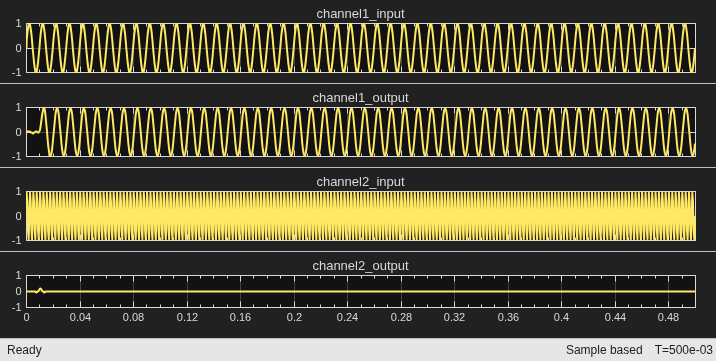
Run the example model and open the Scope to compare the two data streams.
sim(modelname);
open_system("dspmultichannelhdl/Scope");
Generate HDL Code and Test Bench
You must have an HDL Coder™ license to generate HDL code for this example model. Use this command to generate HDL code for the Multichannel FIR Filter subsystem.
hdlsetup(modelname);
systemname = "dspmultichannelhdl/Multichannel FIR Filter";
makehdl(systemname);
### <a href="matlab:configset.internal.open('dspmultichannelhdl','ArtificialAlgebraicLoopMsg')">ArtificialAlgebraicLoopMsg</a> value is set from 'warning' to 'error' (<a href="matlab:set_param('dspmultichannelhdl','ArtificialAlgebraicLoopMsg', 'warning')">revert</a>).
### <a href="matlab:configset.internal.open('dspmultichannelhdl','BlockReduction')">BlockReduction</a> value is set from 'on' to 'off' (<a href="matlab:set_param('dspmultichannelhdl','BlockReduction', 'on')">revert</a>).
### <a href="matlab:configset.internal.open('dspmultichannelhdl','ConditionallyExecuteInputs')">ConditionallyExecuteInputs</a> value is set from 'on' to 'off' (<a href="matlab:set_param('dspmultichannelhdl','ConditionallyExecuteInputs', 'on')">revert</a>).
### <a href="matlab:configset.internal.open('dspmultichannelhdl','DefaultParameterBehavior')">DefaultParameterBehavior</a> value is set from 'Tunable' to 'Inlined' (<a href="matlab:set_param('dspmultichannelhdl','DefaultParameterBehavior', 'Tunable')">revert</a>).
### <a href="matlab:configset.internal.open('dspmultichannelhdl','InheritOutputTypeSmallerThanSingle')">InheritOutputTypeSmallerThanSingle</a> value is set from 'off' to 'on' (<a href="matlab:set_param('dspmultichannelhdl','InheritOutputTypeSmallerThanSingle', 'off')">revert</a>).
### <a href="matlab:configset.internal.open('dspmultichannelhdl','SingleTaskRateTransMsg')">SingleTaskRateTransMsg</a> value is set from 'none' to 'error' (<a href="matlab:set_param('dspmultichannelhdl','SingleTaskRateTransMsg', 'none')">revert</a>).
### The listed configuration parameter values are modified as a part of hdlsetup. Please refer to <a href="matlab:helpview(fullfile(docroot, 'hdlcoder', 'helptargets.map'), 'msg_hdlsetup_function')">hdlsetup</a> document for best practices on model settings.
### Working on the model <a href="matlab:open_system('dspmultichannelhdl')">dspmultichannelhdl</a>
### Generating HDL for <a href="matlab:open_system('dspmultichannelhdl/Multichannel FIR Filter')">dspmultichannelhdl/Multichannel FIR Filter</a>
### Using the config set for model <a href="matlab:configset.showParameterGroup('dspmultichannelhdl', { 'HDL Code Generation' } )">dspmultichannelhdl</a> for HDL code generation parameters.
### Running HDL checks on the model 'dspmultichannelhdl'.
### Begin compilation of the model 'dspmultichannelhdl'...
### Working on the model 'dspmultichannelhdl'...
### Working on... GenerateModel
### Begin model generation 'gm_dspmultichannelhdl'...
### Copying DUT to the generated model....
### Model generation complete.
### Generated model saved at <a href="matlab:open_system('hdlsrc/dspmultichannelhdl/gm_dspmultichannelhdl.slx')">hdlsrc/dspmultichannelhdl/gm_dspmultichannelhdl.slx</a>
### Begin VHDL Code Generation for 'dspmultichannelhdl'.
### Working on dspmultichannelhdl/Multichannel FIR Filter/Discrete FIR Filter as hdlsrc/dspmultichannelhdl/Discrete_FIR_Filter.vhd.
### Working on dspmultichannelhdl/Multichannel FIR Filter as hdlsrc/dspmultichannelhdl/Multichannel_FIR_Filter.vhd.
### Generating package file hdlsrc/dspmultichannelhdl/Multichannel_FIR_Filter_pkg.vhd.
### Code Generation for 'dspmultichannelhdl' completed.
### Generating HTML files for code generation report at <a href="matlab:hdlcoder.report.openReportV2Dialog('/tmp/Bdoc26b_3351752_684864/tpd2933401/dsp_hdlcoder-ex33140559/hdlsrc/dspmultichannelhdl', '/tmp/Bdoc26b_3351752_684864/tpd2933401/dsp_hdlcoder-ex33140559/hdlsrc/dspmultichannelhdl/html/index.html')">index.html</a>
### Creating HDL Code Generation Check Report <a href="matlab:hdlcoder.report.openDdgViaHyperlink('dspmultichannelhdl', '/tmp/Bdoc26b_3351752_684864/tpd2933401/dsp_hdlcoder-ex33140559/hdlsrc/dspmultichannelhdl', 'Multichannel_FIR_Filter_report.html')">Multichannel_FIR_Filter_report.html</a>
### HDL check for 'dspmultichannelhdl' complete with 0 errors, 0 warnings, and 0 messages.
### HDL code generation complete.
Use this command to generate a test bench that compares the HDL simulation results with the Simulink model results.
makehdltb(systemname);
Increase Hardware Area Efficiency of Filter
To increase the area efficiency of the filter, share the filter resources across multiple channels. To do this, implement vector streaming for the Discrete FIR Filter block. For more information on the streaming optimization in HDL Coder, see Streaming (HDL Coder).
Set the StreamingFactor to 2 and generate HDL code.
hdlset_param("dspmultichannelhdl/Multichannel FIR Filter/Discrete FIR Filter", "StreamingFactor", 2);
makehdl(systemname,"TargetDirectory","hdlsrc_optimized");
### Working on the model <a href="matlab:open_system('dspmultichannelhdl')">dspmultichannelhdl</a>
### Generating HDL for <a href="matlab:open_system('dspmultichannelhdl/Multichannel FIR Filter')">dspmultichannelhdl/Multichannel FIR Filter</a>
### Using the config set for model <a href="matlab:configset.showParameterGroup('dspmultichannelhdl', { 'HDL Code Generation' } )">dspmultichannelhdl</a> for HDL code generation parameters.
### Running HDL checks on the model 'dspmultichannelhdl'.
### Begin compilation of the model 'dspmultichannelhdl'...
### Working on the model 'dspmultichannelhdl'...
### The DUT requires an initial pipeline setup latency. Each output port experiences these additional delays.
### Output port 1: 1 cycles.
### Working on... GenerateModel
### Begin model generation 'gm_dspmultichannelhdl'...
### Rendering DUT with optimization related changes (IO, Area, Pipelining)...
### Model generation complete.
### Generated model saved at <a href="matlab:open_system('hdlsrc_optimized/dspmultichannelhdl/gm_dspmultichannelhdl.slx')">hdlsrc_optimized/dspmultichannelhdl/gm_dspmultichannelhdl.slx</a>
### Begin VHDL Code Generation for 'dspmultichannelhdl'.
### MESSAGE: The design requires 2 times faster clock with respect to the base rate = 0.0005.
### Begin VHDL Code Generation for 'Multichannel_FIR_Filter_tc'.
### Working on Multichannel_FIR_Filter_tc as hdlsrc_optimized/dspmultichannelhdl/Multichannel_FIR_Filter_tc.vhd.
### Code Generation for 'Multichannel_FIR_Filter_tc' completed.
### Working on dspmultichannelhdl/Multichannel FIR Filter/Discrete FIR Filter as hdlsrc_optimized/dspmultichannelhdl/Discrete_FIR_Filter.vhd.
### Working on dspmultichannelhdl/Multichannel FIR Filter as hdlsrc_optimized/dspmultichannelhdl/Multichannel_FIR_Filter.vhd.
### Generating package file hdlsrc_optimized/dspmultichannelhdl/Multichannel_FIR_Filter_pkg.vhd.
### Code Generation for 'dspmultichannelhdl' completed.
### Generating HTML files for code generation report at <a href="matlab:hdlcoder.report.openReportV2Dialog('/tmp/Bdoc26b_3351752_684864/tpd2933401/dsp_hdlcoder-ex33140559/hdlsrc_optimized/dspmultichannelhdl', '/tmp/Bdoc26b_3351752_684864/tpd2933401/dsp_hdlcoder-ex33140559/hdlsrc_optimized/dspmultichannelhdl/html/index.html')">index.html</a>
### Creating HDL Code Generation Check Report <a href="matlab:hdlcoder.report.openDdgViaHyperlink('dspmultichannelhdl', '/tmp/Bdoc26b_3351752_684864/tpd2933401/dsp_hdlcoder-ex33140559/hdlsrc_optimized/dspmultichannelhdl', 'Multichannel_FIR_Filter_report.html')">Multichannel_FIR_Filter_report.html</a>
### HDL check for 'dspmultichannelhdl' complete with 0 errors, 0 warnings, and 1 messages.
### HDL code generation complete.
You can alternatively specify the StreamingFactor using the HDL Block Properties menu. To do this, in the model, right-click the Discrete FIR Filter block. To add the HDL Coder app options to the context menu, point to Select Apps and click HDL Coder. Then, in the HDL Coder app section, select HDL Block Properties.
Compare Resource Utilization
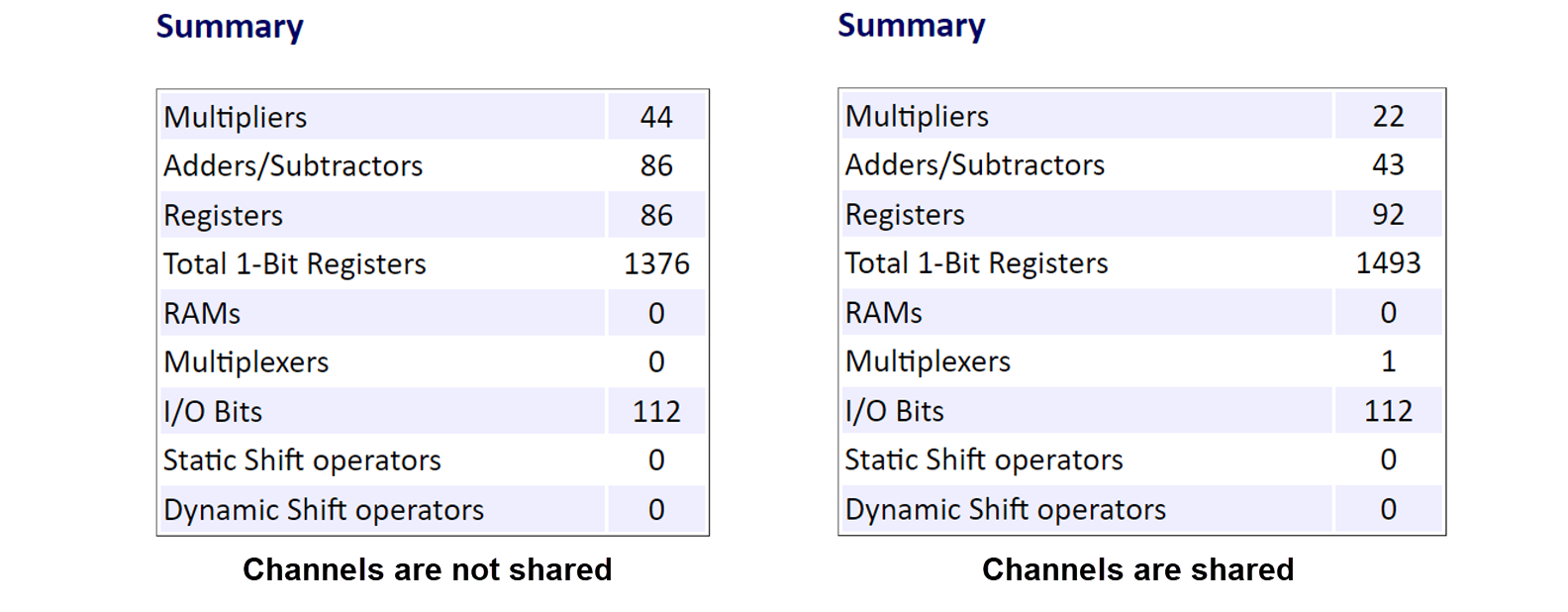
Compare resource use with and without streaming. In the code generation report, open the High-Level Resource Report section. For more information on code generation reports, see Create and Use Code Generation Reports (HDL Coder).
Using the streaming optimization halves the amount of required Multipliers and Adders/Subtractors and requires a clock rate that is two-times faster than the design base rate.