Main Content

plotFuzzyClusters

Plot data clusters for fuzzy-c-means clustering

Since R2025a

    Description

    plotFuzzyClusters(data,U) plots fuzzy clusters using input data data and fuzzy partition matrix U. To compute U, first cluster the data using the fcm function.

    The plot contains an Nf-by-Nf array of axes, where Nf is the number of features in data. In the plot:

    • Each data point is classified into the cluster for which the data point has the highest membership value.

    • The nondiagonal axes show 2-D plots for each pairwise feature combination.

    • The diagonal axes show the marginal cluster membership values of the data points with respect to each feature.

    example

    plotFuzzyClusters(data,U,Name=Value) specifies options using one or more name-value arguments. For example, plotFuzzyClusters(data,U,ClusterCenters=centers) plots the clustered data along with the computed cluster centers specified by centers.

    example

    h = plotFuzzyClusters(___) returns a tiled chart layout that you can use to modify the plot properties. Use this syntax to customize the plot appearance or when plotting fuzzy clusters in an App Designer app.

    example

    Examples

    collapse all

    Load the data to cluster. The three columns in clusterDemo correspond to the three features in the data.

    load clusterDemo.dat

    Cluster the data into three clusters using the fcm function.

    options = fcmOptions(...
        NumClusters=3,...
        Verbose=false);
    [centers,U,objFun] = fcm(clusterDemo,options);

    Plot the clusters using the fuzzy partition matrix.

    plotFuzzyClusters(clusterDemo,U)
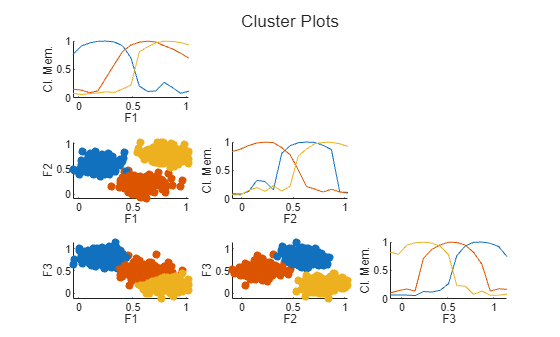
    Figure contains 6 axes objects. Axes object 1 with xlabel F1, ylabel Cl. Mem. contains 3 objects of type line. Axes object 2 with xlabel F1, ylabel F2 contains 3 objects of type scatter. Axes object 3 with xlabel F2, ylabel Cl. Mem. contains 3 objects of type line. Axes object 4 with xlabel F1, ylabel F3 contains 3 objects of type scatter. Axes object 5 with xlabel F2, ylabel F3 contains 3 objects of type scatter. Axes object 6 with xlabel F3, ylabel Cl. Mem. contains 3 objects of type line.

    Because there are three features in the data, the plot shows a 3-by-3 grid of axes. The nondiagonal axes show the classified data points for each pair of features. The diagonal axes show the marginal cluster membership values across each feature range.

    By default, plotFuzzyClusters plots each data point. Alternatively, you can interpolate the data points and create surface plots.

    plotFuzzyClusters(clusterDemo,U,PlotType="surface")
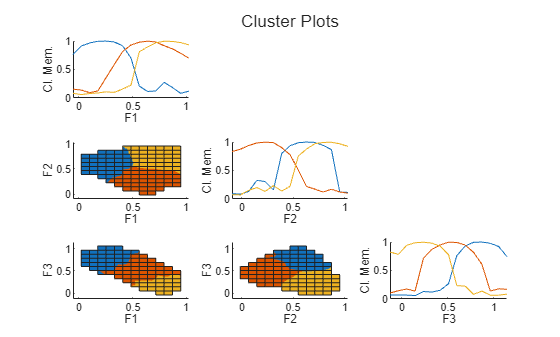
    Figure contains 6 axes objects. Axes object 1 with xlabel F1, ylabel Cl. Mem. contains 3 objects of type line. Axes object 2 with xlabel F1, ylabel F2 contains 3 objects of type surface. Axes object 3 with xlabel F2, ylabel Cl. Mem. contains 3 objects of type line. Axes object 4 with xlabel F1, ylabel F3 contains 3 objects of type surface. Axes object 5 with xlabel F2, ylabel F3 contains 3 objects of type surface. Axes object 6 with xlabel F3, ylabel Cl. Mem. contains 3 objects of type line.

    Load the data to be clustered.

    load fcmdata.dat

    Cluster the data into two clusters.

    options = fcmOptions(...
        NumClusters=2,...
        Verbose=false);
    [centers,U] = fcm(fcmdata,options);

    Plot the clustered data along with the cluster centers.

    plotFuzzyClusters(fcmdata,U,ClusterCenters=centers)
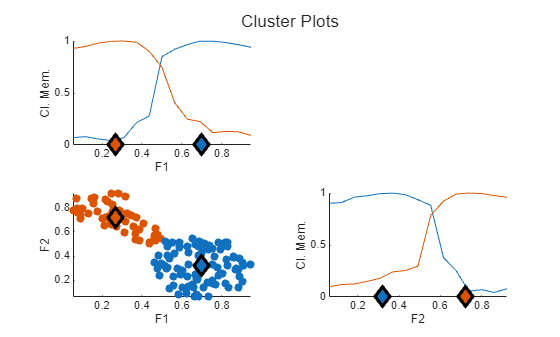
    Figure contains 3 axes objects. Axes object 1 with xlabel F1, ylabel Cl. Mem. contains 4 objects of type line. Axes object 2 with xlabel F1, ylabel F2 contains 4 objects of type scatter. Axes object 3 with xlabel F2, ylabel Cl. Mem. contains 4 objects of type line.

    In each plot, the cluster centers are shown as diamonds.

    Load the data to cluster. The three columns in clusterDemo correspond to the three features in the data.

    load clusterDemo.dat

    Cluster the data into three clusters using the fcm function.

    options = fcmOptions(...
        NumClusters=3,...
        Verbose=false);
    [centers,U,objFun] = fcm(clusterDemo,options);

    View the clustering results for the first and second features.

    plotFuzzyClusters(clusterDemo,U,...
        SelectedFeatures=[1 2])
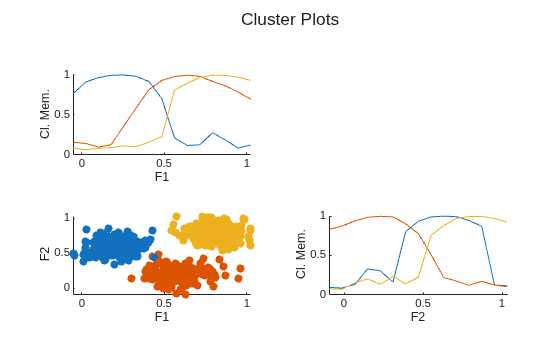
    Figure contains 3 axes objects. Axes object 1 with xlabel F1, ylabel Cl. Mem. contains 3 objects of type line. Axes object 2 with xlabel F1, ylabel F2 contains 3 objects of type scatter. Axes object 3 with xlabel F2, ylabel Cl. Mem. contains 3 objects of type line.

    To expand the data plot, you can suppress the membership plots on the diagonal axes.

    plotFuzzyClusters(clusterDemo,U,...
        SelectedFeatures=[1 2], ...
        ShowMembershipPlot=false)
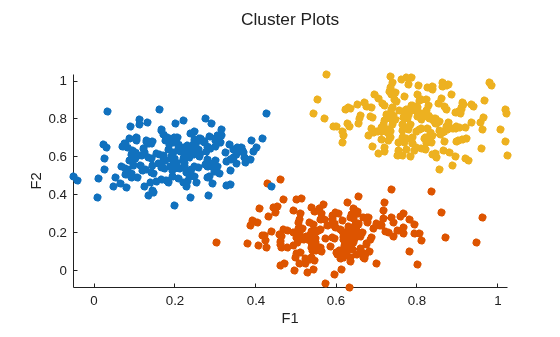
    Figure contains an axes object. The axes object with xlabel F1, ylabel F2 contains 3 objects of type scatter.

    Load the data to be clustered.

    load fcmdata.dat

    Cluster the data into two clusters.

    options = fcmOptions(...
        NumClusters=2,...
        Verbose=false);
    [centers,U] = fcm(fcmdata,options);

    Plot the clustered specifying nondefault feature names and the plot title.

    plotFuzzyClusters(fcmdata,U,...
        FeatureNames=["Feature 1", "Feature 2"], ...
        Title="Clustered Data")
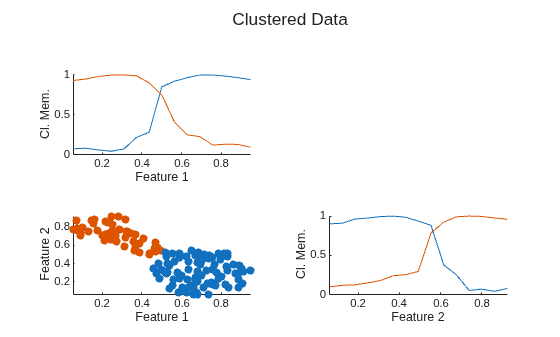
    Figure contains 3 axes objects. Axes object 1 with xlabel Feature 1, ylabel Cl. Mem. contains 2 objects of type line. Axes object 2 with xlabel Feature 1, ylabel Feature 2 contains 2 objects of type scatter. Axes object 3 with xlabel Feature 2, ylabel Cl. Mem. contains 2 objects of type line.

    Load the data to cluster. For this example, create a random data set.

    data = rand(100,2);

    Cluster the data into two clusters.

    options = fcmOptions(...
        NumClusters=2,...
        Verbose=false);
    [centers,U] = fcm(data,options);

    Plot the clusters and return a handle to the resulting tiled chart layout. For this example, suppress the cluster membership plots.

    h = plotFuzzyClusters(data,U);
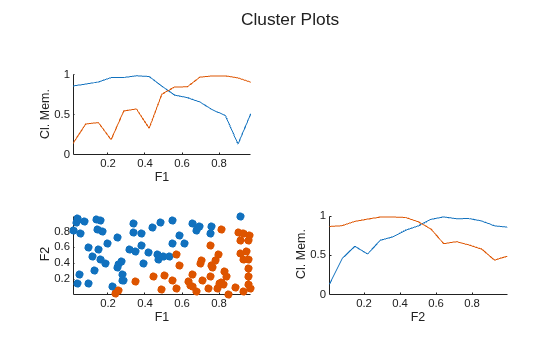
    Figure contains 3 axes objects. Axes object 1 with xlabel F1, ylabel Cl. Mem. contains 2 objects of type line. Axes object 2 with xlabel F1, ylabel F2 contains 2 objects of type scatter. Axes object 3 with xlabel F2, ylabel Cl. Mem. contains 2 objects of type line.

    You can customize the plot by modifying its properties using the plot handle, which is useful when adding a fuzzy cluster plot to an App Designer app.

    For this example, change the tile indexing to move the cluster plot to the upper triangular area.

    h.TileIndexing = "columnmajor";
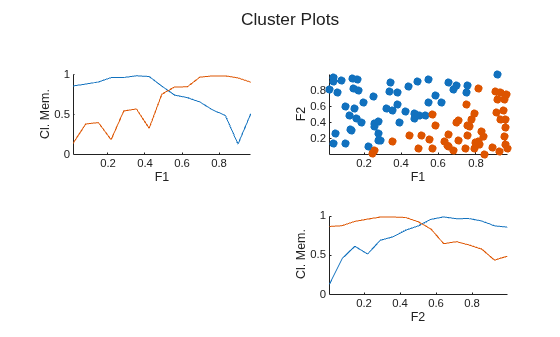
    Figure contains 3 axes objects. Axes object 1 with xlabel F1, ylabel Cl. Mem. contains 2 objects of type line. Axes object 2 with xlabel F1, ylabel F2 contains 2 objects of type scatter. Axes object 3 with xlabel F2, ylabel Cl. Mem. contains 2 objects of type line.

    You can also modify the plot appearance using the plot handle. For example, add grid lines to each of the axes.

    h.Children(1).XGrid = "on";
    h.Children(1).YGrid = "on";
    h.Children(2).XGrid = "on";
    h.Children(2).YGrid = "on";
    h.Children(3).XGrid = "on";
    h.Children(3).YGrid = "on";
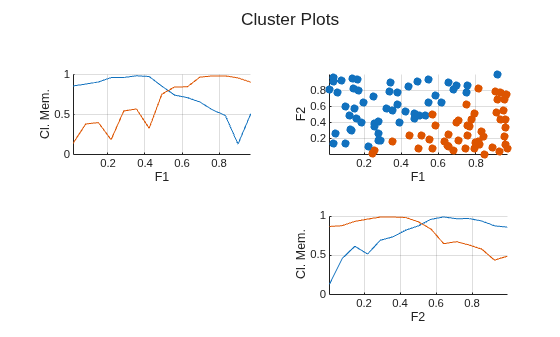
    Figure contains 3 axes objects. Axes object 1 with xlabel F1, ylabel Cl. Mem. contains 2 objects of type line. Axes object 2 with xlabel F1, ylabel F2 contains 2 objects of type scatter. Axes object 3 with xlabel F2, ylabel Cl. Mem. contains 2 objects of type line.

    Input Arguments

    collapse all

    Data points, specified as an Nd-by-Nf matrix, where Nd is the number of data points and Nf is the number of features in each data point.

    Fuzzy partition matrix returned by the fcm function when clustering the data in data, specified as an Nc-by-Nd matrix. Element U(i,j) indicates the degree of membership μij of the jth data point in the ith cluster.

    Name-Value Arguments

    collapse all

    Specify optional pairs of arguments as Name1=Value1,...,NameN=ValueN, where Name is the argument name and Value is the corresponding value. Name-value arguments must appear after other arguments, but the order of the pairs does not matter.

    Example: PlotType="surface" plots a surface plot.

    Cluster centers returned by the fcm function, specified as an Nc-by-Nf matrix, where Nc is the number of clusters and Nf is the number of data features.

    To omit the cluster centers from the plot, set ClusterCenters to [].

    Dependencies

    • The number of rows in ClusterCenters must match the number of rows in U.

    • The number of columns in ClusterCenters must match the number of columns in data.

    Plot type, specified as one of these values:

    • "scatter" — Scatter plot of data points specified in data.

    • "surface" — Surface plot with interpolated regions between specified data points.

    Since R2026a

    Option to display cluster membership plots on diagonal axes, specified as one of these values:

    • true — Display membership plots.

    • false — Do not display membership plots.

    Since R2026a

    Features to plot, specified as a vector positive integers. By default, plotFuzzyClusters shows plots for all features.

    Example: plotFuzzyClusters(data,U,SelectedFeatures=[1 3]) shows plots for the features in the first and third columns of data.

    Since R2026a

    Feature names for labeling the plot axes, specified as a string array or cell array of character vectors. The number of feature names must be one of these values:

    • Number of features in the input data, where each element of FeatureNames contains the feature name for the corresponding column in data.

    • Number of features specified in SelectedVariables, where each element of FeatureNames contains the feature name for the corresponding feature index in SelectedFeatures.

    By default, each feature name is "F<n>", where <n> is the corresponding column number from data.

    Option to display a legend, specified as one of these values:

    • true — Display a legend.

    • false — Do not display a legend.

    Since R2026a

    Plot title, specified as a string or character vector.

    Output Arguments

    collapse all

    Plot handle, returned as a TiledChartLayout object.

    Version History

    Introduced in R2025a

    expand all

    See Also

    Functions

    Live Editor Tasks