Nearest-Neighbor Search
R2026bThere are a few ways to compute nearest-neighbors in MATLAB, depending on the dimensionality of the problem:
For 2-D and 3-D searches, use the
nearestNeighbormethod provided by thetriangulationclass and inherited by thedelaunayTriangulationclass.For 4-D and higher, use the
delaunaynfunction to construct the triangulation and the complementarydsearchnfunction to perform the search. While these N-D functions support 2-D and 3-D, they are not as general and efficient as the triangulation search methods.
This example shows how to perform a nearest-neighbor search in 2-D with delaunayTriangulation.
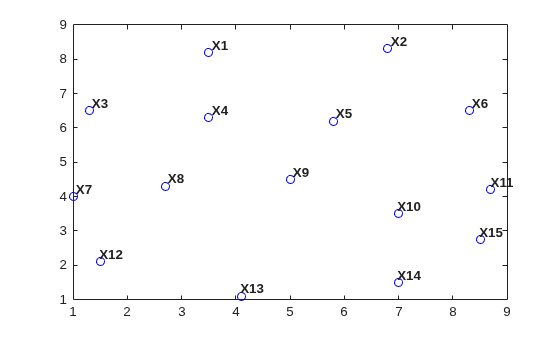
Begin by creating a random set of 15 points.
X = [3.5 8.2; 6.8 8.3; 1.3 6.5; 3.5 6.3; 5.8 6.2; 8.3 6.5;...
    1 4; 2.7 4.3; 5 4.5; 7 3.5; 8.7 4.2; 1.5 2.1; 4.1 1.1; ...
    7 1.5; 8.5 2.75];
Plot the points and add annotations to show the ID labels.
plot(X(:,1),X(:,2),'ob')
hold on
vxlabels = arrayfun(@(n) {sprintf("X%d",n)},(1:15)');
Hpl = text(X(:,1) + 0.2,X(:,2) + 0.2,vxlabels, ...
      FontWeight="bold",HorizontalAlignment="center", ...
      BackgroundColor="none");
hold off
Create a Delaunay triangulation from the points.
dt = delaunayTriangulation(X);
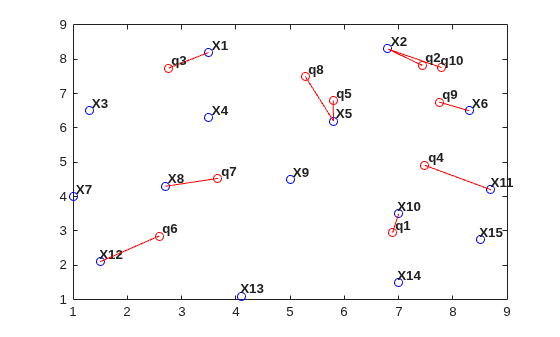
Create some query points and for each query point find the index of its corresponding nearest neighbor in X using the nearestNeighbor method.
numq = 10;
rng(0,"twister");
q = 2 + rand(numq,2)*6;
xi = nearestNeighbor(dt,q);
Add the query points to the plot and add line segments joining the query points to their nearest neighbors.
xnn = X(xi,:);

hold on
plot(q(:,1),q(:,2),"or");
plot([xnn(:,1) q(:,1)]',[xnn(:,2) q(:,2)]',"-r");

vxlabels = arrayfun(@(n) {sprintf("q%d",n)},(1:numq)');
Hpl = text(q(:,1) + 0.2,q(:,2) + 0.2,vxlabels, ...
      FontWeight="bold",HorizontalAlignment="center", ...
      BackgroundColor="none");

hold off
Performing a nearest-neighbor search in 3-D is a direct extension of the 2-D example based on delaunayTriangulation.
For 4-D and higher, use the delaunayn and dsearchn functions as illustrated in the following example:
Create a random sample of points in 4-D and triangulate the points using delaunayn:
X = 20*rand(50,4)-10;
tri = delaunayn(X);
Create some query points and for each query point find the index of its corresponding nearest-neighbor in X using the dsearchn function:
q = rand(5,4);
xi = dsearchn(X,tri, q);
The nearestNeighbor method and the dsearchn function allow the Euclidean distance between the query point and its nearest-neighbor to be returned as an optional argument. In the 4-D example, you can compute the distances, dnn, as follows:
[xi,dnn] = dsearchn(X,tri,q);

