setSecret
R2026bDescription
setSecret( adds a secret with the
specified name to your MATLAB® vault. Your vault and secrets persist across MATLAB sessions.secretname)
Each secret consists of a name, value, and optional metadata.
Secret name – A unique case-sensitive text identifier for the secret. The secret name is stored unencrypted in your vault as a string scalar.
Secret value – A text value associated with the secret. The Secret Prompt dialog box, where you enter the secret value, supports copy-paste functionality. The secret value is stored encrypted in your vault using industry standard AES-256 encryption. The secret value is returned as a string scalar.
Secret metadata – A dictionary containing additional information associated with the secret. The optional secret metadata is stored unencrypted in your vault.
On an installed version of MATLAB, your vault is accessible only from the exact combination of your operating system account and local machine, and your vault and secrets do not leave your local machine. With MATLAB Online™, your vault is accessible with your MathWorks Account, and your vault and secrets are stored on a secure database on MathWorks® servers. For increased security when you use MATLAB Online, enable two-step verification for your MathWorks Account.
setSecret(
specifies whether to overwrite an existing secret value in the vault.secretname,Overwrite=tf)
Examples
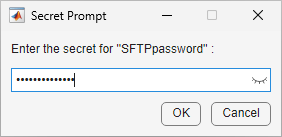
Create a secret by initiating the Secret Prompt dialog box with the name of your secret.
setSecret("SFTPpassword")Use the dialog box to set your secret value and add the secret to your MATLAB vault. Toggle the eye icon in the text box to hide or show the characters in your value.
View all the secret names and metadata sizes in your vault.
listSecrets does not show secret values or the details of secret
metadata.
listSecrets
      SecretName                      SecretMetadata
    ______________    _______________________________________________

"SFTPpassword" {[dictionary (string ⟼ cell) with no entries]}Create a secret to store your SFTP server password by initiating the Secret Prompt dialog box with the name of your secret.
setSecret("SFTPpassword")Use the dialog box to set your secret value and add the secret to your MATLAB vault. Toggle the eye icon in the text box to hide or show the characters in your value.

To provide the SFTP server password, use the secret from your vault containing the password value.
s = sftp("sftp.example.net","adam",Password=getSecret("SFTPpassword"));
View all the secret names and metadata sizes in your vault.
listSecrets
      SecretName                      SecretMetadata
    ______________    _______________________________________________

    "SFTPpassword"    {[dictionary (string ⟼ cell) with no entries]}
Initiate the Secret Prompt dialog box with the name of the secret whose value you want to overwrite. You can use tab completion to select an existing secret.
setSecret("SFTPpassword",Overwrite=true)Set your new secret value using the dialog box.
View your updated vault. Note that there is no change to the secret name or metadata.
listSecrets
      SecretName                      SecretMetadata
    ______________    _______________________________________________

    "SFTPpassword"    {[dictionary (string ⟼ cell) with no entries]}
Input Arguments
Limitations
The
setsecretworkflow requires the Secret Prompt dialog box, which requires a graphical user interface.
Version History
Introduced in R2024aSee Also
getSecret | isSecret | listSecrets | removeSecret | setSecretMetadata | getSecretMetadata

