Main Content

Synchronizer

R2026b

Mechanical synchronizer

  • Synchronizer block

Libraries:
Simscape / Driveline / Clutches

Description

The Synchronizer block represents a synchronizer that contains a dog clutch, a cone clutch, and a translational detent. Synchronizers facilitate smooth shifting in manual transmissions by equalizing the speeds of gears before engagement, reducing gear clash and ensuring seamless transitions between different gear ratios.

The shift linkage first translates to engage the cone clutch. Frictional torque causes the shift linkage and cone clutch shaft to rotate at equal speed. When the force acting on the shift linkage exceeds the detent force, the dog clutch can engage.
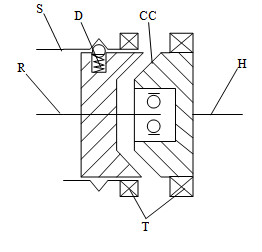
Cross-section of a typical synchronizer. The cone clutch on the hub side is disengaged from the ring side.

The schematic illustrates a synchronizer in the disengaged state. In this state, the ring (R) and hub (H) shafts can spin independently at different speeds. To synchronize ring and hub shaft speeds, the shift linkage (S) translates toward the hub shaft to engage the cone clutch. The friction surfaces of the cone clutch produce a frictional torque that equalizes the rotational speeds of the ring and hub shafts. The dog clutch teeth (T) can engage when the translational force acting on the shift linkage exceeds the peak detent force. The peak detent force should allow sufficient time and normal force to equalize ring and hub shaft speeds so that the dog clutch can engage.
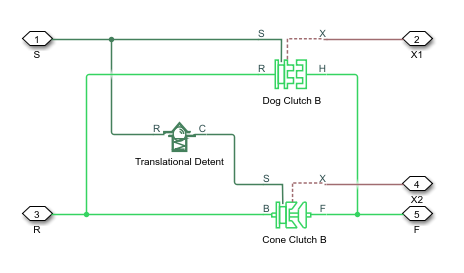
Dog Clutch block connected in parallel with a Cone Clutch block. A Translational Detent block is connected between their shift linkage ports.

The model implements the Dog Clutch, Cone Clutch, and Translational Detent blocks. Refer to each block reference page for more information on the corresponding block function. You can use a similar approach to model customized versions of the synchronizer. One example is the Transmission (Detailed) subsystem in the Vehicle with Manual Transmission example model.

Connections R and H are mechanical rotational conserving ports that represent the ring (R) and hub (H), respectively. Connection S is a mechanical translational conserving port that represents the ring shifter handle.

Connections X1 and X2 are physical signal outputs that report the shift linkage positions of the dog clutch and cone clutch, respectively. The shift linkage positions are zero when the clutch is fully disengaged. When the dog clutch is fully engaged, the dog clutch shift linkage position has a magnitude equal to the sum of the dog clutch ring-hub gap and the tooth height. When cone clutch is fully engaged, the cone clutch shift linkage position has a magnitude equal to the cone clutch ring-hub gap.

Dog Clutch Torque Transmission Models

You can choose from these torque transmission models.

Friction Clutch Approximate Model

When you set Torque transmission model to Friction clutch approximation - Suitable for HIL and, the block treats the clutch engagement as a friction phenomenon between the ring and the hub. This setting is better suited for linearization, fixed-step simulation, and hardware-in-loop (HIL) simulation. The block uses a composite implementation of the Fundamental Friction Clutch block.

When you use this setting, the clutch has three possible configurations: disengaged, engaged, and locked. When disengaged, the contact force between the ring and the hub is zero. This force remains zero until the shift linkage reaches the minimum position for engagement.

When the ring-hub tooth overlap, h, exceeds the minimum value for engagement, the contact force between the two components begins to increase linearly with the shift linkage position, z.

At full engagement, the contact force reaches its maximum value and the clutch state switches to locked. In this state, the ring and the hub spin as a unit without slip. To unlock the clutch, the transmitted torque must exceed the value of the Maximum transmitted torque parameter.

Dynamic with Backlash

When you set Torque transmission model to Dynamic with backlash, the block simulates clutch phenomena such as backlash, torsional compliance, and contact forces between ring and hub teeth. This model provides greater accuracy than the friction clutch approximation.

When you use this setting, the clutch has two possible configurations: disengaged and engaged. When disengaged, the contact force between the ring and the hub is zero. This force remains zero until the shift linkage reaches the minimum position for engagement.

When the ring-hub tooth overlap, h, exceeds the engagement threshold value, the clutch transmits torque. This torque is the sum of torsional spring and damper components, including backlash between the ring and hub teeth, such thatTC={kRH(ϕδ2)μR·ωϕ>δ20δ2<ϕ<δ2kRH(ϕ+δ2)μRωϕ<δ2,where:

  • kRH is the torsional stiffness of the ring-hub coupling.

  • ϕ is the relative angle, about the common rotation axis, between the ring and the hub.

  • δ is the backlash between ring and hub teeth.

  • ω is the relative angular velocity between the ring and the hub. This variable describes how fast the two components slip past each other.

Compliant end stops limit the translational motion of the clutch shift linkage and the ring. The compliance model treats the end stops as linear spring-damper sets. The location of the end stops depends on the relative angle and angular velocity between the ring and hub teeth:

  • If the teeth align and the relative angular velocity is smaller than the maximum value for clutch engagement, the end stop location is the sum of the ring-hub clearance when fully disengaged and the tooth height. The clutch can engage in this end stop position.

  • If the teeth do not align or the relative angular velocity exceeds the maximum value for clutch engagement, the end-stop location is set to prevent the ring from engaging the hub. The clutch does not engage in this end stop position.

Translational friction opposes shift linkage and ring motion. This friction is the sum of Coulomb and viscous components, such thatFZ=kK·FN·tanh(4vvth)μTv,where:

  • FZ is the net translational friction force acting on the shift linkage and ring.

  • kK is the kinetic friction coefficient between ring and hub teeth.

  • FN is the normal force between ring and hub teeth, where FN = TC/Rm.

  • v is the translational velocity of the shift linkage and the ring.

  • vth is the translational velocity threshold. Below this threshold, a hyperbolic tangent function smooths the Coulomb friction force to zero as the shift linkage and ring velocity tends to zero.

  • μT is the viscous damping coefficient acting on the shift linkage and the ring.

Dynamic Modal

When you set Torque transmission model to Dynamic modal, the block determines the discrete clutch modal behavior by taking the shift linkage position from the mechanical translational conserving port S. This setting captures more complex clutch dynamics than the Two-mode parameterization and is faster than the Friction clutch approximation and Dynamic with backlash settings.

You can use the Dynamic modal setting to simulate engagement blocking when the speed difference is too large for the clutch plates to engage. The block represents engagement blocking as a spring-damper system where you can parameterize the spring and damping coefficients. The engagement modes overlap, which prevents the mode from changing until the shift linkage position is beyond the engagement overlap region. You define the engagement overlap region using the Tooth overlap to engage parameter.

Diagram depicting the mode transitions between engaged and disengage. The z variable represents the shift linkage position. The Engaged and Disengaged modal regions overlap, which attenuates the mode transition rate.

The linkage position constrains are:

  • z is the shift linkage position at port S.

  • h is the Tooth height parameter.

  • zGap is the Ring hub clearance when disengaged parameter.

  • zOverlap is the Tooth overlap to engage parameter.

  • ωthr is the Engagement speed threshold parameter.

The engagement mode positions are:

  • z = 0 — The clutch is fully disengaged.

  • 0 < z < zGap — The clutch is disengaged when the shift linkage position is in the region defined by zGap. The clutch can transition from disengaged to engaged at x = zGap + zOverlap.

  • zGap < z < h — The clutch is engaged when z is in the region defined by h. The clutch can transition from engaged to disengaged when z = zGap.

  • z = zGap + h — The clutch is fully engaged.

  • z = zGap + zOverlap — When z is in the engagement overlap region, the clutch engages only when the speed difference is less than the value of the ωthr parameter.

Thermal Modeling

You can model the effects of heat flow and temperature change through an optional thermal conserving port. By default, the thermal port is hidden. To expose the thermal port, in the Clutch settings, select a temperature-dependent setting tor the Friction model parameter. Specify the associated thermal parameters for the component.

Assumptions and Limitations

  • The model does not account for inertia effects. You can add a Simscape™ Inertia block at each port to add inertia to the synchronizer model.

Ports

Output

expand all

Physical signal output port that measures the magnitude of the dog clutch translation.

Programmatic Use

Port: X1

Physical signal output port that measures the magnitude of the cone clutch translation.

Programmatic Use

Port: X2

Conserving

expand all

Mechanical rotational conserving port associated with the clutch hub.

Programmatic Use

Port: H

Mechanical rotational conserving port associated with the clutch ring.

Programmatic Use

Port: R

Mechanical rotational conserving port associated with shift linkage.

Programmatic Use

Port: S

Thermal conserving port associated with heat flow.

Dependencies

To enable this port, in the Friction section, set Friction model to Temperature-dependent friction coefficients or Temperature and velocity-dependent friction coefficients.

Programmatic Use

Port: T

Parameters

expand all

Cone Clutch

Outer conical diameter do.

Programmatic Use

Parameter: d_o

Inner conical diameter di.

Programmatic Use

Parameter: d_i

Half opening angle α of the cone geometry.

Programmatic Use

Parameter: theta

Parameterization method to model the kinetic friction coefficient. The options and default values for this parameter depend on the friction model that you select for the block. The options are:

  • Fixed kinetic friction coefficient — Provide a fixed value for the kinetic friction coefficient.

  • Velocity-dependent kinetic friction coefficient — Define the kinetic friction coefficient by one-dimensional table lookup based on the relative angular velocity between disks.

  • Temperature-dependent friction coefficients — Define the kinetic friction coefficient by table lookup based on the temperature.

  • Temperature and velocity-dependent friction coefficients — Define the kinetic friction coefficient by table lookup based on the temperature and the relative angular velocity between disks.

Programmatic Use

Parameter: friction_model
Values: "sdl.enum.friction_model_TLU_thermal.fixed" | "sdl.enum.friction_model_TLU_thermal.velocity" | "sdl.enum.friction_model_TLU_thermal.temperature" | "sdl.enum.friction_model_TLU_thermal.velocity_temperature"

Input values for the relative velocity as a vector. The values in the vector must increase from left to right. The minimum number of values depends on the interpolation method that you select. For linear interpolation, provide at least two values per dimension. For smooth interpolation, provide at least three values per dimension.

Dependencies

To enable this parameter, set Friction model to Velocity-dependent kinetic friction coefficient or Temperature and velocity-dependent friction coefficients.

Programmatic Use

Parameter: mu_w_vector

Input values for the temperature as a vector. The minimum number of values depends on the interpolation method that you select. For linear interpolation, provide at least two values per dimension. For smooth interpolation, provide at least three values per dimension. The values in the vector must increase from left to right.

Dependencies

To enable this parameter set Friction model to Temperature-dependent friction coefficients or Temperature and velocity-dependent friction coefficients.

Programmatic Use

Parameter: mu_temperature_TLU

Static or peak value of the friction coefficient. The static friction coefficient must be greater than the kinetic friction coefficient.

Dependencies

To enable this parameter, set Friction model to Fixed kinetic friction coefficient or Velocity-dependent kinetic friction coefficient.

Programmatic Use

Parameter: mu_static

Static, or peak, values of the friction coefficient as a vector. The vector must have the same number of elements as the temperature vector. Each value must be greater than the value of the corresponding element in the kinetic friction coefficient vector.

Dependencies

To enable this parameter, set Friction model to Temperature-dependent friction coefficients or Temperature and velocity-dependent friction coefficients.

Programmatic Use

Parameter: mu_static_vector

The kinetic, or Coulomb, friction coefficient. The coefficient must be greater than zero.

Dependencies

To enable this parameter, set Friction model to Fixed kinetic friction coefficient.

Programmatic Use

Parameter: mu_coulomb

Output values for kinetic friction coefficient as a vector. All values must be greater than zero.

If the Friction model parameter is set to

  • Velocity-dependent kinetic friction coefficient — The vector must have same number of elements as relative velocity vector.

  • Temperature-dependent friction coefficients — The vector must have the same number of elements as the temperature vector.

Dependencies

To enable this parameter, set Friction model to Velocity-dependent kinetic friction coefficient or Temperature-dependent friction coefficients.

Programmatic Use

Parameter: mu_coulomb_vector

Parameter: mu_coulomb_temp_vector

Output values for kinetic friction coefficient as a matrix. All the values must be greater than zero. The size of the matrix must equal the size of the matrix that is the result of the temperature vector × the kinetic friction coefficient relative velocity vector.

Dependencies

To enable this parameter, set Friction model to Temperature and velocity-dependent friction coefficients.

Programmatic Use

Parameter: mu_coulomb_matrix

Interpolation method for approximating the output value when the input value is between two consecutive grid points:

  • Linear — Select this option to get the best performance.

  • Smooth — Select this option to produce a continuous curve with continuous first-order derivatives.

For more information on interpolation algorithms, see the PS Lookup Table (1D) block reference page.

Dependencies

To enable this parameter, set Friction model to Velocity-dependent kinetic friction coefficient, Temperature-dependent friction coefficients, or Temperature and velocity-dependent friction coefficients.

Programmatic Use

Parameter: mu_interp_method
Values: "simscape.enum.interpolation.linear" | "simscape.enum.interpolation.smooth"

Extrapolation method for determining the output value when the input value is outside the range specified in the argument list:

  • Linear — Select this option to produce a curve with continuous first-order derivatives in the extrapolation region and at the boundary with the interpolation region.

  • Nearest — Select this option to produce an extrapolation that does not go above the highest point in the data or below the lowest point in the data.

  • Error — Select this option to avoid going into the extrapolation mode when you want your data to be within the table range. If the input signal is outside the range of the table, the simulation stops and generates an error.

For more information on extrapolation algorithms, see the PS Lookup Table (1D) block reference page.

Dependencies

To enable this parameter, set Friction model to Velocity-dependent kinetic friction coefficient, Temperature-dependent friction coefficients, or Temperature and velocity-dependent friction coefficients.

Programmatic Use

Parameter: mu_extrap_method
Values: "simscape.enum.extrapolation.linear" | "simscape.enum.extrapolation.nearest" | "simscape.enum.extrapolation.error"

Relative velocity below which the two surfaces can lock. The surfaces lock if the torque is less than the product of the effective radius, the static friction coefficient, and the applied normal force.

Programmatic Use

Parameter: w_tol

Force threshold. The block simulates the normal force only when it exceeds the value of the Threshold force parameter. Otherwise, there is no transmitted frictional torque.

Programmatic Use

Parameter: force_min

Dog Clutch

Method to use to model the behavior of the dog clutch:

  • Two-mode — Fully abstracted torque transmission model based on mode charts. This setting is fast enough for real time simulation and does not require knowledge of the clutch dimensions. You can control the shift linkage only with a physical or logic-controlled signal.

  • Friction clutch approximation - Suitable for HIL and linearization — Medium- to high-fidelity composite implementation of the Fundamental Friction Clutch block. This setting supports thermal modeling. You can control the shift linkage by using either a physical signal or a mechanical translational conserving connection.

  • Dynamic with backlash — High-fidelity clutch engagement model, that accounts for phenomena such as backlash, torsional compliance, and contact forces between the ring and hub teeth.

  • Dynamic modal — System-level clutch engagement model that captures the effects of engagement blocking due to the speed differential.

Dependencies

To enable this parameter, in the Cone Clutch section, set Friction model to Fixed kinetic friction coefficient or Velocity-dependent friction coefficients.

Programmatic Use

Parameter: model
Values: "sdl.enum.synchronizer_dog_clutch_model.backlash" | "sdl.enum.synchronizer_dog_clutch_model.dynamicmodal" | "sdl.enum.synchronizer_dog_clutch_model.clutch"

Input values for the temperature as a vector. The minimum number of values depends on the interpolation method that you select. For linear interpolation, provide at least two values per dimension. For smooth interpolation, provide at least three values per dimension. The values in the vector must increase from left to right.

Dependencies

To enable this parameter, in the Cone Clutch section, set Friction model to Temperature-dependent friction coefficients or Temperature and velocity-dependent friction coefficients.

Programmatic Use

Parameter: torque_temperature_TLU

Largest torque that the clutch can transmit, corresponding to a nonslip engaged configuration. If the torque transmitted between the ring and the hub exceeds this value, the two components begin to slip with respect to each other. This torque determines the static friction limit in the friction clutch approximation.

Dependencies

To enable this parameter, in the Cone Clutch section, set Friction model to Fixed kinetic friction coefficient or Velocity-dependent kinetic friction coefficient and, in the Dog Clutch section, set Torque transmission model to Friction clutch approximation - Suitable for HIL and linearization.

Programmatic Use

Parameter: max_torque

Largest torque that the clutch can transmit, corresponding to a nonslip engaged configuration, specified as a vector. If the torque transmitted between the ring and the hub exceeds this value, the two components begin to slip with respect to each other. This torque determines the static friction limit in the friction clutch approximation. The vector has the same number of elements as the temperature vector.

Dependencies

To enable this parameter, in the Cone Clutch section, set Friction model to Temperature-dependent kinetic friction coefficient or Temperature and velocity-dependent kinetic friction coefficient.

Programmatic Use

Parameter: max_torque_vector

Interpolation method for approximating the output value when the input value is between two consecutive grid points:

  • Linear — Select this option to get the best performance.

  • Smooth — Select this option to produce a continuous curve with continuous first-order derivatives.

For more information on interpolation algorithms, see the PS Lookup Table (1D) block reference page.

Dependencies

To enable this parameter, in the Cone Clutch section, set Friction model to Temperature-dependent kinetic friction coefficient or Temperature and velocity-dependent kinetic friction coefficient.

Programmatic Use

Parameter: torque_interp_method
Values: "simscape.enum.interpolation.linear" | "simscape.enum.interpolation.smooth"

Extrapolation method for determining the output value when the input value is outside the range specified in the argument list:

  • Linear — Select this option to produce a curve with continuous first-order derivatives in the extrapolation region and at the boundary with the interpolation region.

  • Nearest — Select this option to produce an extrapolation that does not go above the highest point in the data or below the lowest point in the data.

  • Error — Select this option to avoid going into the extrapolation mode when you want your data to be within the table range. If the input signal is outside the range of the table, the simulation stops and generates an error.

For more information on extrapolation algorithms, see the PS Lookup Table (1D) block reference page.

Dependencies

To enable this parameter, in the Cone Clutch section, set Friction model to Temperature-dependent kinetic friction coefficient or Temperature and velocity-dependent kinetic friction coefficient.

Programmatic Use

Parameter: torque_extrap_method
Values: "simscape.enum.extrapolation.linear" | "simscape.enum.extrapolation.nearest" | "simscape.enum.extrapolation.error"

Distance from the ring or hub center to the corresponding tooth center. The mean tooth radius determines the normal contact forces between ring and hub teeth given the transmission torque between the two components. The value of this parameter must be greater than zero.

Programmatic Use

Parameter: radius

Total number of teeth in the ring or the hub. The two components have equal tooth numbers. The value of this parameter must be greater than or equal to one.

Dependencies

To enable this parameter, in the Cone Clutch section, set Friction model to Fixed kinetic friction coefficient or Velocity-dependent kinetic friction coefficient and, in the Dog Clutch section, set Torque transmission model to Dynamic with backlash.

Programmatic Use

Parameter: n_teeth

Allowable angular motion, or play, between the ring and hub teeth in the engaged clutch configuration. The value of this parameter must be greater than zero.

Dependencies

To enable this parameter, in the Cone Clutch section, set Friction model to Fixed kinetic friction coefficient or Velocity-dependent kinetic friction coefficient and, in the Dog Clutch section, set Torque transmission model to Dynamic with backlash.

Programmatic Use

Parameter: clutch_backlash

Linear torsional stiffness coefficient at the contact interface between the ring and hub teeth. This coefficient characterizes the restoring component of the contact force between the two sets of teeth. Greater stiffness values correspond to greater contact forces. The value of this parameter must be greater than zero. The default value is 10e6 N*m/rad.

Dependencies

To enable this parameter, in the Cone Clutch section, set Friction model to Fixed kinetic friction coefficient or Velocity-dependent kinetic friction coefficient and, in the Dog Clutch section, set Torque transmission model to Dynamic with backlash.

Programmatic Use

Parameter: clutch_stiffness

Linear torsional damping coefficient at the contact interface between the ring and hub teeth. This coefficient characterizes the dissipative component of the contact force between the two sets of teeth. Greater damping values correspond to greater energy dissipation during contact. The value of this parameter must be greater than zero.

Dependencies

To enable this parameter, in the Cone Clutch section, set Friction model to Fixed kinetic friction coefficient or Velocity-dependent kinetic friction coefficient and, in the Dog Clutch section, set Torque transmission model to Dynamic with backlash.

Programmatic Use

Parameter: clutch_damping

Minimum rotational speed at which the clutch delivers power.

Dependencies

To enable this parameter, set Torque transmission model to Dynamic modal.

Programmatic Use

Parameter: w_threshold

Detent

Peak shear force of the detent.

Programmatic Use

Parameter: peak_force

Width of the region where the detent exhibits shear force.

Programmatic Use

Parameter: width

Viscous friction coefficient at the contact surface of the detent. The value of this parameter must be greater than or equal to zero.

Programmatic Use

Parameter: detent_visc_fric_transl

Parameter: dog_clutch_visc_fric_transl

Ratio of the kinetic friction to the peak shear force of the detent. The parameter is used to set the value of the kinetic friction. The parameter must be greater than or equal to zero.

Programmatic Use

Parameter: friction_ratio

Velocity required for peak kinetic friction at the contact surface of the detent. The parameter ensures the force is continuous when the travel direction changes, increasing the numerical stability of the simulation. The parameter must be greater than zero. The default value is 0.05 m/s.

Programmatic Use

Parameter: v_thr

Shift Linkage

Direction the shift linkage must travel in to engage the clutch. Choices include positive and negative displacements.

Programmatic Use

Parameter: direction
Values: "sdl.enum.shift_linkage_direction.positive" | "sdl.enum.shift_linkage_direction.negative"

Relative angular velocity between the ring and the hub above which the clutch cannot engage. The value is specific to the specific gearbox or transmission. Minimizing the value helps avoid high dynamic impact during engagement. The value of this parameter must be greater than zero.

Dependencies

To enable this parameter, set Torque transmission model to Friction clutch approximation - Suitable for HIL and linearization or Dynamic with backlash.

Programmatic Use

Parameter: engagement_speed

Overlap length between the ring and hub teeth along the common longitudinal axis. The clutch engages when the tooth overlap is greater than this value. The clutch remains disengaged until the meshing gear teeth overlap by at least this length. The value must be greater than zero.

Programmatic Use

Parameter: engagement_overlap

Distance between the base and crest of a tooth. Ring and hub teeth share the same height. The tooth height and the ring-hub clearance when fully disengaged determine the maximum travel span of the shift linkage. The value of this parameter must be greater than zero.

Programmatic Use

Parameter: tooth_height

Maximum open gap between the dog clutch ring and hub tooth crests along the shift linkage translation axis. This gap corresponds to the fully disengaged clutch state. The tooth height and the ring-hub clearance when fully disengaged determine the maximum travel span of the shift linkage. The value of this parameter must be greater than zero.

Programmatic Use

Parameter: dog_clutch_ring_hub_gap

Maximum open gap between the cone clutch ring and hub tooth crests along the shift linkage translation axis. This gap corresponds to the fully disengaged clutch state. The value of this parameter must be greater than zero and less than the dog clutch ring-hub clearance.

Programmatic Use

Parameter: cone_clutch_ring_hub_gap

Hard stop that prevents the shift linkage from traveling beyond the fully disengaged position:

  • Selected — Hard stop when fully disengaged.

  • Cleared — No hard stop when fully disengaged.

Programmatic Use

Parameter: back_stop
Values: "true" | "false"

Stiffness of the hard stops on both sides of the dog clutch ring. The model assumes the ring and stops behave elastically. Contact deformation is proportional to the applied force and the reciprocal of the contact stiffness. The value of the stiffness must be assigned with reference to the parameter Tooth overlap to engage. Too low a stiffness could cause the deformation to exceed the required overlap and initiate a false engagement. The parameter must be greater than zero.

Programmatic Use

Parameter: dog_clutch_transl_stiffness

Stiffness of the hard stops on both sides of the cone clutch ring. The model assumes the ring and stops behave elastically. Contact deformation is proportional to the applied force and the reciprocal of the contact stiffness.

Programmatic Use

Parameter: cone_clutch_transl_stiffness

Translational contact damping between the dog clutch ring and the hub. The value of the damping is inversely proportional to the number of oscillations that occur after impact.

Programmatic Use

Parameter: dog_clutch_transl_damping

Translational contact damping between the cone clutch ring and the hub. The value of damping is inversely proportional to the number of oscillations that occur after impact.

Programmatic Use

Parameter: cone_clutch_transl_damping

Viscous friction coefficient for the relative translational motion between the hub and the ring. The value of the parameter depends on lubrication state and quality of contacting surfaces.

Stiffness coefficient when blocking engagement.

Dependencies

To enable this parameter, in the Dog Clutch section, set Torque transmission model to Dynamic modal.

Programmatic Use

Parameter: engagement_block_stiffness

Damping coefficient when blocking engagement.

Dependencies

To enable this parameter, in the Dog Clutch section, set Torque transmission model to Dynamic modal.

Programmatic Use

Parameter: engagement_block_damping

Friction coefficient at the shift linkage when the ring and hub are engaged. This value is the friction between the shift linkage and its support.

Dependencies

To enable this parameter, in the Dog Clutch section, set Torque transmission model to Dynamic modal.

Programmatic Use

Parameter: engaged_fric_transl

Friction coefficient at the shift linkage when the ring and hub are disengaged. This value is the friction between the shift linkage and its support.

Dependencies

To enable this parameter, in the Dog Clutch section, set Torque transmission model to Dynamic modal.

Programmatic Use

Parameter: disengaged_fric_transl

Speed threshold below which the ring and hub are either fully engaged and locked or fully disengaged and locked.

Dependencies

To enable this parameter, in the Dog Clutch section, set Torque transmission model to Dynamic modal.

Programmatic Use

Parameter: v_tol

Force threshold above which the ring and hub can unlock and disengage.

Dependencies

To enable this parameter, in the Dog Clutch section, set Torque transmission model to Dynamic modal.

Programmatic Use

Parameter: f_tol

Kinetic friction coefficient at the contact interface between ring and hub teeth. This coefficient characterizes the dissipative force that resists shift linkage motion due to tooth-tooth contact during clutch engagement/disengagement.

Greater coefficient values correspond to greater energy dissipation during shift linkage motion. The value of this parameter must be greater than zero.

Dependencies

To enable this parameter, in the Cone Clutch section, set Friction model to Fixed kinetic friction coefficient or Velocity-dependent kinetic friction coefficient and, in the Dog Clutch section, set Torque transmission model to Dynamic with backlash.

Programmatic Use

Parameter: fric_coeff

Initial Conditions

Beginning configuration of cone and dog clutches:

  • All clutches unlocked — Cone and dog clutches transmit zero torque between the ring and hub shafts.

  • Cone clutch locked — Cone clutch transmits torque between the ring and hub shafts.

  • All clutches locked — Cone and dog clutches transmit torque between the ring and hub shafts.

Programmatic Use

Parameter: initial_state_locked
Values: "sdl.enum.synchronizerIC.unlocked" | "sdl.enum.synchronizerIC.coneLocked" | "sdl.enum.synchronizerIC.locked"

Initial position of the shift linkage section that attaches to the dog clutch. The value of the parameter has these restrictions:

Linkage Travel Direction Dog Clutch StateParameter Restriction
Positive shift linkage displacement engages clutchInitially engagedParameter must be greater than the sum of parameters Ring-hub clearance when dog clutch disengaged and Tooth overlap to engage
Initially disengagedParameter must be smaller than the sum of parameters Ring-hub clearance when dog clutch disengaged and Tooth overlap to engage
Negative shift linkage displacement engages clutchInitially engagedNegative of the parameter must be greater than the sum of parameters Ring-hub clearance when dog clutch disengaged and Tooth overlap to engage
Initially disengagedNegative of the parameter must be smaller than the sum of parameters Ring-hub clearance when dog clutch disengaged and Tooth overlap to engage

Programmatic Use

Parameter: dog_clutch_init_pos

Initial position of the shift linkage section that attaches to the cone clutch. The value of the parameter has these restrictions:

Linkage Travel Direction Dog Clutch StateParameter Restriction
Positive shift linkage displacement engages clutchInitially engagedParameter must be greater than the value of Ring-hub clearance when cone clutch disengaged
Initially disengagedParameter must be smaller than the value of Ring-hub clearance when cone clutch disengaged
Negative shift linkage displacement engages clutchInitially engagedNegative of the parameter must be greater than the value of Ring-hub clearance when dog cone disengaged
Initially disengagedNegative of the parameter must be smaller than the value of Ring-hub clearance when dog cone disengaged

Programmatic Use

Parameter: cone_clutch_init_pos

Rotation angle between the ring and the hub at simulation time zero. This angle determines whether the ring and hub teeth can interlock, and hence whether the clutch can engage. The initial offset angle must satisfy these conditions:

  • If the clutch initial state is disengaged, the initial offset angle must fall in the range

    180°Nϕ0+180°N,

    where N is the number of teeth present in the ring or the hub. The two components contain the same number of teeth.

  • If the clutch initial state is engaged, the initial offset angle must fall in the range

    δ2ϕ0+δ2,

    where δ is the backlash angle between the ring and hub teeth.

Dependencies

To enable this parameter,

  • In the Cone Clutch section, set Friction model to Fixed kinetic friction coefficient or Velocity-dependent kinetic friction coefficient.

  • In the Dog Clutch section, set Torque transmission model to Dynamic with backlash.

Programmatic Use

Parameter: init_rel_angle

Thermal Port

Thermal Port settings are visible only when, in the Cone Clutch settings, the Friction model parameter is set to Temperature-dependent friction coefficients or Temperature and velocity-dependent friction coefficients.

Thermal energy required to change the component temperature by a single degree. The greater the thermal mass, the more resistant the component is to temperature change.

Dependencies

To enable this parameter, in the Cone Clutch section, set Friction model to Temperature-dependent friction coefficients or Temperature and velocity-dependent friction coefficients

Programmatic Use

Parameter: thermal_mass

Component temperature at the start of simulation. The initial temperature alters the component efficiency according to an efficiency vector that you specify, affecting the starting meshing or friction losses.

Dependencies

To enable this parameter, in the Cone Clutch section, set Friction model to Temperature-dependent friction coefficients or Temperature and velocity-dependent friction coefficients.

Programmatic Use

Parameter: T_init

More About

expand all

Extended Capabilities

expand all

C/C++ Code Generation
Generate C and C++ code using Simulink® Coder™.

Version History

Introduced in R2012b

expand all