Generate Code
R2026bGenerate code using Embedded Coder® for the for each software component. An Embedded Coder license is required for code generation.
To generate code for the application and service components:
Open the model file.
For this example, to find the component model files, navigate to the
GenerateEmbeddedCode/ApplicationCmpfolder and theGenerateEmbeddedCode/ComponentCmpfolder.Note
You can only generate code from the models saved to the
ApplicationCmpandComponentCmpfolders. You cannot generate code from the skeleton model,VCUSoftwareSOA.slx.On the model toolstrip, select the Apps tab and open the Embedded Coder app.

Check that your model is ready for code generation by running model advisor checks to verify compliance with guidelines and standards. For more information, see Embedded Coder Model Advisor Checks for Standards, Guidelines, and Code Efficiency (Embedded Coder).
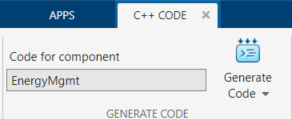
To generate code from the model, on the C++ Code tab, click Generate Code.
Repeat these steps for each component.
Note
Additional hand code is needed to integrate the generated software component files.
See Also
Code Generation by Using Embedded Coder (Embedded Coder)

