Parquet File Format for Simulation Data
R2026bYou can import simulation data from and export simulation data to Parquet files using the Simulation Data Inspector. Parquet is an open-source file format with efficient compression and encoding of column-oriented data often used for processing big data. The format supports real or complex scalar and multidimensional data from signals, buses, and arrays of buses.
For more information about how to import data from a Parquet file into the Simulation Data Inspector, see Import Data from Workspace or File into Simulation Data Inspector. (since R2026b)
To export simulation data to a Parquet file, use the Record block (since R2025a) or the Simulation Data Inspector (since R2026a). For more information, see Export Data from Simulation Data Inspector to Parquet File and Export Data to Parquet File Using Record Block.
Data Types
The Record block and the Simulation Data Inspector support some data
types that are not natively supported by the Parquet format. Most data types, such as
double, int, or string, do not
change. This table lists data types supported by the software and how these data types are
represented in the Parquet file.
| Simulink Data Type | Parquet File Logical Data Type |
|---|---|
double | double |
single | single |
int8 | int8 |
int16 | int16 |
int32 | int32 |
int64 | int64 |
uint8 | uint8 |
uint16 | uint16 |
uint32 | uint32 |
uint64 | uint64 |
string | string |
Boolean | Boolean |
half | double. Requires JSON sidecar to recover original
half type on import. |
fixed point | double. Requires JSON sidecar to recover original
fixed-point type on import. |
enum | int32. Requires JSON sidecar to recover enumeration class
definition on import. |
image | Data type of underlying image data |
datetime | double representation of epoch time |
On import, the JSON sidecar provides the original data type for signals stored as a
different type in the Parquet file. Without a sidecar, data imports using the type stored in
the Parquet file. The sidecar is needed to recover the original type for
half and fixed-point signals, which are stored as
double, and enumerated signals, which are stored as
int32.
For more information about Parquet file data types, see Apache Parquet Data Type Mappings.
Companion Metadata File
A Parquet file can have a companion JSON sidecar file that stores signal metadata the
Parquet format cannot natively represent. The sidecar file has the same name as the Parquet
file with a .json extension. The Simulation Data Inspector and the
Record block generate a JSON sidecar by default when exporting data to a
Parquet file.
To export without a sidecar, in the Simulation Data Inspector, clear the
Generate sidecar option in the Export dialog box. If you are
exporting data programmatically, use the export or
Simulink.sdi.exportRun function with the
ParquetMetadata name-value argument set to "off".
The sidecar file can contain these metadata fields:
| JSON Field | Description |
|---|---|
SignalName | Signal name |
ColumnName | Column name in the Parquet file |
Column_Id | Zero-based column index |
IsTime | Set to true for time columns |
Channel | Channel index for multidimensional signals |
DataType | Original data type of the signal |
BaseDataType | Base data type for fixed-point signals |
Dimensions | Signal dimensions |
Complexity | Whether the signal contains complex data |
ComplexFormat | Storage format for complex data |
EnumDefn | Enumeration class definition |
Domain | Signal domain, such as Signals or
Parameters |
Unit | Signal units |
Interpolation | Interpolation method |
SampleTime | Sample time of the signal |
BlockPath | Path to the source block |
BlockSubPath | Sub-path within the source block |
PortIndex | Port index on the source block |
DataSource | Data source identifier |
RootSource | Root source identifier |
FileName | Source file name |
TimeSource | Time source identifier |
SyncMethod | Synchronization method for comparison |
AbsoluteTolerance | Absolute tolerance for comparison |
RelativeTolerance | Relative tolerance for comparison |
TimeTolerance | Time tolerance for comparison |
OverrideGlobalTolerance | Whether the signal overrides global tolerance settings |
This example shows a JSON sidecar for a Parquet file with two signals.
{
  "Runs": [
    {
      "Columns": [1, 2],
      "RunName": "My Simulation",
      "Run_Id": 0
    }
  ],
  "Columns": [
    {
      "ColumnName": "time",
      "Column_Id": 0,
      "IsTime": true
    },
    {
      "ColumnName": "Velocity_data",
      "Column_Id": 1,
      "SignalName": "Velocity",
      "DataType": "double",
      "Dimensions": 1,
      "Interpolation": "linear",
      "Unit": "m/s",
      "BlockPath": "myModel/Integrator",
      "PortIndex": 1
    },
    {
      "ColumnName": "Position_data",
      "Column_Id": 2,
      "SignalName": "Position",
      "DataType": "half",
      "BaseDataType": "double",
      "Dimensions": 1,
      "Interpolation": "linear",
      "Unit": "m",
      "BlockPath": "myModel/Gain",
      "PortIndex": 1
    }
  ]
}
On import, the Simulation Data Inspector reads the sidecar file to recover metadata and
reconstruct signals with their original properties. For example, a signal with a data type
of half is stored as double in the Parquet file. The
sidecar records the original half data type so the signal imports to the
Simulation Data Inspector with the correct type.
When you import a Parquet file without a sidecar:
Data imports using the type stored in the Parquet file. Half-precision and fixed-point data remain as
double, and enumerated data remains asint32.Complex signals import as a multidimensional signal with two channels of real values.
All signals are grouped into one run.
Signal dimensions are inferred from the Parquet column structure.
Selective Import
Since R2026b
To selectively import specific signals from a Parquet file, select a subset of signals
from the Parquet file in the Simulation Data Inspector Import dialog box. To
programmatically import a subset of signals, use the SignalNames or
ColumnIndices name-value argument with Simulink.sdi.createRun, Simulink.sdi.Run.create, or
Simulink.sdi.addToRun. Specifying a bus name
with SignalNames imports all elements in that bus.
To explore the contents of a Parquet file before importing:
Use
Simulink.sdi.Parquet.getSignalMetadatato get signal names and column indices.Use
Simulink.sdi.Parquet.getHierarchyDatasetto view bus hierarchy.
For example, import only the signals named Velocity and
Position from a Parquet file into the Simulation Data Inspector.
runID = Simulink.sdi.createRun("MyParquetFile.parquet", ...
    SignalNames=["Velocity","Position"]);
Data Format
How data is formatted in the Parquet file depends on the type of signal. This table shows how each type of Simulink® signal is stored in the Parquet file.
| Simulink Signal Type | Parquet File Format |
|---|---|
| Scalar signal | Single column with a scalar value at each time step |
| Scalar signal with complex data | Single column with a |
| Nonscalar signal | Single column with sample values in the form of a vector, list of column vectors, or a nested list of column vectors for each time step |
| Nonscalar signal with complex data | Single column containing |
| Virtual or nonvirtual bus | Separate columns for each element in the bus or bus hierarchy |
| Array of buses | Separate columns for each element in the array of buses |
| Variable-size signal | Not supported |
Column names in the Parquet file determine how the Simulation Data Inspector classifies each column on import.
Time columns must be named
timeor end with the suffix_time.Data columns must be named with the suffix
_data. On import, the_datasuffix is stripped from the signal name.
Columns that do not match a recognized naming pattern are skipped on import. The Record block and the Simulation Data Inspector apply these suffixes automatically on export.
Single-Rate and Multirate Data
The first column in a Parquet file must be a time column of type
double. Time values must increase monotonically.
A Parquet file can use shared or individual time columns. When single-rate data uses a shared time column, the first column in the file contains time data, followed by columns containing signal data. The Record block and the Simulation Data Inspector export data to a Parquet file using shared time columns by default.
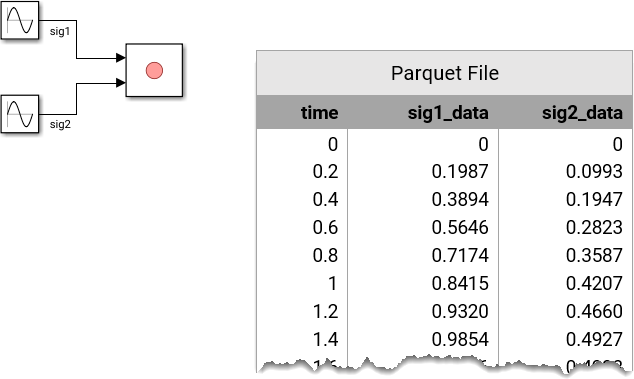
When multirate data uses shared time columns, signals that have identical time data are grouped by shared time vectors. Each time column specifies the sample times for signal columns to its right, up to the next time column.
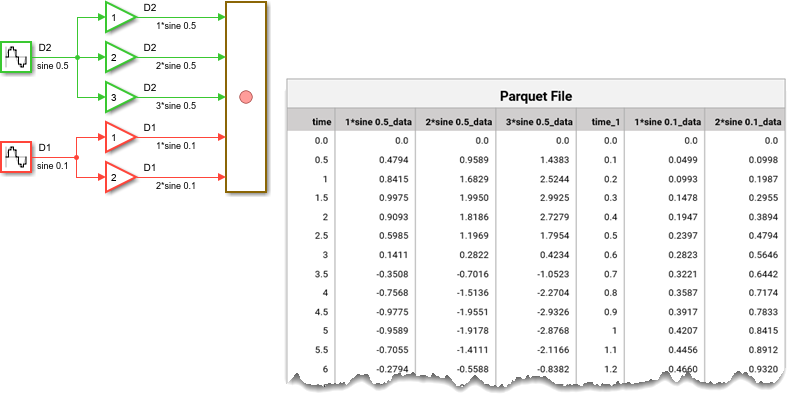
When data uses individual time columns, each signal has its own time column, stored as pairs of time and signal data columns.

A Parquet file requires that all columns be of equal length. When signals are not of
equal length, the software appends NULL to any empty cells. On import,
NULL values are read as NaN.
Complex Signals
Complex sample values are stored in a Parquet file as a 1-by-2 vector, where the first
element is the real part and the second element is the imaginary part of the complex value.
For example, a scalar signal value of 0.3973 + 0.5960i is saved as
[0.3973, .5960].
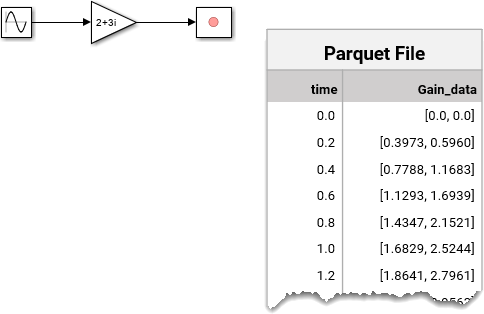
On import, the JSON sidecar is required to identify complex signals. Without
Complexity:"complex" in the sidecar, complex signals import as a real
multidimensional signal with two channels of real values.
Multidimensional Signal Data
Multidimensional signal data with fixed dimensions can be represented in two ways:
A single signal with multidimensional sample values
A set of signals with scalar sample values: one signal, called a channel, for each element of the multidimensional data
For both representations, the data for each time step is stored as vectors for one-dimensional arrays, a list of column vectors for two-dimensional arrays, or as a nested list of column vectors for arrays with more than two dimensions. For instance, a 2-by-3 matrix-valued signal is stored as a column of data where each entry consists of a vector of three 2-element vectors.
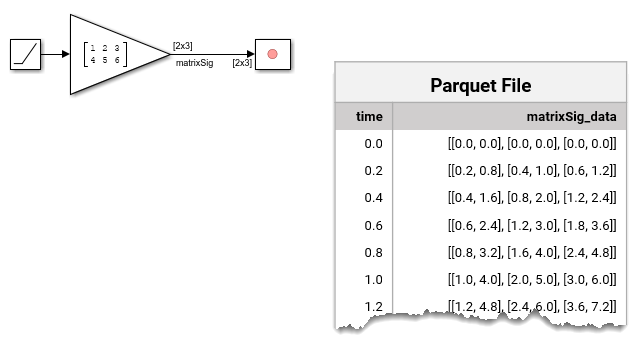
To export individual channels to a Parquet file, in the Simulation Data Inspector, use
the signal table to select only the channels to be exported. By default, signals with
samples that contain fewer than five elements are represented as channels. To represent a
multidimensional signal with five or more elements as channels, use the expand
function or click the signal dimension in the signal table and select Convert to
channels. When you export only selected runs or signals and you select
individual channels, rather than the parent signal, of an expanded multidimensional signal,
the Parquet file allocates a separate column for each channel. For more information about
multidimensional signals, see Analyze Multidimensional Signal Data.
On import without a companion metadata file, the Simulation Data Inspector infers signal dimensions from the nesting depth.
Complex Multidimensional Signal Data
When multidimensional signals contain complex data, each sample element is a nested
1-by-2 vector, where the first element is the real part and the second element is the
imaginary part of the complex value. For real values, the second element is
0.
![A model logs a 2-by-3 matrix signal containing complex data using a Record block. In the saved Parquet file, there are two columns: time and signal data grouped into three 1-by-2 vectors of the 2-by-3 matrix signal at each sample time. Each element of the sample values is represented as a pair of real and imaginary components in the form ([real, imaginary]).](record-parquet-matrix-complex.png)
On import, the JSON sidecar is required to correctly interpret complex data.
Buses
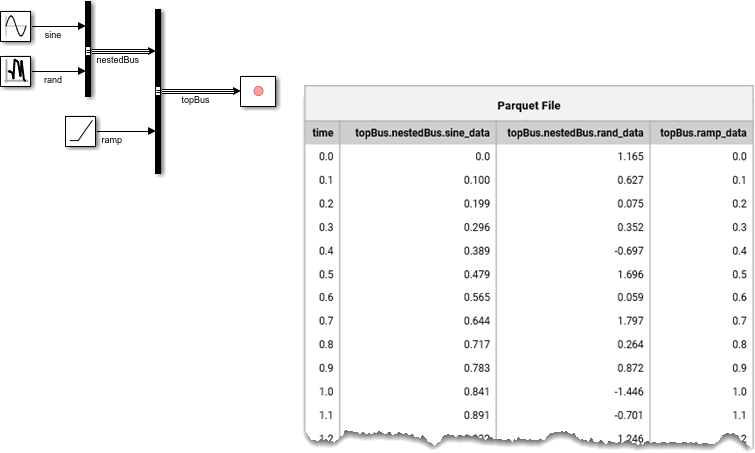
Bus data is stored in the Parquet file with separate columns for each element in the bus hierarchy. Dots in signal names specify the bus hierarchy.
Arrays of buses are also stored with separate columns for each element. Each element in the array uses index notation combined with dot notation.
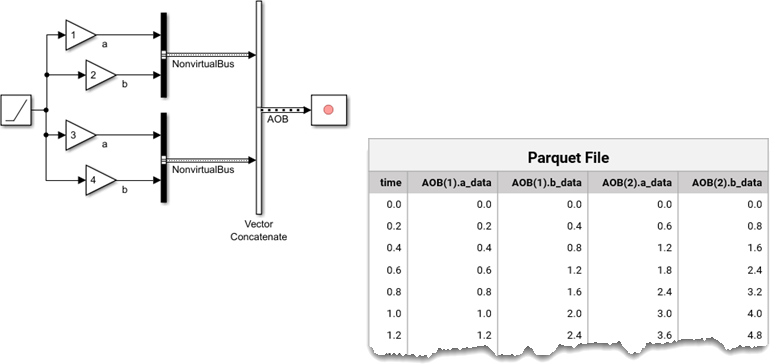
You can export data from virtual or nonvirtual buses. On import, bus hierarchy is preserved through dot notation in column names.
Enumerated Data
Enumerated data is stored in a Parquet file as int32 values
representing the underlying integer data.
For example, the MyColors class in this model defines a set of
enumerated values consisting of six colors, each associated with an integer value between
0 and 5.

Only the underlying integer values associated with each enumerated value are stored in the Parquet file.
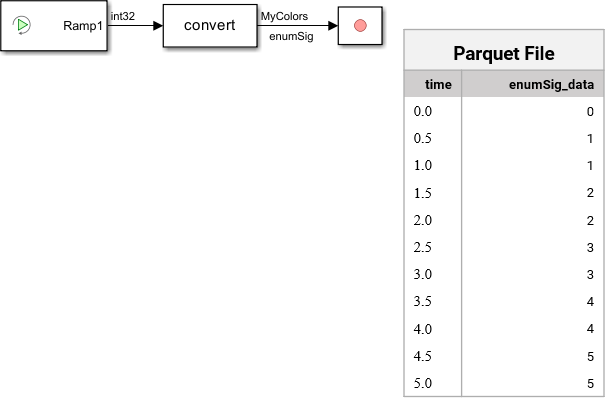
On import, the JSON sidecar provides the enumeration class definition so the Simulation
Data Inspector can reconstruct the enumerated type. Without a sidecar, enumerated data
imports as int32.
See Also
Tools
Blocks
Objects
Functions
export|Simulink.sdi.exportRun|Simulink.sdi.createRun|Simulink.sdi.addToRun|Simulink.sdi.Run.create|Simulink.sdi.Parquet.getSignalMetadata|Simulink.sdi.Parquet.getHierarchyDataset

