sldvmergedata
R2026bMerge test generation results from multiple sessions when the model remains unchanged
Since R2026a
Description
mergedSldvData = sldvmergedata(sldvData1,..,sldvDataN)
The sldvmergedata function results from multiple test generation
analysis sessions into a single data file. It assigns a suitable status value and, when
possible, a test case to each coverage objective in the final data by processing input
result files. When multiple test cases exist for an objective,
sldvmergedata selects one. If any input file reports an objective as
dead logic, sldvmergedata marks that objective as dead logic in the
final data.
You must generate all input data files without changing the model semantics across analysis runs. This means you keep the model contents unchanged and use identical parameter configurations across runs that produce the input data files.
Note
Use sldvcombinetests when you want to
aggregate generated test cases from multiple analysis runs into a single result file.
This function is less strict than sldvmergedata function because it
allows certain changes to the model during those runs.
Examples
Merge test generation results for the model mState_machine.
Open the example. Set up test generation options for decision coverage.
model = "mState_Machine";
open_system(model);
opts = sldvoptions;
opts.MaxProcessTime = 60;
opts.Mode = "TestGeneration";
opts.ModelCoverageObjectives = "Decision";
[~,fileNames1,errors] = sldvrun(model,opts,true);
Use the generated results to generate a coverage file.
runOpts = sldvruntestopts;
runOpts.coverageEnabled = true;
[~,covData] = sldvruntest(model,fileNames1.DataFile,runOpts);
covFileNameDecision = "mState_Machine_cov.cvt";
cvsave(covFileNameDecision,covData);
You now have two different coverage files. Both the .cvt files are identical with different names to distinguish the usage with or without the usage of parameters. You can load these files later, merge, or review.
Use coverage data to run test cases with decision coverage.
opts.ModelCoverageObjectives = "ConditionDecision";
opts.IgnoreCovSatisfied = "on";
opts.CoverageDataFile = covFileNameDecision;
Use prior coverage and run Condition Decision.
opts2 = sldvoptions;
opts2.Mode = "TestGeneration";
opts2.ModelCoverageObjectives = "ConditionDecision";
opts2.IgnoreCovSatisfied = "on";            % Skip already satisfied objectives
opts2.CoverageDataFile = covFileNameDecision;
[~,fileNames2] = sldvrun(model,opts2,true);
Execute tests from second run with coverage collection.
[~,covData2] = sldvruntest(model,fileNames2.DataFile,runOpts);
covFileNameCondDec = "mState_Machine_conddec_cov.cvt";
cvsave(covFileNameCondDec,covData2);
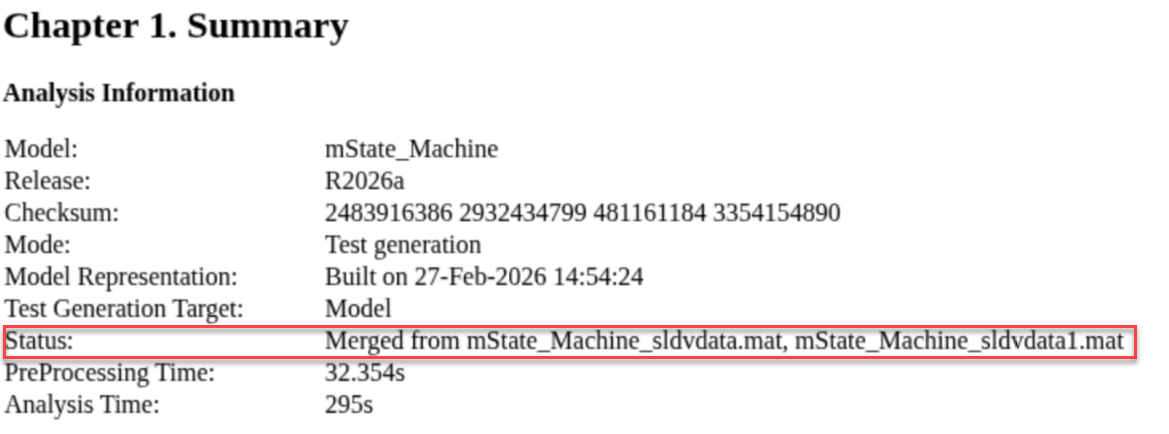
Merge the analysis results.
sldvData = sldvmergedata(fileNames1.DataFile,fileNames2.DataFile);
The analysis results from both the earlier runs of Simulink Design Verifier data files is here:
You can also save the merged data.
mergedDataFile = "mState_Machine_sldv_merged_sldvData.mat";
save(mergedDataFile,"sldvData");
Input Arguments
Output Arguments
Limitations
You can merge only test generation results. Merging results from different analysis modes such as detecting design errors and property proving is not supported.
Version History
Introduced in R2026a
See Also
sldvlogsignals | slvnvlogsignals (Simulink Coverage) | slvnvmakeharness (Simulink Coverage) | slvnvruncgvtest (Simulink Coverage) | sldvrun | sldvruntest | sldvcombinetests

