detectMultiPatternPoints
R2026bSyntax
Description
Natively Supported Patterns
imagePoints = detectMultiPatternPoints(imageFileNames,patternCount,"charuco-board",patternDims,markerFamily,checkerSize,markerSize)imageFileNames, with dimensions specified by
patternDims, markerFamily, and
checkerSize. patternCount specifies the number
of patterns to detect.
Note
To use the detectMultiPatternPoints function, first install the related features
using the installMultiSensorCalibrationTools function.
imagePoints = detectMultiPatternPoints(imageFileNames,patternCount,"aprilgrid",patternDims,tagFamily)imageFileNames, with dimensions specified by
patternDims.
Custom Pattern Detector
imagePoints = detectMultiPatternPoints(imageFileNames,patternCount,patternDetector,numKeyPoints)numKeyPoints of two or more custom calibration patterns of same
type that can be detected in an image using the specified detector function
patternDetector.
Optional Arguments
imagePoints = detectMultiPatternPoints(___,Name=Value)Verbose=true displays
the progress of the detection process.
Examples
Estimate the relative position and orientation of eight cameras with overlapping fields of view by using calibration images that contain multiple ChArUco boards.
Download the calibration images.
calibImagesURL = "https://www.mathworks.com/supportfiles/vision/data/overlapping-cameras-multiple-charuco-with-intrinsics.zip";
calibImagesDir = fullfile(pwd,"overlapping-cameras-multiple-charuco-with-intrinsics");
calibImagesZip = fullfile(pwd,"overlapping-cameras-multiple-charuco-with-intrinsics.zip");
if ~exist(calibImagesZip,"file")
    disp("Downloading calibration images (82 MB)...")
    websave(calibImagesZip,calibImagesURL);
end
Downloading calibration images (82 MB)...
if ~exist(calibImagesDir,"dir")
    unzip(calibImagesZip,calibImagesDir)
end
Specify calibration image filenames for each camera.
numCameras = 8;
camDirPrefix = "Cam00";
imageFiles = cell(1,numCameras);
for i = 1:numCameras
    camDir = fullfile(calibImagesDir,camDirPrefix+i);
    imds = imageDatastore(camDir);
    imageFiles{i} = imds.Files;
end
imageFiles = [imageFiles{:}];
Define the ChArUco board properties. Specify checker size and marker size in centimeters.
checkerSize = 9.15; % in cm
markerSize = 6.8;   % in cm
markerFamily = "DICT_6X6_1000";
patternDims = [5 5];
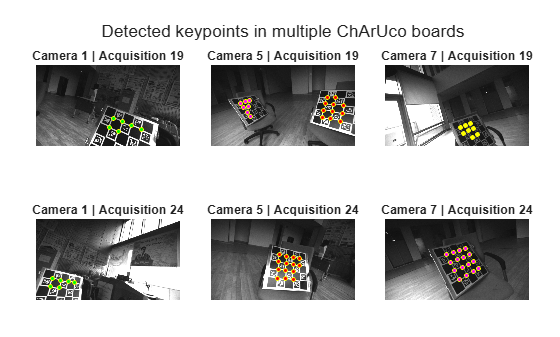
Detect the keypoints of the four ChArUco boards captured in the calibration images using the detectMultiPatternPoints function. Specify the MinMarkerID for each pattern.
patternCount = 4;
patternIDs = [144, 156, 192, 204];

imagePoints = detectMultiPatternPoints(imageFiles,patternCount,"charuco-board",patternDims,markerFamily, ...
    checkerSize,markerSize,MinMarkerID=patternIDs);
[==================================================] 100%
Elapsed time: 00:00:05
Estimated time remaining: 00:00:00
Display the detected keypoints in a couple of acquisitions and three of the eight cameras.
t = tiledlayout(2,3,TileSpacing="compact",Padding="compact");
colors = ["red","green","magenta","yellow"];
for acqIdx = [19,24]
    for camIdx = [1,5,7]
        nexttile
        imshow(imageFiles{acqIdx,camIdx})
        title("Camera " + camIdx + " | Acquisition " + acqIdx)
        hold on
        for patternIdx = 1:patternCount
            plot(imagePoints(:,1,acqIdx,camIdx,patternIdx),imagePoints(:,2,acqIdx,camIdx,patternIdx),"yo",...
                MarkerSize=3,MarkerFaceColor=colors(patternIdx))
        end
    end
end
title(t,"Detected keypoints in multiple ChArUco boards")
Generate the world coordinates of each pattern points in their respective pattern coordinate system.
worldPoints = patternWorldPoints("charuco-board",patternDims,checkerSize);Load the intrinsic parameters of the eight cameras. These parameters have been estimated using the Using the Single Camera Calibrator App.
intrinsics = cell(numCameras,1);
for i = 1:numCameras
    camDir = fullfile(calibImagesDir,camDirPrefix+i);
    intrinsics{i} = load(fullfile(camDir,"intrinsics"+i)).intrinsics;
end
Perform multi-camera calibration.
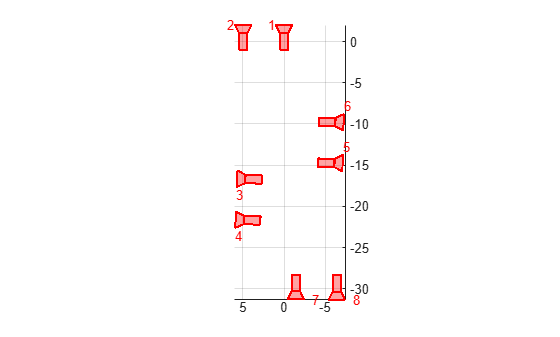
params = estimateMultiCameraParameters(imagePoints,worldPoints,intrinsics,WorldUnits="cm");Plot the estimated camera poses.
figure
plotCamera(params.CameraPoses)
axis equal
grid on
view([0 1 0])
Calibrate multiple cameras that have some cameras sharing fields-of-view and some cameras not sharing any field-of-view.
Download the calibration images containing two ChArUco boards that were captured from six cameras as per the guidelines outlined in Data Collection Guidelines for Multi-Camera Calibration. The calibration images were captured by moving the multi-camera system around the stationary ChArUco boards.
calibImagesURL = "https://www.mathworks.com/supportfiles/vision/data/non-overlapping-cameras-charuco-with-intrinsics.zip";
calibImagesDir = fullfile(pwd,"non-overlapping-cameras-charuco-with-intrinsics");
calibImagesZip = fullfile(pwd,"non-overlapping-cameras-charuco-with-intrinsics.zip");
if ~exist(calibImagesZip,"file")
    disp("Downloading calibration images (65 MB)...")
    websave(calibImagesZip,calibImagesURL);
end
Downloading calibration images (65 MB)...
if ~exist(calibImagesDir,"dir")
    unzip(calibImagesZip,calibImagesDir)
end
Specify calibration image filenames for each camera.
numCameras = 6;
camDirPrefix = "Cam00";
imageFiles = cell(1,numCameras);
for i = 1:numCameras
    camDir = fullfile(calibImagesDir,camDirPrefix+i);
    imds = imageDatastore(camDir);
    imageFiles{i} = imds.Files;
end
imageFiles = [imageFiles{:}];
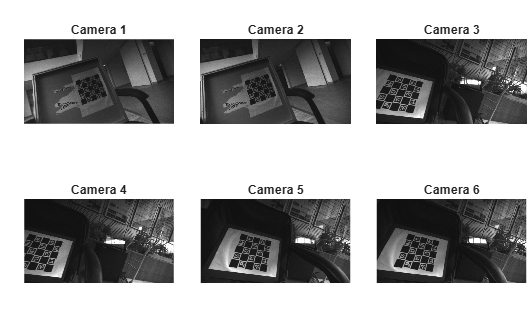
Display images captured by the six cameras from one of the acquisitions.
figure
t = tiledlayout(2,3,TileSpacing="tight", Padding="tight");
for i = 1:numCameras
    nexttile
    imshow(imageFiles{25,i})
    title("Camera " + i)
end
Define the ChArUco board properties. Specify checker size and marker size in centimeters.
checkerSize = 3.40; % in cm
markerSize = 2.55; % in cm
markerFamily = "DICT_6X6_1000";
patternDims = [5 5];
minMarkerID = [0 12];
Detect the key points of the two ChArUco boards captured in the calibration images using the detectMultiPatternPoints function.
patternCount = 2;
imagePoints = detectMultiPatternPoints(imageFiles,patternCount,"charuco-board",patternDims,markerFamily, ...
    checkerSize,markerSize);
[==================================================] 100%
Elapsed time: 00:00:06
Estimated time remaining: 00:00:00
Generate the world coordinates of each pattern points in their respective pattern coordinate system.
worldPoints = patternWorldPoints("charuco-board",patternDims,checkerSize);Load the intrinsic parameters of the six cameras. These parameters have been estimated using the Using the Single Camera Calibrator App.
intrinsics = cell(numCameras,1);
for i = 1:numCameras
    camDir = fullfile(calibImagesDir,camDirPrefix+i);
    intrinsics{i} = load(fullfile(camDir,"intrinsics"+i)).intrinsics;
end
Perform multi-camera calibration. Enable verbose mode to track the progress of the calibration process.
params = estimateMultiCameraParameters(imagePoints,worldPoints,intrinsics,WorldUnits="cm",Verbose=true);Estimating multi-camera extrinsic parameters -------------------------------------------- * Number of cameras: 6 * Number of patterns: 2 * Number of acquisitions: 30 * Number of images used: 110 * Undistorting image points...done. * Grouping cameras with overlapping field-of-view....done. * Group 1: camera 3 4 5 6 * Group 2: camera 1 2 * Refining camera poses of each group: * Group 1...done. * Group 2...done. * Estimating relative pose between camera groups: * [Pair 1/1] Group 1 and 2...done. * Refining all camera poses and pattern poses...done. * Finished calibrating cameras.
Visualize the camera extrinsic parameters along with the patterns from a couple of acquisitions.
figure
showExtrinsics(params,"CameraCentric",AcquisitionIndex=21:22)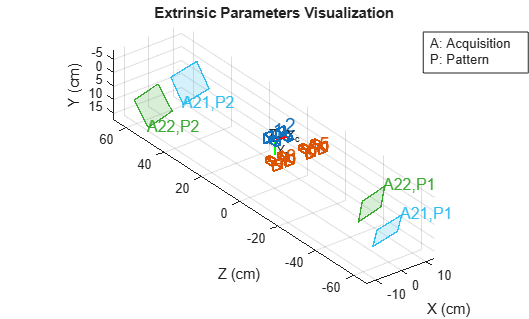
Input Arguments
Name-Value Arguments
Output Arguments
Extended Capabilities
Version History
Introduced in R2026aSee Also
Apps
Objects
Functions
Topics
- What Is Camera Calibration?
- What Is Multi-Camera Calibration?
- What Is Robot Hand-Eye Calibration?
- Calibration Patterns
- Data Collection Guidelines for Multi-Camera Calibration
- Using the Single Camera Calibrator App
- Coordinate Systems
- Evaluating the Accuracy of Single Camera Calibration
- 3-D Motion Reconstruction Using Multiple Cameras

